
-
CrashMonkey4iOS 试用过程总结 at 2016年05月23日
#56 楼 @miserable 这个我也不清楚。。。你还是直接找作者吧。
-
从 0 到 1 搭建移动 App 功能自动化测试平台 (1):模拟器中运行 iOS 应用 at 2016年05月22日
不错,把整个 iOS 安装方面相关的知识串起来了。因为打包各种麻烦,我们项目中一般最先实现自动化的就是打包。
PS:不经过 App store 的安装方式我补充一下:
所有安装到真机(非越狱)的应用(可以是 .app ,也可以是 .ipa ,只要编译时选的是编译成 Arm 的就好。.app 转 .ipa 只需要一条命令)都必须经过证书签名。证书主要有三大种:
- 企业证书:$299/年,土豪专用(哈哈)。可以装到无限台手机上,但不能提交 app store 。一般用于企业内部软件。
- 收费个人开发者证书:$99/年。未提交 app store 前只能最多安装到 100 台设备上,并且该手机的 udid 号必须登记到此开发者证书上(在苹果的开发者平台上登记)。可以提交到 app store。
- 免费个人开发者证书:从 XCode 7 开始推出,仅用于开发中的真机调试。可最多安装到 5 台设备上(这五台设备必须通过连接开发者电脑的方式来登记到证书上),没有提交到 app store 的权限。
同时证书签名还有分 release 和 debug 的哦,只有 debug 拥有调试权限,可以用于自动化测试。
至于安装方式,主要有 2 大类:
- 从电脑安装。Xcode,iTunes,ideviceinstaller,ios-deploy、PP 助手等都属于这种。底层调用的是一样的协议,具体协议没研究过。。。
- OTA 安装,即从网络安装。大批量的安装大多用这种。具体调用的是苹果的 itms-service 协议。有兴趣的同学可以看看这里:https://m.oschina.net/blog/125501 。
其实还有一类,MDM,可以主动推送安装信息。实际安装方式类似 OTA ,但是能获得手机的 udid(MDM 权限很大的哦),可以根据 udid 来推送合适的包。
-
CrashMonkey4iOS 试用过程总结 at 2016年05月22日
#54 楼 @miserable 给详细一点的信息?例如更完整的 Log 什么的?
-
教你如何构建 django 前端 web 框架 at 2016年05月22日
#3 楼 @guoguomanbu 对的~谢谢搬运~
-
教你如何构建 django 前端 web 框架 at 2016年05月21日
貌似你的配置有问题,后台页面的 css 都没加载出来。
我之前快速上手 django 用的是 django girls 的教程,清晰详细~
-
iOS 性能专项初探 at 2016年05月20日
我 google 了下,这篇文章也有提到这个方法,并有截图:http://www.programering.com/a/MTO4ATMwATU.html
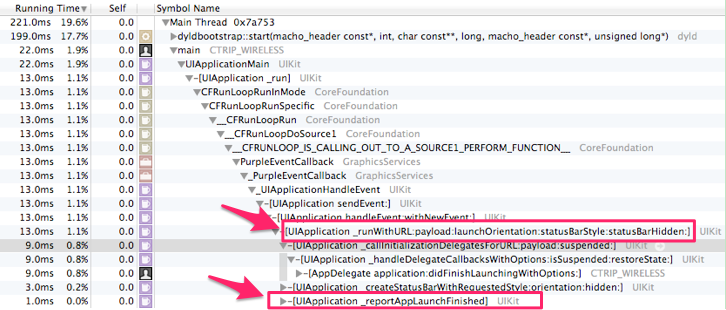
文章中的图如下:
然而,我在 iOS 9.3 上对我自己的一个应用进行 profile ,结果却有出入:
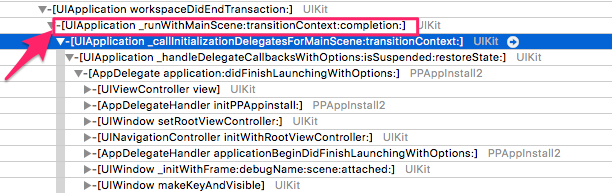
调用栈有点不一样。文中调用的是
_runWithURL:payload:launchOrientation:statusBarStyle:statusBarHidden:,而我的是_runWithMainScene:transitionContext:completion:。换了一台 iOS 7.1.2 的设备,调用栈和文章的一致了:

因此,估计文中的方法不适用于 iOS 9.3 。其它版本的系统目前手上没有,待其它同学测试。。。
至于 iOS 9.3 上应该以哪一帧作为启动结束,我也不清楚。。。 @testly 知道不?
-
当窗口宽度在 800 到 1000 之间时,页面上方的导航栏的高度会变高很多,覆盖标题栏 at 2016年05月20日
#1 楼 @lihuazhang 看了下, ruby-china 也有这问题。回去看看
-
用 inspector 无法识别一个 app 界面控件信息 (之前可以识别) at 2016年05月19日
同一个界面,用 uiautomatorviewer 可以获取不?
-
appium 的 Python 版中,使用 WebDriverWait。。。until。。。做元素等待,报参数个数错误 at 2016年05月19日
-
怎样使 appium +python 连接多设备 (真机) 同时运行? at 2016年05月19日

-
可以 @ 的补全菜单里找到全站的用户 at 2016年05月19日
#9 楼 @gaopeng1106 额,你是不是误会了?恒温的意思是可以在 @ 的补全菜单里找到全站的用户。
-
可以 @ 的补全菜单里找到全站的用户 at 2016年05月19日
#4 楼 @lihuazhang 周末弄下。
-
可以 @ 的补全菜单里找到全站的用户 at 2016年05月19日
#8 楼 @lihuazhang 这个是 by design 的。。。加了用户名排版不大好看。
-
appium 的 Python 版中,使用 WebDriverWait。。。until。。。做元素等待,报参数个数错误 at 2016年05月18日
-
提供一个自动获取安卓 desired_caps 信息的方法和简化 SDK 方法 at 2016年05月18日
#7 楼 @gaofating 再次强调,没有大神。。。
-
appium 的 Python 版中,使用 WebDriverWait。。。until。。。做元素等待,报参数个数错误 at 2016年05月18日
#1 楼 @chenhengjie123 我错了,应该不是这个问题。不知道你的
presence_of_element_located是怎么 import 的?能不能把完整的代码贴上来?我直接用官网的示例是没问题的:
#!/usr/bin/env python
# -*- coding: utf-8 -*-


from selenium import webdriver
from selenium.webdriver.common.by import By
from selenium.webdriver.support.ui import WebDriverWait
from selenium.webdriver.support import expected_conditions as EC

driver = webdriver.Firefox()
driver.get("http://testerhome.com")
try:
    element = WebDriverWait(driver, 10).until(
        EC.presence_of_element_located((By.ID, "navbar-header"))
    )
finally:
    driver.quit()
PS:麻烦正文用 markdown 排版。。。
-
appium 的 Python 版中,使用 WebDriverWait。。。until。。。做元素等待,报参数个数错误 at 2016年05月18日
示例里面的 wait 是来自
selenium.webdriver.support.ui的,和你的不一样。from selenium.webdriver.support.ui import WebDriverWait -
[烧脑巨作,不容错过] 像 hacker 一样思考 at 2016年05月18日
涨知识了
-
赞~有收获、有总结、有分享,看到 Appium Girls 活动能帮到众多妹子真是太好啦。
-
DUBBO,RMI 接口测试中,关于真实对象和构造的对象比较问题 at 2016年05月18日
可以试试 测试开发之路 ---- 可读性,可维护性,可扩展性 里提到的责任链模式,自己实现一个。
-
为什么 appium inspector 不能打开手机呢,一直提示无法连接服务器 at 2016年05月18日
把 Appium server 完整的 log 输出贴上来。不要截图,直接复制粘贴文字。
我感觉你截图里面的 log 并不是包含出错信息的 log 。
-
WebDriverAgent 简介 at 2016年05月18日
#20 楼 @wenshi11019 给个具体界面截图吧?