

学习笔记——测试进阶之路 工作笔记:项目组自动化日报填报系统
大海
·
2025年12月08日
·
4884 次阅读
「原创声明:保留所有权利,禁止转载」
工具背景
目前,团队采用共享的在线 Excel 表格作为每日工作日报的统一填报载体。该流程要求项目负责人每天早上手动在表格中插入新的一行,并填写当天日期、成员姓名等基础信息后,组员才能依次在对应列中填写 “当日实际工作”“未完成事项” 及 “明日计划” 等内容。
这一方式存在多个显著问题:
- 首先,存在强依赖和等待环节——所有成员必须等待负责人完成行添加后才能开始填写,若负责人因会议、休假等原因延迟操作,将直接影响整个团队的填报进度;
- 其次,多人同时编辑极易引发冲突——在线 Excel 在高并发写入时容易出现单元格错位、内容覆盖或格式丢失,尤其在移动端编辑时更为严重,导致数据不一致甚至需要人工核对修正;
- 再次,缺乏状态感知与提醒机制——负责人无法直观掌握谁已提交、谁尚未填写,往往需反复在群内催促,既增加沟通成本,也容易遗漏;
- 最后,历史追溯不便——随着表格行数不断增长,查找某人某日的日报内容变得困难,且无法结构化查询或导出。
这些问题不仅消耗了大量非必要的协作时间,也降低了日报作为工作记录和计划工具的有效性。因此,亟需一种更稳定、自助、自动化的日报管理方式。
解决方案
为解决上述问题,我开发了一套轻量级的网页版日报提交服务。组员只需在浏览器中选择姓名并填写当日工作内容,即可即时提交,无需等待或担心格式冲突;系统会自动关联 “昨日计划” 作为今日工作的初始参考,进一步减少重复输入。项目负责人可在所有成员提交后,一键生成格式统一的汇总内容,直接复制到 Teams 群聊中。此外,系统还支持查看历史日报、识别未提交人员并提供提醒,确保日报流程高效、完整、可追溯。
该服务旨在将原本繁琐、易错的手动协作,转变为自动化、自助式的高效流程,真正为团队减负提效。
项目代码
DailyReport.py
#!/usr/bin/env python3
# -*- coding: utf-8 -*-
# @Time    : 2025-12-06 15:51
# @File    : DailyReport.py
# @Desc    : 日报提交主函数


import os
import pandas as pd
from datetime import datetime, timedelta
from flask import Flask, render_template, request, redirect, flash, url_for

app = Flask(__name__)
app.secret_key = 'your_daily_report_secret_key_2025'

DATA_DIR = 'data'
os.makedirs(DATA_DIR, exist_ok=True)

# 团队成员名单
TEAM_MEMBERS = [
    "Wang A",
    "Shen B",
    "Xiao C",
    "Li D",
    "Liu E",
    "Lin F"
]


def migrate_old_csv_files():
    """自动将旧格式 YYYY.MM.csv 重命名为 YYYY-MM.csv"""
    for filename in os.listdir(DATA_DIR):
        if filename.endswith('.csv') and '.' in filename:
            name_part = filename[:-4]  # 去掉 .csv
            if name_part.count('.') == 1:
                try:
                    year, month = name_part.split('.')
                    if len(year) == 4 and len(month) == 2 and month.isdigit():
                        new_name = f"{year}-{month}.csv"
                        old_path = os.path.join(DATA_DIR, filename)
                        new_path = os.path.join(DATA_DIR, new_name)
                        if not os.path.exists(new_path):
                            os.rename(old_path, new_path)
                            print(f"已迁移旧文件: {filename} → {new_name}")
                except Exception:
                    continue


def get_csv_path():
    """返回当前月份的 CSV 路径,格式:YYYY-MM.csv"""
    return os.path.join(DATA_DIR, f"{datetime.now().strftime('%Y-%m')}.csv")


def save_to_csv(data):
    """保存日报,若同一天同一人已存在,则覆盖"""
    today, name, work_done, unfinished, plan_tomorrow = data
    path = get_csv_path()

    if os.path.exists(path):
        df = pd.read_csv(path, dtype=str)
        df.fillna('', inplace=True)
        # 删除同一天同一人的旧记录
        df = df[~((df['工作日期'] == today) & (df['负责人'] == name))]
    else:
        df = pd.DataFrame(columns=['工作日期', '负责人', '当天实际工作项', '未完成工作项及备注', '明日计划'])

    new_row = pd.DataFrame([data], columns=df.columns)
    df = pd.concat([df, new_row], ignore_index=True)
    df.to_csv(path, index=False, encoding='utf-8')


@app.route('/', methods=['GET', 'POST'])
def index():
    if request.method == 'POST':
        name = request.form.get('name', '').strip()
        work_done = request.form.get('work_done', '').strip()
        unfinished = request.form.get('unfinished', '').strip()
        plan_tomorrow = request.form.get('plan_tomorrow', '').strip()

        if not name or not work_done:
            flash("姓名和当天工作项不能为空!", "error")
            tomorrow = (datetime.now() + timedelta(days=1)).strftime('%Y-%m-%d')
            return render_template('form.html', tomorrow=tomorrow)

        today = datetime.now().strftime('%Y-%m-%d')
        save_to_csv([today, name, work_done, unfinished, plan_tomorrow])
        flash("日报已保存!请负责人点击「查看今日汇总」进行复制。", "success")
        return redirect('/')

    tomorrow = (datetime.now() + timedelta(days=1)).strftime('%Y-%m-%d')
    return render_template('form.html', tomorrow=tomorrow)

@app.route('/api/yesterday_plan')
def yesterday_plan():
    name = request.args.get('name', '').strip()
    if not name or name not in TEAM_MEMBERS:
        return {'plan': ''}

    yesterday = (datetime.now() - timedelta(days=1)).strftime('%Y-%m-%d')
    year_month = yesterday[:7]
    csv_path = os.path.join(DATA_DIR, f"{year_month}.csv")

    if os.path.exists(csv_path):
        df = pd.read_csv(csv_path, dtype=str)
        df.fillna('', inplace=True)
        # 找出该用户昨天的记录
        row = df[(df['工作日期'] == yesterday) & (df['负责人'] == name)]
        if not row.empty:
            plan = row.iloc[-1]['明日计划']
            return {'plan': plan}

    return {'plan': ''}

@app.route('/summary')
def summary():
    today_str = datetime.now().strftime('%Y-%m-%d')
    selected_date = request.args.get('date', today_str)

    # 验证日期格式
    try:
        parsed_date = datetime.strptime(selected_date, '%Y-%m-%d')
        selected_date = parsed_date.strftime('%Y-%m-%d')
    except ValueError:
        flash("❌ 日期格式无效,请使用 YYYY-MM-DD。", "error")
        return redirect(url_for('index'))

    # 使用 YYYY-MM.csv 格式
    year_month = selected_date[:7]  # e.g., '2025-12'
    csv_path = os.path.join(DATA_DIR, f"{year_month}.csv")

    table_data = []
    if os.path.exists(csv_path):
        df = pd.read_csv(csv_path, dtype=str)
        df.fillna('', inplace=True)
        day_df = df[df['工作日期'] == selected_date]
        for name in sorted(day_df['负责人'].unique()):
            row = day_df[day_df['负责人'] == name].iloc[-1]
            table_data.append({
                'date': row['工作日期'],
                'name': row['负责人'],
                'work_done': row['当天实际工作项'],
                'unfinished': row['未完成工作项及备注'],
                'plan': row['明日计划']
            })

    is_today = (selected_date == today_str)
    now = datetime.now() if is_today else None

    # 计算今日未提交人员(仅当天)
    missing_members = []
    if is_today:
        submitted_names = {row['name'] for row in table_data}
        missing_members = [name for name in TEAM_MEMBERS if name not in submitted_names]

    return render_template(
        'summary.html',
        date=selected_date,
        table_data=table_data,
        now=now,
        today_str=today_str,
        max_date=today_str,
        missing_members=missing_members,
        total_members=len(TEAM_MEMBERS)
    )


@app.route('/clear_today', methods=['POST'])
def clear_today():
    """清空今日所有日报"""
    today = datetime.now().strftime('%Y-%m-%d')
    path = get_csv_path()

    if os.path.exists(path):
        df = pd.read_csv(path, dtype=str)
        df.fillna('', inplace=True)
        df = df[df['工作日期'] != today]
        df.to_csv(path, index=False, encoding='utf-8')

    flash(f"已清空今日({today})所有日报数据。", "success")
    return redirect(url_for('summary'))


if __name__ == '__main__':
    migrate_old_csv_files()
    app.run(host='0.0.0.0', port=5000, debug=True)
form.html
<!DOCTYPE html>
<html lang="zh">
<head>
    <mta charset="UTF-8">
    <title>CKFM项目组工作日报</title>
    <style>
        body {
            font-family: -apple-system, BlinkMacSystemFont, 'Segoe UI', sans-serif;
            background: #f5f7fa;
            padding: 20px;
            margin: 0;
        }
        .container {
            max-width: 800px;
            margin: 0 auto;
            background: white;
            padding: 30px;
            border-radius: 12px;
            box-shadow: 0 4px 20px rgba(0,0,0,0.1);
        }
        h1 {
            text-align: center;
            color: #0078d7;
            margin-bottom: 25px;
            font-size: 28px;
        }
        .form-group {
            margin-bottom: 22px;
        }
        label {
            display: block;
            margin-bottom: 8px;
            font-weight: 600;
            color: #333;
            font-size: 15px;
        }
        input, textarea, select {
            width: 100%;
            padding: 12px;
            border: 1px solid #ccc;
            border-radius: 8px;
            font-size: 15px;
            font-family: inherit;
            box-sizing: border-box;
        }
        textarea {
            min-height: 90px;
            resize: vertical;
        }
        button {
            width: 100%;
            background: #0078d7;
            color: white;
            padding: 14px;
            border: none;
            border-radius: 8px;
            font-size: 17px;
            cursor: pointer;
            font-weight: bold;
        }
        button:hover {
            background: #005a9e;
        }
        .flash {
            padding: 12px;
            margin: 15px 0;
            border-radius: 8px;
            font-weight: 500;
        }
        .flash.success { background: #d4edda; color: #155724; border-left: 4px solid #28a745; }
        .flash.error { background: #f8d7da; color: #721c24; border-left: 4px solid #dc3545; }
        footer {
            text-align: center;
            margin-top: 25px;
            color: #777;
            font-size: 0.95em;
            line-height: 1.5;
        }
    </style>
</head>
<body>
    <div class="container">
        <h1>📝 CKFM项目组工作日报</h1>

        <div style="text-align: center; margin-bottom: 20px;">
            <a href="{{ url_for('summary') }}"
               style="display: inline-block; background: #28a745; color: white; padding: 10px 20px;
                      border-radius: 8px; text-decoration: none; font-weight: bold; font-size: 16px;">
                查看并复制今日汇总到 Teams
            </a>
        </div>

        {% with messages = get_flashed_messages(with_categories=true) %}
            {% if messages %}
                {% for category, msg in messages %}
                    <div class="flash {{ 'success' if 'success' in category else 'error' }}">{{ msg }}</div>
                {% endfor %}
            {% endif %}
        {% endwith %}

        <form method="POST" autocomplete="off">
            <div class="form-group">
                <label for="name">👤 负责人(请选择)</label>
                <select id="name" name="name" required>
                    <option value="">-- 请选择 --</option>
                    <option value="Wang A">Wang A</option>
                    <option value="Shen B">Shen B</option>
                    <option value="Xiao C">Xiao C</option>
                    <option value="Li D">Li D</option>
                    <option value="Liu E">Liu E</option>
                    <option value="Lin F">Lin F</option>
                </select>
            </div>

            <div class="form-group">
                <label for="work_done">✅ 当天实际工作项(必填)</label>
                <textarea id="work_done" name="work_done" required
                          placeholder="示例:1、SRM_采购管理_XXX(4h)..."></textarea>
            </div>

            <div class="form-group">
                <label for="unfinished">⚠️ 未完成工作项及备注(不填写,默认当天工作已完成)(可选)</label>
                <textarea id="unfinished" name="unfinished"
                          placeholder="若无,可留空"></textarea>
            </div>

            <div class="form-group">
                <label for="plan_tomorrow">📅 明日计划({{ tomorrow }})</label>
                <textarea id="plan_tomorrow" name="plan_tomorrow"
                          placeholder="可留空"></textarea>
            </div>

            <button type="submit">📤 提交日报</button>
        </form>

        <footer>
            ✅ 每位同事填写后点击「提交日报」<br>
            👥 项目负责人在所有人提交完毕后,点击上方「查看并复制今日汇总到 Teams」<br>
            📋 复制后,在 <strong>Teams 桌面客户端</strong> 中直接粘贴,格式将与 Excel 复制效果完全一致
        </footer>
    </div>

    <script>
        const nameSelect = document.getElementById('name');
        const workDoneField = document.getElementById('work_done');
        const unfinishedField = document.getElementById('unfinished');
        const planTomorrowField = document.getElementById('plan_tomorrow');

        nameSelect.addEventListener('change', function() {
            const name = this.value;

            // 清空所有字段
            workDoneField.value = '';
            unfinishedField.value = '';
            planTomorrowField.value = '';

            if (!name) return;

            // 自动加载该用户昨天的“明日计划”,作为今天的“实际工作项”
            fetch(`/api/yesterday_plan?name=${encodeURIComponent(name)}`)
                .then(response => response.json())
                .then(data => {
                    workDoneField.value = data.plan || '';
                })
                .catch(err => {
                    console.warn('加载昨日计划失败:', err);
                    workDoneField.value = '';
                });
        });
    </script>
</body>
</html>
summary.html
<!DOCTYPE html>
<html lang="zh">
<head>
    <meta charset="UTF-8">
    <title>{{ date }} 日报汇总</title>
    <style>
        body {
            font-family: -apple-system, BlinkMacSystemFont, 'Segoe UI', sans-serif;
            padding: 20px;
            background: #f9f9f9;
            color: #333;
        }
        .container {
            max-width: 1200px;
            margin: 0 auto;
            background: white;
            padding: 24px;
            border-radius: 10px;
            box-shadow: 0 2px 12px rgba(0,0,0,0.08);
        }
        h1 {
            color: #0078d7;
            text-align: center;
            margin-bottom: 16px;
            font-size: 26px;
        }
        .nav-back {
            text-align: center;
            margin-bottom: 16px;
        }
        .nav-back a {
            display: inline-block;
            background: #6c757d;
            color: white;
            padding: 8px 20px;
            border-radius: 6px;
            text-decoration: none;
            font-weight: bold;
            font-size: 14px;
            transition: background 0.2s;
        }
        .nav-back a:hover {
            background: #5a6268;
        }
        .date-selector {
            text-align: center;
            margin-bottom: 12px;
        }
        .date-selector input[type="date"] {
            padding: 8px;
            border: 1px solid #ccc;
            border-radius: 6px;
            font-size: 15px;
        }
        .date-selector button {
            margin-left: 10px;
            padding: 8px 16px;
            background: #0078d7;
            color: white;
            border: none;
            border-radius: 6px;
            cursor: pointer;
        }
        .date-selector button:hover {
            background: #005a9e;
        }
        .instructions {
            background: #e9f7fe;
            padding: 14px;
            border-radius: 8px;
            margin-bottom: 24px;
            font-size: 14px;
            color: #005a9e;
            line-height: 1.5;
        }
        table {
            width: 100%;
            border-collapse: collapse;
            margin-bottom: 24px;
            font-size: 14px;
            box-shadow: 0 1px 3px rgba(0,0,0,0.05);
        }
        th, td {
            border: 1px solid #ddd;
            padding: 12px;
            text-align: left;
            vertical-align: top;
        }
        th {
            background-color: #f8fbff;
            font-weight: bold;
            color: #2c3e50;
        }
        tr:nth-child(even) {
            background-color: #fcfcfc;
        }
        .copy-btn {
            display: block;
            margin: 10px auto 30px;
            padding: 12px 28px;
            background: #28a745;
            color: white;
            border: none;
            border-radius: 8px;
            font-size: 17px;
            cursor: pointer;
            font-weight: bold;
            box-shadow: 0 2px 6px rgba(40, 167, 69, 0.3);
            transition: background 0.2s, transform 0.1s;
        }
        .copy-btn:hover {
            background: #218838;
            transform: translateY(-1px);
        }
        .admin-section {
            margin-top: 40px;
            padding-top: 24px;
            border-top: 1px dashed #ccc;
            text-align: center;
            color: #666;
            font-size: 13px;
            line-height: 1.5;
        }
        .admin-section p {
            margin: 0 0 12px;
            font-weight: bold;
            color: #e74c3c;
        }
        .clear-btn {
            background: #f8f9fa;
            color: #dc3545;
            border: 1px solid #dc3545;
            padding: 6px 18px;
            border-radius: 4px;
            font-size: 13px;
            cursor: pointer;
            font-weight: normal;
            transition: all 0.2s;
        }
        .clear-btn:hover {
            background: #fff5f5;
            color: #c82333;
        }
        .no-data {
            text-align: center;
            color: #e74c3c;
            margin: 30px 0;
            font-size: 16px;
        }
        .missing-alert {
            background: #fff8e1;
            border-left: 4px solid #ffc107;
            padding: 12px 16px;
            margin-bottom: 20px;
            color: #856404;
            border-radius: 0 4px 4px 0;
            font-weight: bold;
        }
    </style>
</head>
<body>
    <div class="container">
        <h1>📋 {{ date }} 日报汇总</h1>

        <!-- 返回首页 -->
        <div class="nav-back">
            <a href="{{ url_for('index') }}">← 返回日报填写页</a>
        </div>

        <!-- 日期选择器 -->
        <div class="date-selector">
            <form method="GET">
                <label>
                    查看其他日期的日报:
                    <input type="date" name="date" value="{{ date }}" max="{{ max_date }}">
                </label>
                <button type="submit">🔍 查询</button>
            </form>
        </div>

        <!-- 漏填提醒(仅当天显示)-->
        {% if missing_members %}
        <div class="missing-alert">
            ⚠️ 今日应交 {{ total_members }} 人,已交 {{ total_members - missing_members|length }} 人 ——
            以下同事尚未提交:<strong>{{ missing_members | join('、') }}</strong>
        </div>
        {% endif %}

        {% if not table_data %}
            <div class="no-data">
                ⚠️ {{ date }} 暂无日报提交。
            </div>
        {% else %}
            <div class="instructions">
                ✅ 点击下方「一键复制表格」,粘贴到 <strong>Microsoft Teams</strong> 聊天群中。<br>
                📌 每人仅占一行,所有内容已在单元格内换行显示。
            </div>

            <table id="report-table">
                <thead>
                    <tr>
                        <th>工作日期</th>
                        <th>负责人</th>
                        <th>当天实际工作项</th>
                        <th>未完成工作项及备注(不填写,默认当天工作已完成)</th>
                        <th>明日计划</th>
                    </tr>
                </thead>
                <tbody>
                    {% for row in table_data %}
                    <tr>
                        <td>{{ row.date }}</td>
                        <td>{{ row.name }}</td>
                        <td>{{ row.work_done|replace('\n', '<br>')|safe }}</td>
                        <td>{{ row.unfinished|replace('\n', '<br>')|safe }}</td>
                        <td>{{ row.plan|replace('\n', '<br>')|safe }}</td>
                    </tr>
                    {% endfor %}
                </tbody>
            </table>

            <button class="copy-btn" onclick="copyTable()">📋 一键复制表格</button>
        {% endif %}

        <!-- 仅当查看的是“今天”时,才显示清空按钮 -->
        {% if now %}
        <div class="admin-section">
            <p>⚠️ 管理员操作(谨慎使用)</p>
            <form method="POST" action="{{ url_for('clear_today') }}"
                  onsubmit="return confirm('⚠️ 确认清空今日({{ date }})所有的日报?\n❗ 此操作不可恢复,且会影响团队汇总内容!')">
                <button type="submit" class="clear-btn">🗑️ 清空今日所有日报</button>
            </form>
        </div>
        {% endif %}

        <script>
            async function copyTable() {
                const table = document.getElementById('report-table');
                if (!table) {
                    alert('⚠️ 当前无可复制的表格内容。');
                    return;
                }

                const range = document.createRange();
                range.selectNode(table);
                window.getSelection().removeAllRanges();
                window.getSelection().addRange(range);

                try {
                    const html = table.outerHTML;
                    await navigator.clipboard.write([
                        new ClipboardItem({ 'text/html': new Blob([html], { type: 'text/html' }) })
                    ]);
                    alert('✅ 表格已复制成功!\n请直接粘贴到 Microsoft Teams 中。');
                } catch (err) {
                    // Fallback for older browsers
                    document.execCommand('copy');
                    alert('✅ 已通过传统方式复制!\n请粘贴到 Teams(部分浏览器可能需手动全选表格再复制)');
                }

                window.getSelection().removeAllRanges();
            }
        </script>
    </div>
</body>
</html>
最终效果

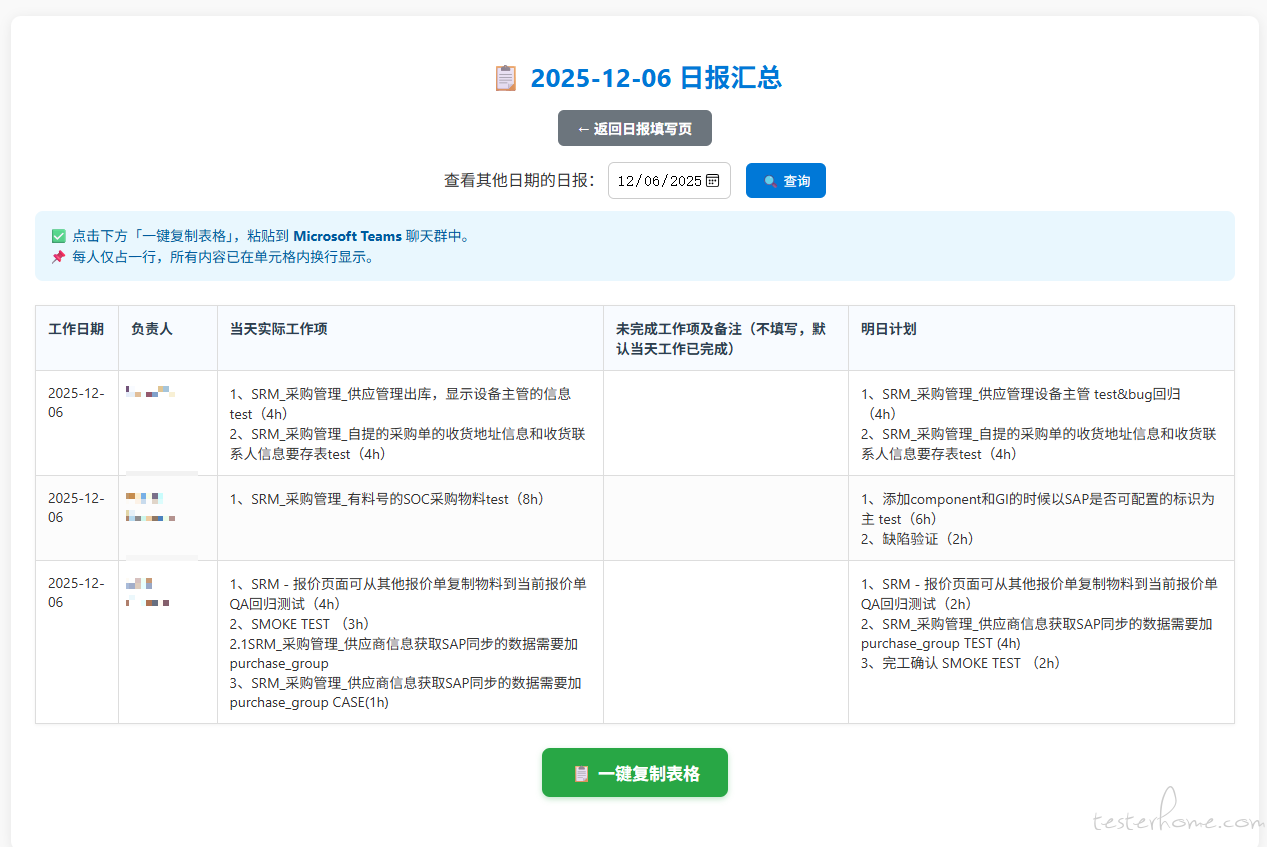
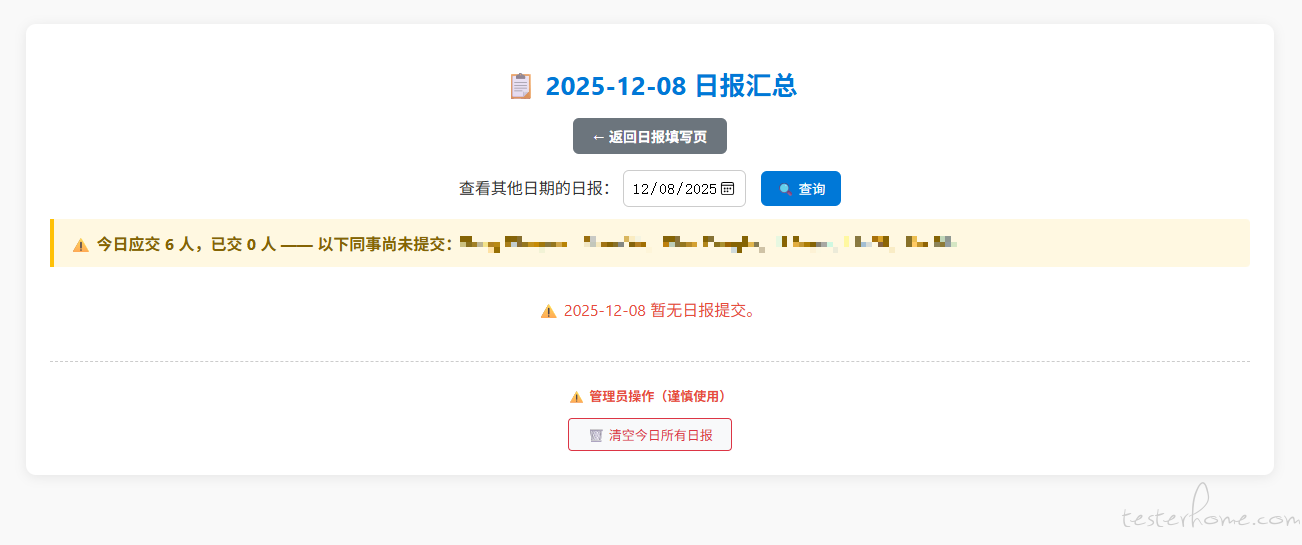
TesterHome 为用户提供「保留所有权利,禁止转载」的选项。
除非获得原作者的单独授权,任何第三方不得转载标注了「原创声明:保留所有权利,禁止转载」的内容,否则均视为侵权。
具体请参见TesterHome 知识产权保护协议。
如果觉得我的文章对您有用,请随意打赏。您的支持将鼓励我继续创作!
暂无回复。