
大家好!我是新人唱跳 rap 打篮球,是一个立志 2026 年开始每周都能水一篇文章的人
上回咱们聊了 Skills 的本质,今天咱们来点实战的!就像打游戏一样,光知道技能原理不行,还得知道怎么放技能、什么时候放、放什么技能最合适!
Skills 的实践与应用
深入理解 SKill 触发机制
Skills 默认情况下支持两种触发方式。
同一个 Skill 既可以作为斜杠命令使用,也可以让 Claude 自动判断何时需要。
为什么要这样设计? 用户有时知道自己要什么(/review),有时只是描述需求("帮我看看代码")。
Skills 的双向触发机制让两种场景都能被满足,同时保持能力定义的统一。
和 Sub-Agents 类似,SKills 的触发机制靠 LLM 语义推理,而非精确匹配。
Claude 读取所有 SKills 的 description,通过语义理解判断当前对话是否匹配某个 Skill。
当用户发送消息时,Claude 的处理流程如下图所示:
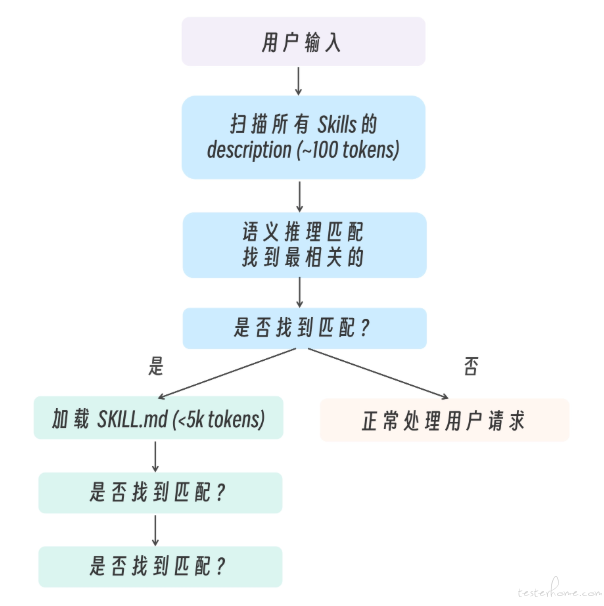
当用户请求可能匹配多个 Skills 时,Claude 会:
- 评估每个 SKill 的 description 与用户请求的相关性。
- 选择最相关的那个。
- 如果不确定,可能会询问用户或使用通用方式处理。
控制方式
disable-model-invocation: true
设有 disable-model-invocation: true 的 Skill,
其 description 不会加载到上下文——Claude 完全看不到它,只有用户 /name 才能触发。
全局禁用
在/permission 中 deny skill 工具
精确控制
Skill(commit) 精确匹配,Skill(deploy *) 前缀匹配
逐个控制
给 Skill 加 disable-model-invocation: true frontmatter
好的 SKill 设计遵循"导航页 + 详情页"模式
SKILL.md                    ← 导航页:概述 + 引用(< 500 行)
├── reference.md            ← 详情页:详细 API 文档
├── examples.md             ← 详情页:使用示例
└── scripts/validate.sh     ← 工具:可执行脚本
注意:SKILL.md 应该被控制在 500 行以内。如果过于复杂,应该将详细参考资料移到独立文件,并在 SKILL.md 中进行引用(也就是我们所常说的渐进式加载)。
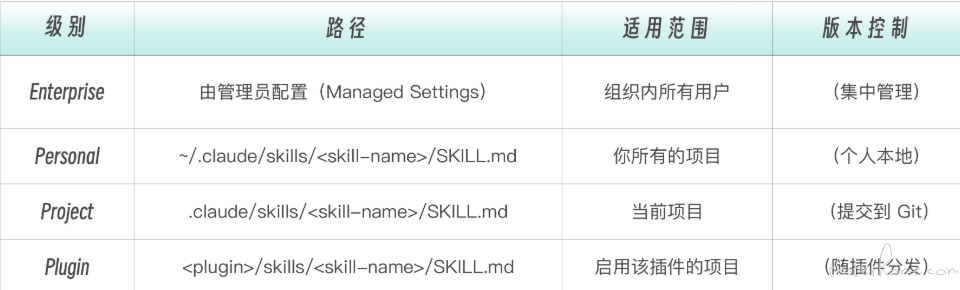
同名优先级:Enterprise > Personal > Project。Plugin Skills 使用 plugin-name:skill-name 命名空间,不与其他级别冲突。
当你在子目录(如 packages/frontend/)中工作时,Claude Code 会自动发现该目录下的 .claude/skills/。这种 monorepo 的 Skills 自动发现机制让 monorepo 中的每个 package 都可以有自己的 Skills。
两大类型的 SKills:参考型和任务型
工程角度,SKill 内容分为两类,参考性和任务型。
- 怎么做(参考型)
- 做什么(任务型)
你在写 description 时需要明确它属于哪种类型。
# 参考型——Claude 自动选择是否使用
name: api-conventions
description: API design patterns for this codebase. Use when writing or reviewing API endpoints.

# 任务型——通常由用户手动触发
name: deploy
description: Deploy the application to production
disable-model-invocation: true
从企业本体论的视角看,所谓"参考型"和"任务型"Skill,其实对应的是两种不同的组织存在方式。
参考型 Skill 更像组织的行为规范层。它定义"在这个世界里,什么是正确的做法"——例如 API 设计标准、代码风格、错误处理约定。这类 Skill 通常由模型根据语义自动判断是否加载,它不主导行动,而是塑造行动的方式。它属于"世界规则"。
任务型 Skill 则更像组织的操作流程层。它定义一次明确的行动——部署、发布、迁移、生成报告等。这类行为具有边界和风险,通常需要显式触发,因此常配合 disable-model-invocation 使用。它属于"世界事件"。
创建一个参考性 SKILL.md 文件:api-conventions
创建参考型 Skill 是一个"API 设计规范"
.claude/skills/api-conventions/     # skill 目录,名称即 skill 名
└── SKILL.md                        # 主文件(必需)
---
name: api-conventions
description: API design patterns and conventions for this project. Covers RESTful URL naming, response format standards, error handling, and authentication requirements. Use when writing or reviewing API endpoints, designing new APIs, or making decisions about request/response formats.
allowed-tools:
  - Read
  - Grep
  - Glob
---

# API Design Conventions

These are the API design standards for our project. Apply these conventions whenever working with API endpoints.

## URL Naming

- Use plural nouns for resources: `/users`, `/orders`, `/products`
- Use kebab-case for multi-word resources: `/order-items`, `/user-profiles`
- Nested resources for belongsTo relationships: `/users/{id}/orders`
- Maximum two levels of nesting; beyond that, use query parameters
- Use query parameters for filtering: `/orders?status=active&limit=20`

## Response Format

All API responses must follow this structure:

```json
{
  "data": {},        // 成功时返回的数据
  "error": null,     // 错误时返回错误对象 { code, message, details }
  "meta": {          // 分页和元信息
    "page": 1,
    "limit": 20,
    "total": 100
  }
}
HTTP Status Codes
- 200: 成功返回数据
- 201: 成功创建资源
- 400: 请求参数错误
- 401: 未认证
- 403: 无权限
- 404: 资源不存在
- 422: 业务逻辑错误
- 500: 服务器内部错误
Authentication
- All endpoints require Bearer token unless explicitly marked as public
- Public endpoints must be documented with
@publicannotation - Token format:
Authorization: Bearer <jwt-token>
Versioning
- API version in URL path:
/api/v1/users - Breaking changes require new version ```
这个文件有三个部分:
-
YAML frontmatter,是通过
---包裹的元数据 - Markdown 正文,是技能的具体说明
-
辅助文件:
.claude/skills//SKILL.md——每个 Skill 在自己的目录中,可以包含辅助文件
注意这个 SKill 的关键特征——它是一个典型的参考型 SKill:
- 没有执行步骤:不是先做 A 再做 B,而是"遵循这些规范"。
- 没有输出模版:不要求 Claude 输出固定格式的报告。
-
没有设
disable-model-invocation:Claude 可以自动判断何时需要。 -
只读工具:
allowed-tools限制为 Read/Grep/Glob,因为规范查阅不需要改代码。
这正是企业本体论的体现——它告诉 Claude 在我们的世界里,API 应该长什么样。
description 是 SKill 的灵魂
在这里,description 不是给人看的文档,而是给 Claude 看的触发器。
Claude 选择是否激活一个 Skill,完全依赖于阅读 description。这不是关键词匹配,而是语义理解。
好的 description 示例:
description: Extract text and tables from PDF files, fill forms, merge documents. Use when working with PDF files or when the user mentions PDFs, forms, or document extraction.
为什么这版更好?因为它:
- 列出了具体动作(extract, fill, merge)
- 包含了用户可能说的关键词(PDF, forms, document extraction)
- 明确说明了触发场景("Use when…")
description 写作公式
description = [做什么] + [怎么做] + [什么时候用]
更多示例:
# 代码审查 Skill
description: Review code for quality, security, and best practices. Checks for bugs, performance issues, and style violations. Use when the user asks for code review, wants feedback on their code, mentions reviewing changes, or asks about code quality.

# API 文档 Skill
description: Generate API documentation from code. Extracts endpoints, parameters, and response schemas. Use when the user wants to document APIs, create API reference, generate endpoint documentation, or needs help with OpenAPI/Swagger specs.

# 数据库查询 Skill
description: Query databases and analyze results. Supports SQL generation, query optimization, and result interpretation. Use when the user asks about data, wants to run queries, needs database information, or mentions tables/schemas.
Skills Frontmatter 字段详解
Claude Code 官方支持的完整 frontmatter 字段如下:
---
name: my-skill-name #可选:Skill标识符(省略则用目录名)
description: What this does # 推荐:触发器(最重要)
argument-hint: "[issue-number]" # 自动补全时的参数提示
disable-model-invocation: true # 禁止Claude自动触发
user-invocable: true # 对用户隐藏/skill-name
allowed-tools: # 限制可用工具
  - Read
  - Grep
  - Glob
model: sonnet
context: fork # 在子代理中隔离执行
agent: Explore # context: fork时的代理类型
hooks: # Skill级别的Hooks
  PreToolUse:
    - matcher: Write
      hooks:
        - type: command
          command: "echo 'Write called in skill'"
---
其中所有字段都是可选的,但强烈建议提供 description,否则 Claude 无法判断何时使用。
注意:所有 Skill 的 description 会被加载到上下文中供 Claude 判断选择,默认总预算为 15,000 字符。
如果你的 Skills 很多,导致 description 被截断,可以运行 /context 查看警告,并通过环境变量
SLASH_COMMAND_TOOL_CHAR_BUDGET 调大预算。
字段详解
- name:最大 64 字符,只能使用小写字母、数字、连字符,推荐使用动名词形式
- description:最重要的字段——它决定 Skill 何时被触发
- argument-hint:自动补全提示,为用户提供参数格式提示
- disable-model-invocation 和 user-invocable:控制"谁能触发这个 Skill"
- allowed-tools:限制 Skills 被激活时 Claude 能使用的工具
Skills 支持的工具包括:
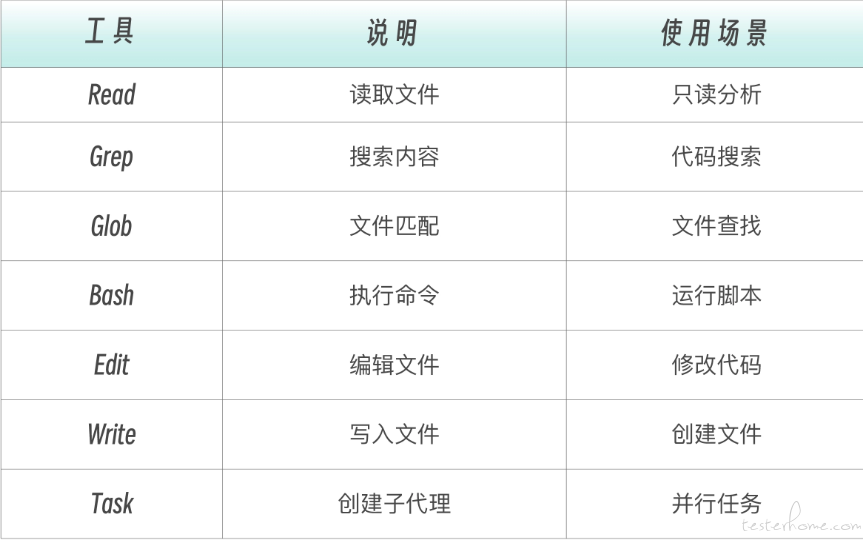
- Read
- Grep
- Glob
- Bash
- Edit
- Write
- Task
还可以更精细地控制 Bash 命令:
allowed-tools:
  - Bash(git:*)      # 只能执行 git 命令
  - Bash(npm test:*) # 只能执行 npm test 相关命令
注意:allowed-tools 中的工具在 Skill 激活时无需逐次确认。你的全局权限设置(/permissions)仍然控制其他工具的审批行为。
什么时候使用 Skill?
简而言之:
-
CLAUDE.md放"Claude 每次都该知道的少量规则"(< 100 行) -
Skill放"特定场景下的详细指令和知识"(可以很长,按需加载)
如果你犹豫放 CLAUDE.md 还是 Skill,那么就放 Skill,并在 CLAUDE.md 里加一行引用。
记住:好的 Skill 设计就像给 AI 的"使用说明书",要清晰、具体、全面!现在就去试试创建你的第一个 Skill 吧!
我是新人唱跳 rap 打篮球,是一个立志 2026 年开始每周都能水一篇文章的人,希望我的文章可以给你带来好心情!