

学习笔记——测试进阶之路 工作笔记:XMind to JIRA Converter
「原创声明:保留所有权利,禁止转载」
需求背景
目前组内成员都喜欢用 XMIND 写测试用例,但是 XMIND 文件无法正常上传到 JIRA 里面,XRAY 插件不支持 XMIND 文件格式,必须要转为 CSV 文件格式才可以进行上传。所以,为了解决这个痛点,也希望能实现一键上传 XMIND 文件,并自动转为 CSV 文件上传到 JIRA 里面去,就需要开发一个转换工具。
本工具的功能如下:
- 提供 XMind 文件转 CSV 格式功能,转换后的 CSV 文件可以点击下载
- 将 CSV 文件直接上传到 Jira 系统中,直接生成对应的测试用例数据
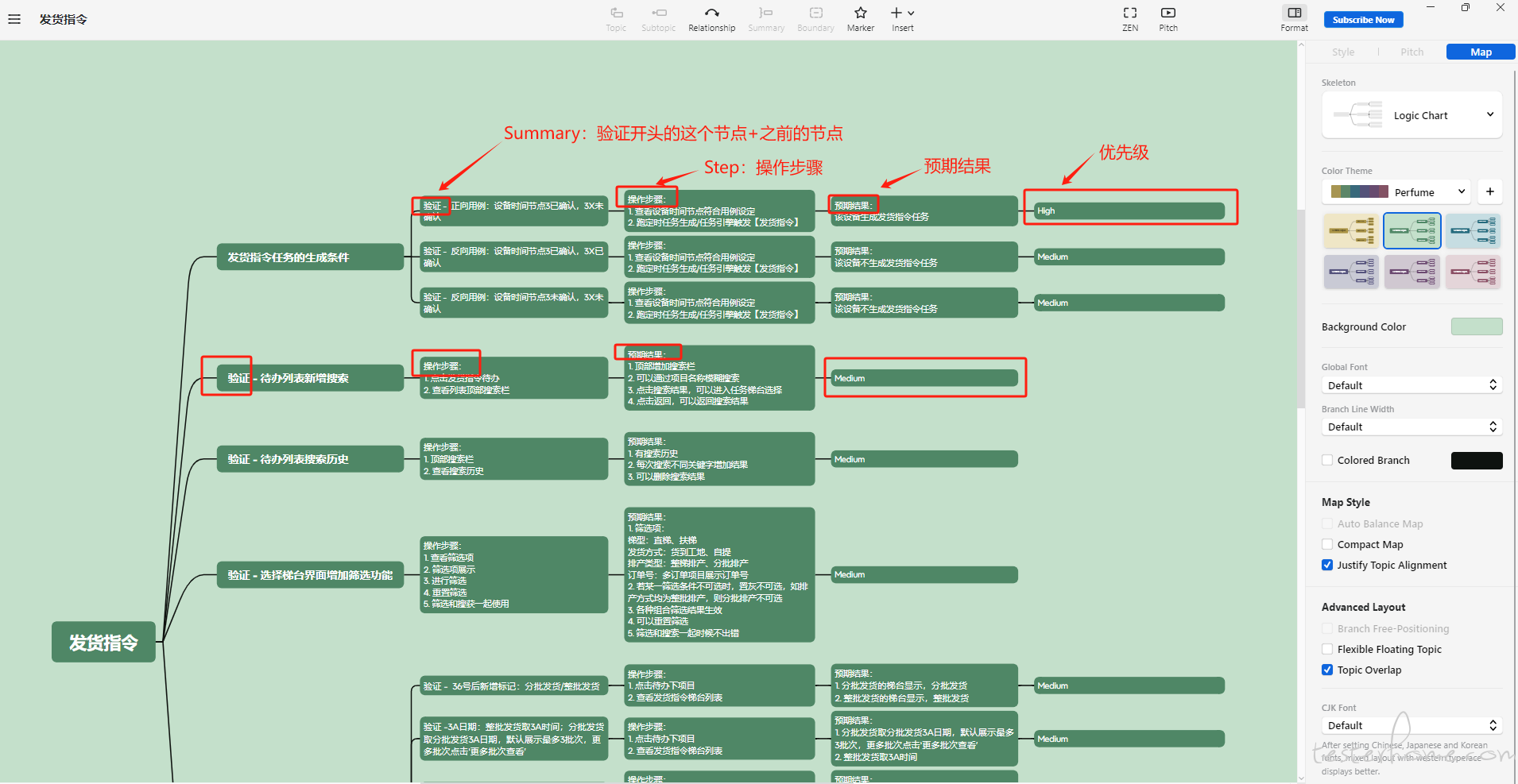
- XMIND 的编写规范,参考范例
修复和更新:
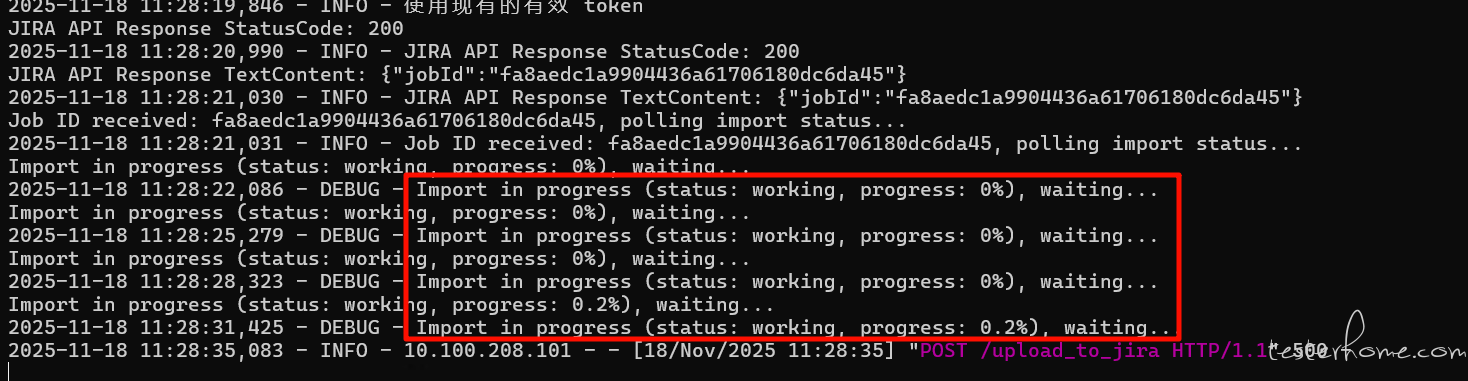
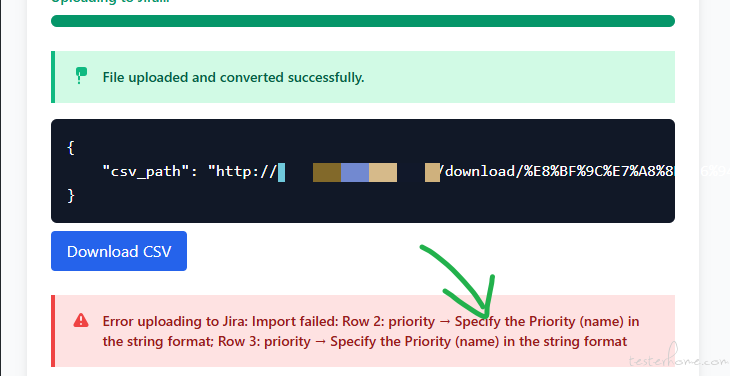
增加了 JOB ID 任务的最终执行后的状态确认,如果任务执行后,最终是导入失败,会给出错误提示信息。
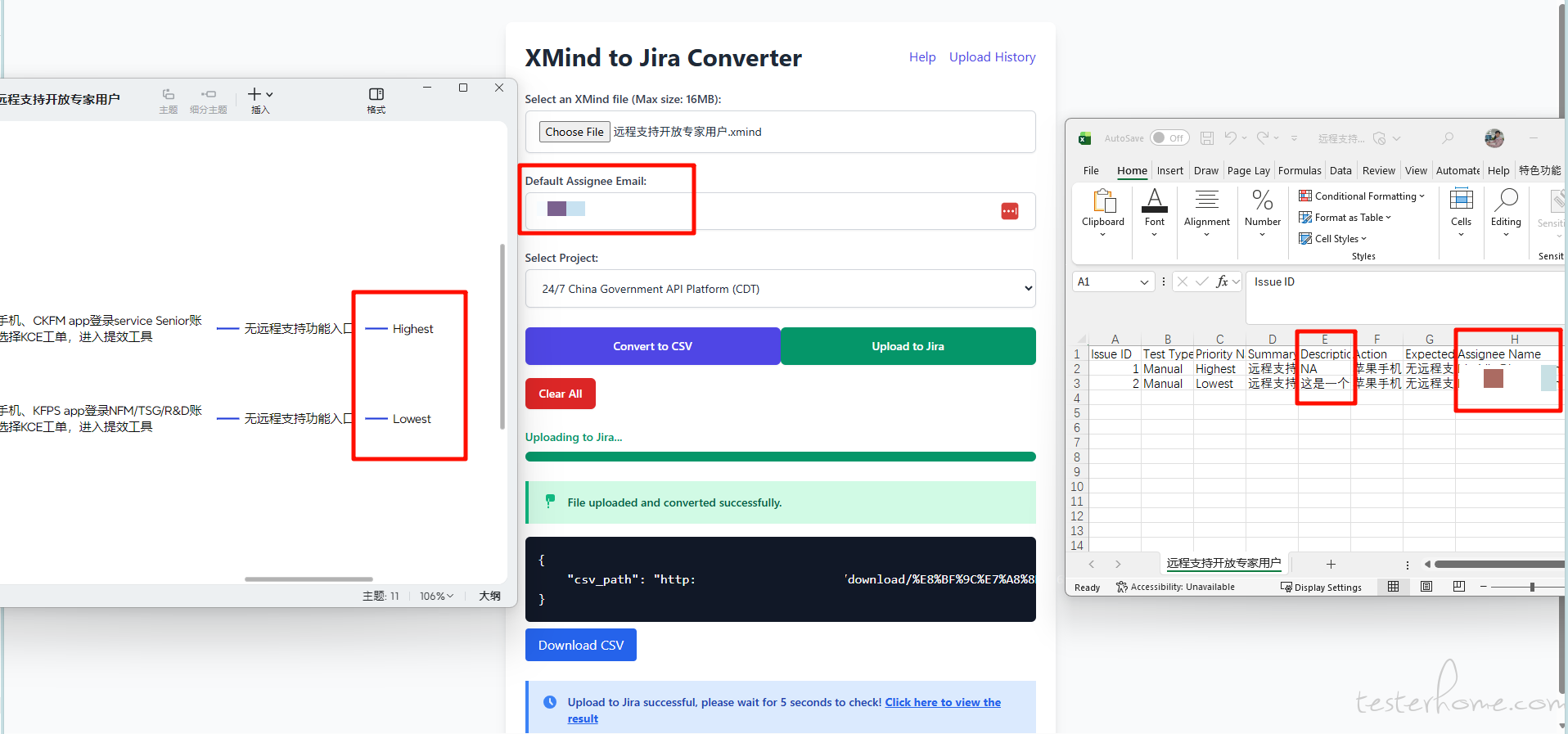
添加指派人功能,允许用户直接在网页端手动输入指派人邮箱
新增前置条件功能,允许选填
代码结构
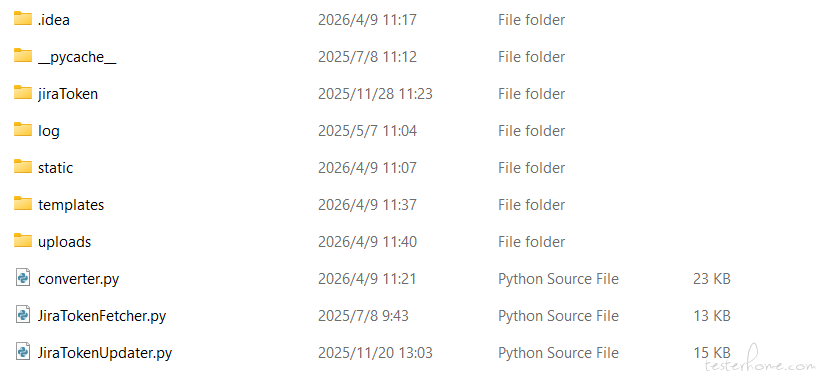
脚本代码
JiraTokenFetcher.py
# !/usr/bin/python
# -*- coding: utf-8 -*-

"""
@File    : JiraTokenFetcher.py
@Create Time:  2025/5/28 10:38
@Description:  Get jira X-Acpt value or JMT value
"""

import json
import logging
import os
import requests
from seleniumwire import webdriver  # Import from seleniumwire
from selenium.webdriver.common.by import By
from selenium.webdriver.support.ui import WebDriverWait
from selenium.webdriver.support import expected_conditions as EC
from selenium.webdriver.chrome.service import Service
from selenium.webdriver.chrome.options import Options
import time

# 配置日志记录
logging.basicConfig(level=logging.INFO, format='%(asctime)s - %(levelname)s - %(message)s')

# 定义 token 存储文件的路径
TOKEN_STORE_FILE = r'C:\XMindToJiraConverterTool\jiraToken\jira_token_store.txt'

class TokenFetcher:
    def __init__(self, chrome_driver_path):
        self.chrome_driver_path = chrome_driver_path
        self.seleniumwire_options = {'proxy': {}}
        self.chrome_options = Options()
        self.chrome_options.add_experimental_option("detach", False)  # 不保持浏览器窗口打开
        # self.chrome_options.add_argument("--headless")  # 启用 headless 模式
        self.chrome_options.add_argument("--disable-gpu")  # 禁用 GPU 加速(某些情况下需要)
        self.chrome_options.add_argument("--no-sandbox")  # 禁用沙盒模式(某些情况下需要)
        self.chrome_options.add_argument("--disable-dev-shm-usage")  # 禁用 /dev/shm 的使用(某些情况下需要)

    def load_token_from_file(self):
        """从文件加载 token"""
        if not os.path.exists(TOKEN_STORE_FILE):
            logging.info("Token 文件不存在,需要获取新的 token")
            return None

        try:
            with open(TOKEN_STORE_FILE, 'r') as file:
                token_data = json.load(file)
                logging.info(f"已加载 token, token: {token_data}")
                return token_data.get('token')
        except Exception as e:
            logging.error(f"加载 token 文件失败: {e}")
            return None

    def save_token_to_file(self, token):
        """
        将 token 保存到文件
        :param token:
        :return:
        """
        if not token:
            logging.error("Token为空,无法保存")
            return

        # 确保文件夹存在
        os.makedirs(os.path.dirname(TOKEN_STORE_FILE), exist_ok=True)

        try:
            with open(TOKEN_STORE_FILE, 'w') as file:
                json.dump({'token': token}, file)
            logging.info(f"Token 已保存到文件: {TOKEN_STORE_FILE}")
        except Exception as e:
            logging.error(f"保存 token 文件失败: {e}")

    def validate_token(self, token):
        """
        获取有效的 token,优先使用现有 token
        :param token:
        :return:
        """
        if not token:
            return False

        try:
            # 验证 token 是否可以通过验证接口
            validate_url = "https://us.xray.cloud.getxray.app/api/internal/test-repository/get-tests"

            headers = {
                'X-Acpt': token,
                'Accept': 'application/json, text/plain, */*',
                'Accept-Encoding': 'gzip, deflate, br, zstd',
                'Accept-Language': 'zh-CN,zh;q=0.9,en-US;q=0.8,en;q=0.7',
                'Content-Type': 'application/json;charset=UTF-8',
                'Origin': 'https://us.xray.cloud.getxray.app',
                'Host': 'us.xray.cloud.getxray.app'
            }
            payload = {
                "folderIds": [
                    "6528f6753506ca9792cba495"
                ],
                "projectId": "10650"
            }
            response = requests.post(validate_url, headers=headers, json=payload)

            if response.status_code == 200:
                logging.info("Token 验证成功")
                return True
            else:
                logging.warning(f"Token 验证失败,状态码: {response.status_code}")
                return False
        except Exception as e:
            logging.error(f"Token 验证过程中发生错误: {e}")
            return False

    def get_valid_token(self):
        """
        获取有效的 token,优先使用现有 token
        :return:
        """
        # 尝试从文件加载 token
        token = self.load_token_from_file()

        # 如果 token 存在且有效,直接返回
        if token and self.validate_token(token):
            logging.info("使用现有的有效 token")
            return token

        # 如果现有 token 无效或不存在,重新获取 token
        logging.info("现有的 token 无效或不存在,正在获取新的 token")
        new_token = self.get_token(max_retries=3)

        # 如果成功获取新 token,保存并返回
        if new_token:
            self.save_token_to_file(new_token)
            return new_token

        # 如果获取新 token 失败,返回 None
        return None

    def wait_for_element(self, driver, by, value, timeout=300):
        """ 等待元素出现 """
        try:
            return WebDriverWait(driver, timeout).until(EC.presence_of_element_located((by, value)))
        except Exception as e:
            logging.error(f"元素 {value} 出现超时: {e}")
            raise

    def click_element(self, driver, by, value, timeout=10):
        """ 点击元素 """
        try:
            element = WebDriverWait(driver, timeout).until(EC.element_to_be_clickable((by, value)))
            element.click()
        except Exception as e:
            logging.error(f"点击元素 {value} 失败: {e}")
            raise

    def get_token(self, max_retries=3):
        token = None
        driver = None
        retries = 0

        while retries < max_retries:
            try:
                # 创建 Chrome 驱动
                driver = webdriver.Chrome(
                    service=Service(self.chrome_driver_path),
                    options=self.chrome_options,
                    seleniumwire_options=self.seleniumwire_options
                )

                # 设置浏览器窗口全屏
                driver.maximize_window()
                logging.info(">>>>>>>>>>>>>>>>>>>>>> 浏览器窗口已设置为全屏 <<<<<<<<<<<<<<<<<<<<<<<")

                # 打开网页
                driver.get('https://xx.atlassian.net/projects/QR247?selectedItem=com.atlassian.plugins.atlassian-connect-plugin:com.xpandit.plugins.xray__testing-board')
                logging.info(">>>>>>>>>>>>>>>>>>>>>> 页面已打开 <<<<<<<<<<<<<<<<<<<<<<<")

                # 输入用户名
                try:
                    username_input = self.wait_for_element(driver, By.ID, 'username-uid1')
                except:
                    username_input = self.wait_for_element(driver, By.CSS_SELECTOR, '[data-testid="username"]')
                username_input.send_keys('guodong.ge@kone.com')
                logging.info(">>>>>>>>>>>>>>>>>>>>>> 用户名已输入 <<<<<<<<<<<<<<<<<<<<<<<")

                # 点击继续按钮
                self.click_element(driver, By.XPATH, '//span[text()="Continue"]')
                logging.info(">>>>>>>>>>>>>>>>>>>>>> 继续按钮已点击 <<<<<<<<<<<<<<<<<<<<<<<")

                # 等待页面加载完成并检查是否找到 Testing Board 按钮
                testing_board_button = self.wait_for_element(driver, By.CSS_SELECTOR,
                                                             'h2[data-testid="navigation-kit-ui-tab.ui.link-tab.non-interactive-tab"][aria-current="page"] span')
                if testing_board_button.text == "Testing Board":
                    logging.info("-------------------- Testing Board 按钮已找到 --------------------")
                else:
                    logging.error("-------------------- Testing Board 按钮未找到 --------------------")
                    time.sleep(2)
                    retries += 1
                    if retries < max_retries:
                        logging.info(f"重试获取token,剩余尝试次数: {max_retries - retries}")
                        continue
                    else:
                        logging.error("达到最大重试次数,未能获取到有效的token")
                        return token

                # 遍历所有请求,查找包含 X-Acpt 或 JWT 的请求
                for request in driver.requests:
                    logging.debug(f"Request URL: {request.url}")
                    logging.debug(f"Request headers: {request.headers}")
                    if 'x-acpt' in request.headers and request.headers['x-acpt']:
                        token = request.headers['x-acpt']
                        logging.info(f"获取到 X-Acpt Token: {token}")
                        break
                    elif 'jwt' in request.url:
                        token = request.url.split('=')[-1]
                        logging.info(f"获取到 JWT Token: {token}")
                        break

                if not token:
                    logging.error("获取token失败")
                    retries += 1
                    if retries < max_retries:
                        logging.info(f"重试获取token,剩余尝试次数: {max_retries - retries}")
                        continue
                    else:
                        logging.error("达到最大重试次数,未能获取到有效的token")
                        return token

                # 如果成功获取token,退出循环
                break

            except Exception as e:
                logging.error(f"获取token过程中发生错误: {str(e)}")
                retries += 1
                if retries < max_retries:
                    logging.info(f"重试获取token,剩余尝试次数: {max_retries - retries}")
                else:
                    logging.error("达到最大重试次数,未能获取到有效的token")
                    return token
            finally:
                # 关闭浏览器
                if driver:
                    driver.quit()
                    logging.info("-------------------- 浏览器已关闭 --------------------")

        return token


if __name__ == "__main__":
    fetcher = TokenFetcher(chrome_driver_path = r"C:/Program Files/Google/Chrome/Application/chromedriver.exe")

    # 验证从文件加载Token功能
    loaded_token = fetcher.load_token_from_file()
    if loaded_token:
        logging.info("从文件加载Token功能验证成功")
        # 验证加载的Token是否有效
        is_valid = fetcher.validate_token(loaded_token)
        if is_valid:
            logging.info("加载的Token有效且在有效期内")
        else:
            logging.warning("加载的Token无效或已过期")
    else:
        logging.info("文件中不存在有效的Token,将尝试获取新的Token")

    # 验证获取新的Token功能
    new_token = fetcher.get_token(max_retries=3)
    if new_token:
        logging.info("获取新的Token功能验证成功")
        # 验证获取到的Token是否有效
        is_valid = fetcher.validate_token(new_token)
        if is_valid:
            logging.info("获取到的Token有效且在有效期内")
        else:
            logging.warning("获取到的Token无效或已过期")
    else:
        logging.error("获取新的Token功能验证失败")

    # 验证保存Token到文件功能
    if new_token:
        fetcher.save_token_to_file(new_token)
        # 验证保存后文件中的Token
        saved_token = fetcher.load_token_from_file()
        if saved_token == new_token:
            logging.info("保存Token到文件功能验证成功")
        else:
            logging.error("保存Token到文件功能验证失败")
    else:
        logging.error("由于未获取到新的Token,无法验证保存Token到文件功能")

    # 验证获取有效Token功能
    valid_token = fetcher.get_valid_token()
    if valid_token:
        logging.info("获取有效Token功能验证成功")
        # 验证获取到的有效Token是否有效
        is_valid = fetcher.validate_token(valid_token)
        if is_valid:
            logging.info("获取到的有效Token有效且在有效期内")
        else:
            logging.warning("获取到的有效Token无效或已过期")
    else:
        logging.error("获取有效Token功能验证失败")
JiraTokenUpdater.py
#!/usr/bin/env python3
# -*- coding: utf-8 -*-
# =============================================================================
#  MIT License  © 2025 Lin Bin <bin.1.lin@email.com>
# =============================================================================
# @Time    : 2025-11-20
# @File    : JiraTokenUpdater.py
# @Desc    : Jira Token 手动更新服务
# -----------------------------------------------------------------------------

import http.server
import socketserver
import json
import os
import socket
from urllib.parse import parse_qs, urlparse

# ====== 配置区 ======
PORT = 6061
TOKEN_STORE_FILE = r'C:\XMindToJiraConverterTool\jiraToken\jira_token_store.txt'
MIN_TOKEN_LENGTH = 50
# ===================

def get_local_ip():
    try:
        with socket.socket(socket.AF_INET, socket.SOCK_DGRAM) as s:
            s.connect(("8.8.8.8", 80))
            ip = s.getsockname()[0]
        return ip
    except Exception:
        try:
            return socket.gethostbyname(socket.gethostname())
        except Exception:
            return "无法获取 IP"

def render_page(message=None, message_type="info"):
    local_ip = get_local_ip()
    success_color = "#4CAF50"
    error_color = "#F44336"
    info_color = "#2196F3"
    border_radius = "8px"
    box_shadow = "0 2px 10px rgba(0,0,0,0.1)"

    message_html = ""
    js_script = ""
    if message:
        msg_id = "alert-message"
        if message_type == "success":
            icon = "✅"
            bg_color = f"{success_color}15"
            border_color = success_color
            text_color = success_color
            # 关键修复:提示消失后自动清除 URL 查询参数
            js_script = f"""
            <script>
            (function() {{
                const msg = document.getElementById('{msg_id}');
                if (!msg) return;

                setTimeout(() => {{
                    msg.style.transition = 'opacity 0.4s, transform 0.4s';
                    msg.style.opacity = '0';
                    msg.style.transform = 'translateY(-10px)';

                    setTimeout(() => {{
                        msg.remove();
                        // 清除 URL 中的 ?msg=success,避免刷新重复显示
                        try {{
                            const url = new URL(window.location.href);
                            if (url.searchParams.has('msg')) {{
                                url.searchParams.delete('msg');
                                window.history.replaceState(null, '', url.pathname + url.hash);
                            }}
                        }} catch (e) {{
                            console.warn('URL cleanup failed:', e);
                        }}
                    }}, 400);
                }}, 10000);
            }})();
            </script>
            """
        elif message_type == "error":
            icon = "❌"
            bg_color = f"{error_color}15"
            border_color = error_color
            text_color = error_color
        else:
            icon = "ℹ️"
            bg_color = f"{info_color}15"
            border_color = info_color
            text_color = info_color

        message_html = f'''
        <div id="{msg_id}" style="
            padding: 16px;
            margin: 20px 0;
            background-color: {bg_color};
            border-left: 4px solid {border_color};
            border-radius: {border_radius};
            color: {text_color};
            font-weight: 500;
            display: flex;
            align-items: center;
            gap: 12px;
            box-shadow: {box_shadow};
        ">
            <span style="font-size: 1.2em;">{icon}</span>
            <span>{message}</span>
        </div>
        '''

    html = f'''
    <!DOCTYPE html>
    <html lang="zh-CN">
    <head>
        <meta charset="utf-8">
        <meta name="viewport" content="width=device-width, initial-scale=1">
        <title>Jira Token 更新器</title>
        <style>
            * {{ box-sizing: border-box; }}
            body {{
                font-family: -apple-system, BlinkMacSystemFont, "Segoe UI", Roboto, "Helvetica Neue", Arial, sans-serif;
                background-color: #f8f9fa;
                margin: 0;
                padding: 20px;
                color: #333;
            }}
            .container {{
                max-width: 720px;
                margin: 0 auto;
            }}
            .card {{
                background: white;
                border-radius: {border_radius};
                box-shadow: {box_shadow};
                padding: 32px;
                margin-bottom: 24px;
            }}
            h1 {{
                font-weight: 600;
                font-size: 28px;
                margin-top: 0;
                color: #1a73e8;
                display: flex;
                align-items: center;
                gap: 12px;
            }}
            h1::before {{
                content: "🔑";
                font-size: 1.4em;
            }}
            p {{
                line-height: 1.6;
                margin: 16px 0;
            }}
            code {{
                background: #f1f3f4;
                padding: 2px 8px;
                border-radius: 4px;
                font-family: Consolas, Monaco, monospace;
                font-size: 0.95em;
                color: #d93025;
            }}
            .form-group {{
                margin: 24px 0;
            }}
            input[type="text"] {{
                width: 100%;
                padding: 14px;
                font-size: 16px;
                border: 1px solid #dadce0;
                border-radius: {border_radius};
                background: #fff;
                transition: border-color 0.2s, box-shadow 0.2s;
                font-family: Consolas, Monaco, monospace;
            }}
            input[type="text"]:focus {{
                outline: none;
                border-color: #1a73e8;
                box-shadow: 0 0 0 2px rgba(26, 115, 232, 0.2);
            }}
            .btn {{
                background: #1a73e8;
                color: white;
                border: none;
                padding: 14px 28px;
                font-size: 16px;
                font-weight: 500;
                border-radius: {border_radius};
                cursor: pointer;
                transition: background 0.2s, transform 0.1s;
                box-shadow: 0 2px 6px rgba(26, 115, 232, 0.3);
            }}
            .btn:hover {{
                background: #1765cc;
            }}
            .btn:active {{
                transform: translateY(1px);
            }}
            .warning {{
                color: #d93025;
                font-size: 0.9em;
                margin-top: 8px;
                display: flex;
                align-items: flex-start;
                gap: 8px;
            }}
            .warning::before {{
                content: "⚠️";
                flex-shrink: 0;
            }}
            .instructions {{
                background: #f8f9fa;
                padding: 20px;
                border-radius: {border_radius};
                margin-top: 20px;
            }}
            .instructions h3 {{
                margin-top: 0;
                color: #1a73e8;
            }}
            ul {{
                padding-left: 20px;
            }}
            li {{
                margin-bottom: 12px;
                line-height: 1.5;
            }}
        </style>
    </head>
    <body>
        <div class="container">
            <div class="card">
                <h1>Jira Token 手动更新服务</h1>
                <p>请将你从浏览器开发者工具中复制的 <code>X-Acpt</code> 请求头值粘贴到下方输入框:</p>

                {message_html}

                <form id="tokenForm" method="post" action="/update_token">
                    <div class="form-group">
                        <input type="text" name="token" placeholder="例如:eyJhbGciOiJIUzI1NiIsInR5cCI6IkpXVCJ9.xxxxx..." required autocomplete="off">
                    </div>
                    <button type="submit" class="btn">💾 更新 Token</button>
                    <div class="warning">
                        请确保复制的是完整的 X-Acpt 值(通常超过 100 个字符,以 eyJ 开头)
                    </div>
                </form>
            </div>

            <div class="card instructions">
                <h3>📌 使用说明</h3>
                <ul>
                    <li><strong>局域网访问</strong>:<code>http://{local_ip}:{PORT}</code></li>
                    <li><strong>命令行更新</strong>:<br>
                        <code style="display: inline-block; margin-top: 6px; padding: 8px 12px; background: #f1f3f4; border-radius: 4px; font-size: 0.95em;">
                            curl -X POST http://{local_ip}:{PORT}/update_token -d "token=你的实际值"
                        </code>
                    </li>
                </ul>
            </div>
        </div>

        <script>
        document.getElementById('tokenForm').onsubmit = function() {{
            const input = this.token;
            input.value = input.value.trim();
            if (input.value.length < {MIN_TOKEN_LENGTH}) {{
                alert('Token 长度不足!\\n请确保复制了完整的 X-Acpt 值(通常超过 100 个字符)。');
                return false;
            }}
            return true;
        }};
        </script>
        {js_script}
    </body>
    </html>
    '''
    return html

class TokenHandler(http.server.BaseHTTPRequestHandler):
    def do_POST(self):
        if self.path == '/update_token':
            try:
                content_length = int(self.headers.get('Content-Length', 0))
                post_data = self.rfile.read(content_length).decode('utf-8')

                token = None
                try:
                    data = json.loads(post_data)
                    token = data.get('token')
                    is_json = True
                except json.JSONDecodeError:
                    parsed = parse_qs(post_data)
                    token = parsed.get('token', [None])[0]
                    is_json = False

                if token is not None:
                    token = str(token).strip()
                if not token or len(token) < MIN_TOKEN_LENGTH:
                    error_msg = f"Token 不能为空、仅含空白字符或长度不足 {MIN_TOKEN_LENGTH} 字符(当前长度: {len(token) if token else 0})"
                    if is_json:
                        self.send_error(400, error_msg)
                    else:
                        self.send_response(200)
                        self.send_header('Content-type', 'text/html; charset=utf-8')
                        self.end_headers()
                        html = render_page(message=error_msg, message_type="error")
                        self.wfile.write(html.encode('utf-8'))
                    return

                os.makedirs(os.path.dirname(TOKEN_STORE_FILE), exist_ok=True)
                with open(TOKEN_STORE_FILE, 'w', encoding='utf-8') as f:
                    json.dump({'token': token}, f, ensure_ascii=False)

                print(f"[INFO] 收到有效 token: {repr(token[:40])}... (总长度: {len(token)})")

                if is_json:
                    self.send_response(200)
                    self.send_header('Content-type', 'application/json')
                    self.send_header('Access-Control-Allow-Origin', '*')
                    self.end_headers()
                    response = {"status": "success", "message": "Token 已成功更新!"}
                    self.wfile.write(json.dumps(response, ensure_ascii=False).encode('utf-8'))
                else:
                    # PRG 模式:重定向到带 success 参数的首页
                    self.send_response(302)
                    self.send_header('Location', '/?msg=success')
                    self.end_headers()
                    return

            except Exception as e:
                print(f"[ERROR] 处理请求时出错: {e}")
                self.send_error(500, str(e))
        else:
            self.send_error(404, "接口不存在")

    def do_GET(self):
        if self.path == '/' or self.path.startswith('/?'):
            query = parse_qs(urlparse(self.path).query)
            msg = None
            msg_type = "info"
            if 'msg' in query:
                msg_val = query['msg'][0]
                if msg_val == 'success':
                    msg = "🎉 Token 已成功更新!"
                    msg_type = "success"
                elif msg_val == 'error':
                    msg = query.get('text', ['未知错误'])[0]
                    msg_type = "error"
            self.send_response(200)
            self.send_header('Content-type', 'text/html; charset=utf-8')
            self.end_headers()
            html = render_page(message=msg, message_type=msg_type)
            self.wfile.write(html.encode('utf-8'))
        else:
            self.send_error(404)

    def do_OPTIONS(self):
        self.send_response(200)
        self.send_header('Access-Control-Allow-Origin', '*')
        self.send_header('Access-Control-Allow-Methods', 'POST, GET, OPTIONS')
        self.send_header('Access-Control-Allow-Headers', 'Content-Type')
        self.end_headers()

if __name__ == "__main__":
    local_ip = get_local_ip()
    print("🚀 Jira Token 更新服务已启动!")
    print(f"   🌐 远程访问: http://{local_ip}:{PORT}")

    try:
        with socketserver.TCPServer(("0.0.0.0", PORT), TokenHandler) as httpd:
            httpd.serve_forever()
    except KeyboardInterrupt:
        print("\n🛑 服务已手动停止。")
    except OSError as e:
        if e.errno == 10013:
            print("❌ 错误:需要管理员权限才能绑定端口(或端口被占用)")
        else:
            print(f"❌ 启动失败: {e}")
converter.py
#!/usr/bin/python
# -*- coding: utf-8 -*-

"""
@File    : converter.py
@Create Time:  2025/4/25 10:14
@Description: 主函数入口(已优化 Jira 导入状态校验)
"""

import logging
from flask import Flask, request, render_template, jsonify, send_from_directory, url_for
import os
import pandas as pd
import xmindparser
from werkzeug.utils import secure_filename
import time
import requests
import json
from typing import List, Dict
from JiraTokenFetcher import TokenFetcher
from flask import Flask, request, render_template, jsonify, send_from_directory, url_for, redirect


app = Flask(__name__)
UPLOAD_FOLDER = 'uploads'
ALLOWED_EXTENSIONS = {'xmind'}
app.config['UPLOAD_FOLDER'] = UPLOAD_FOLDER

# JIRA API 配置
app.config['JIRA_API_URL'] = 'https://us.xray.cloud.getxray.app/api/internal/import/tests'
app.config['JIRA_HEADERS'] = {
    'Accept': 'application/json, text/plain, */*',
    'Accept-Encoding': 'gzip, deflate, br',
    'Accept-Language': 'zh-CN,zh;q=0.9,en-US;q=0.8,en;q=0.7',
    'Content-Type': 'application/json;charset=UTF-8',
    'Origin': 'https://us.xray.cloud.getxray.app',
    'Referer': 'https://us.xray.cloud.getxray.app/view/page/import-tests',
    'User-Agent': 'Mozilla/5.0 (Windows NT 10.0; Win64; x64) AppleWebKit/537.36 (KHTML, like Gecko) Chrome/142.0.0.0 Safari/537.36 Edg/142.0.0.0',

    # 关键新增字段
    'X-addon-key': 'com.xpandit.plugins.xray',

    # 增强浏览器特征
    'Sec-Fetch-Dest': 'empty',
    'Sec-Fetch-Mode': 'cors',
    'Sec-Fetch-Site': 'same-origin',
    'Sec-Fetch-Storage-Access': 'active',
    'DNT': '1',
    'sec-ch-ua': '"Chromium";v="142", "Microsoft Edge";v="142", "Not_A Brand";v="99"',
    'sec-ch-ua-mobile': '?0',
    'sec-ch-ua-platform': '"Windows"'
}

# 配置日志
logging.basicConfig(level=logging.DEBUG)
app.logger.addHandler(logging.StreamHandler())
app.logger.setLevel(logging.DEBUG)

if not os.path.exists(UPLOAD_FOLDER):
    os.makedirs(UPLOAD_FOLDER)

# 上传记录日志文件
UPLOAD_HISTORY_LOG = './log/upload_history.log'
os.makedirs(os.path.dirname(UPLOAD_HISTORY_LOG), exist_ok=True)

# Token 存储路径(与原脚本一致)
TOKEN_STORE_FILE = r'C:\XMindToJiraConverterTool\jiraToken\jira_token_store.txt'
MIN_TOKEN_LENGTH = 50

# 初始化单例TokenFetcher(使用元类实现)
class Singleton(type):
    _instances = {}

    def __call__(cls, *args, **kwargs):
        if cls not in cls._instances:
            cls._instances[cls] = super(Singleton, cls).__call__(*args, **kwargs)
        return cls._instances[cls]


class TokenFetcherSingleton(TokenFetcher, metaclass=Singleton):
    pass


# 初始化TokenFetcher(注意:此处仍使用普通实例,因原代码如此)
token_fetcher = TokenFetcher(chrome_driver_path="C:/Program Files/Google/Chrome/Application/chromedriver.exe")

def allowed_file(filename):
    return filename.endswith('.xmind')

@app.route('/')
def index():
    return render_template('default.html')

@app.route('/tool')
def tool_page():
    return render_template('tool.html')


@app.route('/help')
def help():
    return render_template('help.html')


@app.route('/upload-history')
def upload_history():
    history = []
    if os.path.exists(UPLOAD_HISTORY_LOG):
        with open(UPLOAD_HISTORY_LOG, 'r', encoding='utf-8') as f:
            for line in f:
                parts = line.strip().split(',')
                if len(parts) == 3:
                    history.append({
                        'filename': parts[0],
                        'timestamp': parts[1],
                        'status': parts[2]
                    })
    return render_template('upload_history.html', history=history)


@app.route('/upload', methods=['POST'])
def upload_file():
    app.logger.debug("Received POST request at /upload")
    if 'file' not in request.files:
        app.logger.error("No file part in the request")
        return jsonify({'status': 'error', 'message': 'No file part'})
    file = request.files['file']
    assignee_name = request.form.get('assignee', '').strip()
    if not assignee_name:
        assignee_name = "bin.lin@kone.com"
    if file.filename == '':
        app.logger.error("No selected file")
        return jsonify({'status': 'error', 'message': 'No selected file'})
    if file and allowed_file(file.filename):
        filename = file.filename
        filepath = os.path.join(app.config['UPLOAD_FOLDER'], filename)
        file.save(filepath)
        app.logger.info(f"File saved to {filepath}")
        try:
            csv_path = parse_xmind_to_csv(filepath, default_assignee=assignee_name)
            app.logger.info(f"CSV file saved to {csv_path}")
            download_url = url_for('download_file', filename=os.path.basename(csv_path), _external=True)

            with open(UPLOAD_HISTORY_LOG, 'a', encoding='utf-8') as f:
                timestamp = time.strftime('%Y-%m-%d %H:%M:%S', time.localtime())
                f.write(f"{filename},{timestamp},Success\n")

            return jsonify({
                'status': 'success',
                'message': 'File uploaded and converted successfully.',
                'data': {'csv_path': download_url}
            })
        except Exception as e:
            app.logger.error(f"Error during file processing: {str(e)}")
            with open(UPLOAD_HISTORY_LOG, 'a', encoding='utf-8') as f:
                timestamp = time.strftime('%Y-%m-%d %H:%M:%S', time.localtime())
                f.write(f"{filename},{timestamp},Failed\n")
            return jsonify({
                'status': 'error',
                'message': str(e)
            })
    else:
        app.logger.error("The XMind filename is missing the '.xmind' extension!")
        return jsonify({'status': 'error', 'message': 'The XMind filename is missing the \'.xmind\' extension!'})


def parse_xmind_to_csv(xmind_path, default_assignee="bin.lin@kone.com"):
    app.logger.info(f"Processing XMind file: {xmind_path} with default assignee: {default_assignee}")

    xmind_data = xmindparser.xmind_to_dict(xmind_path)
    if not xmind_data:
        raise ValueError("XMind file is empty or invalid.")
    root_topic = xmind_data[0]['topic']

    issue_id = 1
    VALID_PRIORITIES = {"Highest", "High", "Medium", "Low", "Lowest"}

    def extract_leaf_topics(topic, parent_title=""):
        nonlocal issue_id
        leaf_topics_list = []
        title = topic['title']
        full_title = f"{parent_title} -> {title}" if parent_title else title

        sub_topics = topic.get('topics', [])
        if not sub_topics:
            if " -> " not in full_title:
                raise ValueError(f"叶子节点标题必须包含 ' -> '!当前: {full_title}")

            parts = [part.strip() for part in full_title.split(" -> ")]
            n = len(parts)

            if n < 4:
                raise ValueError(
                    f"路径至少需要4段:... -> Description -> Action -> Expected -> Priority\n"
                    f"当前路径: {full_title}(共{n}段)"
                )

            expected_result = parts[-2]
            action = parts[-3]
            description = parts[-4]
            summary_parts = parts[:-4]

            # 大小写不敏感的 Priority 匹配
            PRIORITY_MAP = {p.lower(): p for p in VALID_PRIORITIES}
            raw_input = parts[-1].strip()
            priority_name = "Medium"

            if raw_input:
                standard_priority = PRIORITY_MAP.get(raw_input.lower())
                if standard_priority:
                    priority_name = standard_priority
                else:
                    app.logger.warning(f"Priority '{raw_input}' 无效,已设为 'Medium'。路径: {full_title}")
            else:
                app.logger.warning(f"Priority 节点为空,已设为 'Medium'。路径: {full_title}")

            summary = " -> ".join(summary_parts) if summary_parts else "Test Case"

            test_data = {
                "Issue ID": issue_id,
                "Test Type": "Manual",
                "Priority Name": priority_name,
                "Summary": summary,
                "Description": description,
                "Action": action,
                "Expected Result": expected_result,
                "Assignee Name": default_assignee
            }
            leaf_topics_list.append(test_data)
            issue_id += 1

        else:
            for sub_topic in sub_topics:
                leaf_topics_list.extend(extract_leaf_topics(sub_topic, full_title))

        return leaf_topics_list

    all_leaf_topics = extract_leaf_topics(root_topic)

    if not all_leaf_topics:
        raise ValueError("未找到任何符合格式的叶子节点!")

    df = pd.DataFrame(all_leaf_topics)
    original_filename = os.path.splitext(os.path.basename(xmind_path))[0]
    csv_filename = f"{original_filename}.csv"
    csv_path = os.path.join(app.config['UPLOAD_FOLDER'], csv_filename)
    app.logger.info(f"Saving CSV file to {csv_path}")

    try:
        df.to_csv(csv_path, index=False, encoding='utf-8-sig')
        app.logger.info(f"CSV file saved successfully: {csv_path}")
    except Exception as e:
        app.logger.error(f"Failed to save CSV file: {str(e)}")
        raise

    return csv_path


@app.route('/download/<path:filename>', methods=['GET'])
def download_file(filename):
    return send_from_directory(app.config['UPLOAD_FOLDER'], filename, as_attachment=True)


@app.route('/clear-history', methods=['POST'])
def clear_history():
    try:
        if os.path.exists(UPLOAD_HISTORY_LOG):
            open(UPLOAD_HISTORY_LOG, 'w', encoding='utf-8').close()
        return jsonify({'status': 'success', 'message': 'History cleared successfully.'})
    except Exception as e:
        return jsonify({'status': 'error', 'message': str(e)})

def get_stored_token():
    try:
        with open(TOKEN_STORE_FILE, 'r', encoding='utf-8') as f:
            data = json.load(f)
            return data.get('token')
    except Exception as e:
        app.logger.error(f"Failed to read stored token: {e}")
        return None


def call_jira_api(json_data: List[Dict], project_key: str, x_acpt_value: str) -> Dict:
    url = f"{app.config['JIRA_API_URL']}?project={project_key}"
    headers = app.config['JIRA_HEADERS'].copy()
    headers['X-Acpt'] = x_acpt_value

    for attempt in range(3):
        try:
            response = requests.post(
                url,
                headers=headers,
                json=json_data,
                timeout=30
            )
            # 检查是否是认证错误
            if response.status_code in (401, 403):
                app.logger.warning("Jira API returned 401/403: token likely expired")
                return {'error': 'token_expired', 'status_code': response.status_code}

            response.raise_for_status()
            app.logger.info(f"JIRA API Response StatusCode: {response.status_code}")
            app.logger.info(f"JIRA API Response TextContent: {response.text}")
            return response.json()
        except requests.exceptions.RequestException as e:
            app.logger.warning(f"第{attempt + 1}次请求失败: {str(e)}")
            if attempt < 2:
                time.sleep(2 ** attempt)
            else:
                app.logger.error("所有重试均失败")
                return {'error': 'request_failed', 'message': str(e)}


def check_import_status(job_id: str, x_acpt_value: str, max_wait_seconds=60) -> dict:
    """
    轮询 Xray 导入任务状态。
    终态包括: 'successful', 'unsuccessful', 'failed', 'cancelled'
    中间态如 'working', 'queued' 会继续轮询。
    """
    status_url = "https://us.xray.cloud.getxray.app/api/internal/import/tests/status"
    headers = app.config['JIRA_HEADERS'].copy()
    headers['X-Acpt'] = x_acpt_value
    headers.pop('Content-Type', None)  # GET 不需要 Content-Type

    start_time = time.time()
    poll_count = 0

    while time.time() - start_time < max_wait_seconds:
        poll_count += 1
        req_url = f"{status_url}?jobId={job_id}"

        # # === 🔍 打印轮询请求 ===
        # app.logger.debug(f"=== 🔍 Polling Import Status [Attempt {poll_count}] ===")
        # app.logger.debug(f"GET {req_url}")
        # app.logger.debug("Headers:")
        # app.logger.debug(json.dumps(dict(headers), indent=2, ensure_ascii=False))
        # # =======================

        try:
            response = requests.get(req_url, headers=headers, timeout=10)

            # === 📥 打印轮询响应 ===
            app.logger.debug(f"Status Code: {response.status_code}")
            app.logger.debug(f"Response Body:\n{response.text}")
            # =======================

            if response.status_code == 200:
                try:
                    result = response.json()
                except json.JSONDecodeError:
                    app.logger.error("Failed to parse status response as JSON")
                    break

                status = result.get('status', 'unknown')
                progress = result.get('progressValue', 'N/A')

                TERMINAL_STATES = {'successful', 'unsuccessful', 'failed', 'cancelled'}

                if status in TERMINAL_STATES:
                    app.logger.info(f"✅ Import job reached terminal state: '{status}'")
                    return result
                else:
                    # 包括 'working', 'queued' 等中间状态
                    app.logger.debug(f"⏳ Import in progress (status: {status}, progress: {progress}%), waiting...")
            else:
                app.logger.warning(f"⚠️ Status check returned HTTP {response.status_code}: {response.text}")
                # 非200也视为异常,但继续重试(除非超时)

        except Exception as e:
            app.logger.error(f"❌ Error during import status polling: {e}")

        time.sleep(2)

    # 超时
    app.logger.error(f"⏰ Import status polling timed out after {max_wait_seconds} seconds (jobId={job_id})")
    return {
        'status': 'timeout',
        'message': f'Import did not complete within {max_wait_seconds} seconds.',
        'jobId': job_id
    }


@app.route('/upload_to_jira', methods=['POST'])
def upload_to_jira():
    app.logger.debug("Received POST request at /upload_to_jira")

    try:
        data = request.get_json()
        csv_path = data.get('csv_path', '')
        project_key = data.get('project_key', 'QR247')

        if not csv_path:
            return jsonify({'status': 'error', 'message': 'CSV path is required.'}), 400

        csv_data = pd.read_csv(
            csv_path,
            keep_default_na=False,  # 不自动识别 NA
            na_values=[]  # 不把任何字符串当 NaN
        )
        json_data = convert_to_jira_format(csv_data)

        # 获取有效的 token
        x_acpt_value = get_stored_token()
        app.logger.debug(f"Loaded token length: {len(x_acpt_value) if x_acpt_value else 0}")
        if not x_acpt_value:
            return jsonify({
                'status': 'error',
                'message': 'Jira token is missing or expired, please update it manually!'
            }), 400

        jira_response = call_jira_api(json_data, project_key, x_acpt_value)

        # 检查是否因 token 问题失败
        if jira_response.get('error') == 'token_expired':
            return jsonify({
                'status': 'error',
                'message': 'Jira token is missing or expired, please update it manually!'
            }), 400

        if 'jobId' not in jira_response:
            return jsonify({
                'status': 'error',
                'message': 'Failed to upload to Jira, no jobId returned.',
                'data': jira_response
            }), 500

        job_id = jira_response['jobId']
        app.logger.info(f"Job ID received: {job_id}, polling import status...")

        # 轮询真实导入结果
        final_status = check_import_status(job_id, x_acpt_value)
        status_val = final_status.get('status')

        if status_val == 'successful':
            view_url = f"https://XX.atlassian.net/jira/software/c/projects/{project_key}/issues/?jql=project%20%3D%20%22{project_key}%22"
            return jsonify({
                'status': 'success',
                'message': f'Upload to Jira successful! <a href="{view_url}" target="_blank" class="text-blue-600 font-bold underline hover:text-blue-800">Click here to view the result</a>',
                'data': final_status
            })
        elif status_val == 'unsuccessful':
            errors = final_status.get('result', {}).get('errors', [])
            error_msgs = []
            for err in errors:
                elem_num = err.get('elementNumber', -1)
                field_errors = err.get('errors', {})
                for field, msg in field_errors.items():
                    row_display = elem_num + 2 if elem_num >= 0 else 'Unknown'
                    error_msgs.append(f"Row {row_display}: {field} → {msg}")

            full_error = "; ".join(error_msgs) if error_msgs else "Import failed with unknown reason."
            app.logger.warning(f"Xray import unsuccessful: {full_error}")
            return jsonify({
                'status': 'error',
                'message': f'Import failed: {full_error}',
                'data': final_status
            }), 422
        elif status_val == 'failed':
            # 显式处理 'failed'
            # 尝试提取 message 或 errors
            app.logger.error(f"Xray import job failed (job_id={job_id}): {final_status}")
            msg = (
                    final_status.get('message') or
                    final_status.get('result', {}).get('message') or
                    "Import job failed during processing (e.g., invalid field format, unsupported content)."
            )
            return jsonify({
                'status': 'error',
                'message': f'Import failed: {msg}',
                'data': final_status
            }), 422
        else:
            # unknown status (e.g., timeout, cancelled)
            app.logger.error(f"Unexpected Xray import status (job_id={job_id}): {final_status}")
            msg = final_status.get('message') or 'Import did not complete successfully.'
            return jsonify({
                'status': 'error',
                'message': msg,
                'data': final_status
            }), 422

    except Exception as e:
        app.logger.error(f"Error during upload to Jira: {str(e)}")
        return jsonify({'status': 'error', 'message': str(e)}), 500


def convert_to_jira_format(csv_data):
    jira_format = []
    VALID_PRIORITIES = {"Highest", "High", "Medium", "Low", "Lowest"}
    DEFAULT_ASSIGNEE = "bin.lin@kone.com"

    def safe_str(val, default=""):
        if pd.isna(val) or val is None:
            return default
        return str(val).strip()

    def is_valid_email(email):
        if not email:
            return False
        parts = email.split("@")
        return len(parts) == 2 and "." in parts[1]

    for idx, row in csv_data.iterrows():
        row_num = idx + 2

        summary = safe_str(row['Summary'])
        if not summary:
            app.logger.warning(f"Row {row_num}: Summary 为空,跳过该测试用例")
            continue

        raw_assignee = safe_str(row['Assignee Name'])
        if is_valid_email(raw_assignee):
            assignee_name = raw_assignee
        else:
            assignee_name = DEFAULT_ASSIGNEE
            app.logger.warning(
                f"Row {row_num}: Assignee '{raw_assignee}' 无效或为空,已设为默认负责人: {DEFAULT_ASSIGNEE}"
            )

        priority_name = safe_str(row['Priority Name'])
        if not priority_name or priority_name not in VALID_PRIORITIES:
            priority_name = "Medium"
            app.logger.warning(f"Row {row_num}: Priority 无效或为空,设为 'Medium'")

        # Description, Action, Expected Result: 空白时填充默认值
        description = safe_str(row['Description'])
        if not description:
            description = "[No description]"

        action = safe_str(row['Action'])
        if not action:
            action = "[No action specified]"

        expected_result = safe_str(row['Expected Result'])
        if not expected_result:
            expected_result = "[No expected result specified]"

        # Test Type 保持原逻辑
        test_type = safe_str(row['Test Type']) or "Manual"

        jira_item = {
            "fields": {
                "priority": {"name": priority_name},
                "summary": summary,
                "description": description,
                "assignee": {"name": assignee_name}
            },
            "xray_testtype": test_type,
            "steps": [
                {"action": action, "result": expected_result}
            ]
        }

        jira_format.append(jira_item)
        app.logger.debug(f"Row {row_num} 转换成功 | Assignee: {assignee_name}")

    if not jira_format:
        raise ValueError("CSV 中无有效测试用例可上传")

    return jira_format


import json
import os

@app.route('/jira-token', methods=['GET'])
def jira_token_page():
    message = None
    msg_type = "info"
    if 'msg' in request.args:
        msg_val = request.args.get('msg')
        if msg_val == 'success':
            message = "🎉 Token 已成功更新!"
            msg_type = "success"
        elif msg_val == 'error':
            message = request.args.get('text', '未知错误')
            msg_type = "error"
    return render_template('jira_token.html', message=message, message_type=msg_type, min_token_length=MIN_TOKEN_LENGTH)


@app.route('/jira-token/update', methods=['POST'])
def update_jira_token():
    token = request.form.get('token', '').strip()
    if not token or len(token) < MIN_TOKEN_LENGTH:
        error_msg = f"Token 不能为空或长度不足 {MIN_TOKEN_LENGTH} 字符(当前长度: {len(token)})"
        return render_template('jira_token.html', message=error_msg, message_type="error")

    try:
        os.makedirs(os.path.dirname(TOKEN_STORE_FILE), exist_ok=True)
        with open(TOKEN_STORE_FILE, 'w', encoding='utf-8') as f:
            json.dump({'token': token}, f, ensure_ascii=False)
        app.logger.info(f"[INFO] 收到有效 token: {repr(token[:40])}... (总长度: {len(token)})")
        # PRG 模式:重定向避免刷新重复提交
        return redirect(url_for('jira_token_page', msg='success'))
    except Exception as e:
        app.logger.error(f"保存 token 失败: {e}")
        return render_template('jira_token.html', message=str(e), message_type="error")


if __name__ == '__main__':
    app.run(debug=True, host='0.0.0.0', port=6060)
default.html
默认项目介绍页
<!DOCTYPE html>
<html lang="zh-CN">
<head>
<meta charset="UTF-8" />
<meta name="viewport" content="width=device-width, initial-scale=1.0"/>
<title>XMind to Jira Converter — 张三集团</title>
<link rel="stylesheet" href="https://cdnjs.cloudflare.com/ajax/libs/font-awesome/6.5.0/css/all.min.css">
<style>
/* ========== 全局重置与基础 ========== */
* { margin: 0; padding: 0; box-sizing: border-box; }
html { font-size: 16px; scroll-behavior: smooth; }
body {
min-height: 100vh;
font-family: -apple-system, BlinkMacSystemFont, 'Segoe UI', 'PingFang SC', 'Microsoft YaHei', sans-serif;
background: #F9FAFC;
color: #1E293B;
display: flex;
flex-direction: column;
overflow-x: hidden;
-webkit-font-smoothing: antialiased;
}
/* ========== HERO ========== */
.hero-section {
position: relative;
padding: 100px 40px 80px;
text-align: center;
background: #FFFFFF;
overflow: hidden;
}
.hero-section::before {
content: '';
position: absolute;
top: -200px; left: 50%;
width: 900px; height: 600px;
background: radial-gradient(ellipse, rgba(0, 80, 145, 0.06) 0%, transparent 70%);
transform: translateX(-50%);
pointer-events: none;
}
.hero-logo {
position: absolute; top: 32px; left: 50%; transform: translateX(-50%);
height: 32px; opacity: 0.5; transition: opacity 0.3s;
}
.hero-logo:hover { opacity: 0.8; }
.hero-tag {
display: inline-flex; align-items: center; gap: 8px;
font-size: 12px; font-weight: 600; color: #005091;
background: #E8F2FB; padding: 6px 18px; border-radius: 20px;
margin-bottom: 32px; letter-spacing: 0.5px;
}
.hero-tag i { font-size: 10px; }
.hero-title {
font-size: 2.75rem; font-weight: 800; line-height: 1.25;
letter-spacing: -0.5px; margin-bottom: 18px; color: #0B1A30;
}
.hero-desc {
font-size: 1.1rem; line-height: 1.7; color: #64748B;
margin: 0 auto 48px; max-width: 680px;
}
/* ========== 数据指标 ========== */
.hero-metrics {
display: flex; justify-content: center; gap: 56px;
margin-bottom: 48px; flex-wrap: wrap;
}
.hero-metric { text-align: center; }
.hero-metric-val {
font-size: 2rem; font-weight: 800; color: #005091;
line-height: 1.2; margin-bottom: 6px; font-variant-numeric: tabular-nums;
}
.hero-metric-val .u { font-size: 0.9rem; font-weight: 600; color: #0078C4; margin-left: 2px; }
.hero-metric-val .old {
font-size: 1rem; color: #CBD5E1; text-decoration: line-through;
font-weight: 500; margin-right: 6px;
}
.hero-metric-label { font-size: 13px; color: #94A3B8; font-weight: 500; }
/* ========== 按钮 ========== */
.btn-group { display: flex; gap: 24px; margin-top: 10px; flex-wrap: wrap; justify-content: center; }
.btn {
padding: 14px 36px; font-size: 1.1rem; text-decoration: none; color: #fff;
background: #005091; border: none; border-radius: 10px;
transition: all 0.25s ease; font-weight: 600;
box-shadow: 0 4px 12px rgba(0, 80, 145, 0.25);
display: inline-flex; align-items: center; gap: 8px;
}
.btn:hover {
transform: translateY(-2px); box-shadow: 0 6px 18px rgba(0, 80, 145, 0.35); background: #003D70;
}
.btn:active { transform: translateY(0); }
/* ========== 详情区 ========== */
.detail-section {
max-width: 880px; width: 100%; margin: 0 auto; padding: 48px 32px 80px;
}
.author-strip {
display: flex; align-items: center; justify-content: center; gap: 16px;
margin-bottom: 56px; flex-wrap: wrap; font-size: 14px; color: #94A3B8; font-weight: 500;
}
.author-strip .name { color: #1E293B; font-weight: 600; }
.author-strip .sep { width: 3px; height: 3px; border-radius: 50%; background: #CBD5E1; flex-shrink: 0; }
.author-strip i { color: #94A3B8; font-size: 12px; margin-right: 4px; }
/* ========== 内容流:重构视觉层级 ========== */
.content-flow {
display: flex;
flex-direction: column;
gap: 48px; /* 充足的呼吸感 */
}
/* 统一的板块标题样式 */
.section-title {
display: flex;
align-items: center;
gap: 14px;
margin-bottom: 20px;
}
.section-title .icon-box {
width: 40px; height: 40px; border-radius: 10px;
display: flex; align-items: center; justify-content: center;
font-size: 17px; color: #FFFFFF; flex-shrink: 0;
}
.section-title h2 {
font-size: 1.15rem; font-weight: 700; color: #0B1A30; margin: 0;
}
.bg-theme .icon-box {
background: linear-gradient(135deg, #64748B 0%, #94A3B8 100%);
box-shadow: 0 2px 6px rgba(100, 116, 139, 0.2);
}
.ability-theme .icon-box {
background: linear-gradient(135deg, #005091 0%, #0078C4 100%);
box-shadow: 0 2px 6px rgba(0, 80, 145, 0.2);
}
.value-theme .icon-box {
background: linear-gradient(135deg, #0E8A5E 0%, #10B981 100%);
box-shadow: 0 2px 6px rgba(16, 185, 129, 0.2);
}
/* 背景与收益使用“微浮层”托底*/
.text-panel {
/* 极淡的白色底色 + 极轻的阴影 = 悬浮在灰色背景上的高级感 */
background: rgba(255, 255, 255, 0.6);
backdrop-filter: blur(10px); /* 增加一层毛玻璃质感 */
-webkit-backdrop-filter: blur(10px);
border-radius: 16px;
padding: 28px 32px;
border-left: 4px solid transparent; /* 预留竖线位置 */
box-shadow: 0 2px 12px rgba(0, 0, 0, 0.02);
transition: box-shadow 0.3s ease;
}
.text-panel:hover {
box-shadow: 0 4px 20px rgba(0, 0, 0, 0.04);
}
/* 不同主题的竖线颜色 */
.bg-theme .text-panel { border-left-color: #94A3B8; }
.value-theme .text-panel { border-left-color: #10B981; }
.text-panel p {
font-size: 14.5px; line-height: 1.9; color: #64748B; margin: 0; text-indent: 2em;
}
/* 全场唯一的“实体高亮卡片”,形成强烈视觉聚焦 */
.ability-grid {
display: grid;
grid-template-columns: repeat(3, 1fr);
gap: 20px;
}
.ability-card {
background: #FFFFFF;
border: 1px solid #E2E8F0;
border-radius: 16px;
padding: 32px 28px;
transition: all 0.35s cubic-bezier(0.25, 0.46, 0.45, 0.94); /* 更丝滑的动效 */
display: flex;
flex-direction: column;
box-shadow: 0 4px 16px rgba(0, 0, 0, 0.03);
position: relative;
overflow: hidden;
}
/* 卡片顶部微妙的渐变色带装饰,提升设计感 */
.ability-card::before {
content: '';
position: absolute;
top: 0; left: 0; right: 0;
height: 3px;
background: linear-gradient(90deg, #005091 0%, #0078C4 100%);
opacity: 0;
transition: opacity 0.3s ease;
}
.ability-card:hover {
transform: translateY(-6px);
box-shadow: 0 16px 32px rgba(0, 80, 145, 0.1);
border-color: rgba(0, 80, 145, 0.15);
}
.ability-card:hover::before {
opacity: 1; /* 悬停时显现顶部色带 */
}
.ability-card .card-icon {
width: 44px; height: 44px; border-radius: 12px;
display: flex; align-items: center; justify-content: center;
font-size: 17px; color: #FFFFFF; margin-bottom: 20px;
background: linear-gradient(135deg, #005091 0%, #0078C4 100%);
box-shadow: 0 4px 12px rgba(0, 80, 145, 0.2);
}
.ability-card h3 {
font-size: 15.5px; font-weight: 700; color: #0B1A30; margin-bottom: 12px; line-height: 1.4;
}
.ability-card p {
font-size: 13.5px; line-height: 1.8; color: #64748B; margin: 0; text-indent: 0;
}
/* ========== 底部 ========== */
.page-footer {
margin-top: auto; background: #FFFFFF; border-top: 1px solid #E2E8F0; padding: 28px 32px;
}
.footer-inner {
max-width: 880px; margin: 0 auto; display: flex; align-items: center;
justify-content: space-between; flex-wrap: wrap; gap: 16px;
}
.footer-text { font-size: 12px; color: #94A3B8; line-height: 1.7; }
.footer-text a { color: #0078C4; text-decoration: none; }
.footer-text a:hover { text-decoration: underline; }
.footer-logo { height: 20px; opacity: 0.3; }
/* ========== 响应式 ========== */
@media (max-width: 768px) {
.hero-section { padding: 80px 20px 60px; }
.hero-logo { top: 24px; height: 26px; }
.hero-title { font-size: 1.85rem; }
.hero-desc { font-size: 1rem; }
.hero-metrics { gap: 28px; margin-bottom: 36px; }
.hero-metric-val { font-size: 1.6rem; }
.hero-metric-val .old { font-size: 0.85rem; }
.btn { padding: 12px 28px; font-size: 1.05rem; width: 100%; justify-content: center; }
.detail-section { padding: 36px 20px 60px; }
.ability-grid { grid-template-columns: 1fr; }
.text-panel { padding: 20px 24px; }
.footer-inner { flex-direction: column; text-align: center; }
}
@media (max-width: 480px) {
.hero-title { font-size: 1.55rem; }
.author-strip { flex-direction: column; gap: 6px; text-align: center; }
.author-strip .sep { display: none; }
}
@media (prefers-reduced-motion: reduce) {
*, *::before, *::after { transition-duration: 0.01ms !important; }
}
</style>
</head>
<body>
<!-- ========== HERO ========== -->
<section class="hero-section">
<img src="https://www.kone.cn/zh/Images/KONE_logo_blue_tcm156-121992.svg?v=1" alt="KONE 张三集团" class="hero-logo">
<div class="hero-tag"><i class="fas fa-sync-alt"></i> 研发效能 × 自动化</div>
<h1 class="hero-title">XMind to Jira Converter</h1>
<p class="hero-desc">打通 XMIND 与 XRAY,实现测试资产自动化沉淀</p>
<div class="hero-metrics">
<div class="hero-metric">
<div class="hero-metric-val"><span class="old">20+ min</span>30<span class="u">s</span></div>
<div class="hero-metric-label">单次用例同步耗时</div>
</div>
<div class="hero-metric">
<div class="hero-metric-val">100<span class="u">+</span><span class="u" style="font-size:0.75rem; margin-left:4px">hrs</span></div>
<div class="hero-metric-label">年均节省人工工时</div>
</div>
<div class="hero-metric">
<div class="hero-metric-val">100<span class="u">%</span></div>
<div class="hero-metric-label">结构化数据闭环</div>
</div>
</div>
<div class="btn-group">
<a href="/tool" class="btn">进入工具</a>
</div>
</section>
<!-- ========== DETAIL SECTION ========== -->
<div class="detail-section">
<div class="author-strip">
<span><i class="fas fa-user"></i>张三 · 设计开发</span>
<span class="sep"></span>
<span><i class="fas fa-building"></i>张三集团 · 大中华区数字化技术中心</span>
<span class="sep"></span>
<span><i class="fas fa-envelope"></i>sample@kone.com</span>
</div>
<div class="content-flow">
<!-- 1. 背景:微浮层质感 -->
<div class="bg-theme">
<div class="section-title">
<div class="icon-box"><i class="fas fa-exclamation-triangle"></i></div>
<h2>背景与挑战</h2>
</div>
<div class="text-panel">
<p>在敏捷测试与 DevOps 深度融合的背景下,团队长期依赖 XMind 编写结构化测试用例。但由于缺乏与 Jira/Xray 的自动化对接通道,大量底层测试资产滞留在本地文件中,无法高效沉淀、跨团队追溯与复用,严重制约了“测试左移”与“质量内建”的落地。</p>
</div>
</div>
<!-- 2. 能力:全场唯一的高亮实体卡片,形成视觉聚焦 -->
<div class="ability-theme">
<div class="section-title">
<div class="icon-box"><i class="fas fa-microchip"></i></div>
<h2>核心技术能力</h2>
</div>
<div class="ability-grid">
<div class="ability-card">
<div class="card-icon"><i class="fas fa-search-plus"></i></div>
<h3>深度解析引擎</h3>
<p>基于 Python 底层解析 XMind 结构,精准提取用例层级、标题、步骤与预期结果,兼容多版本格式。</p>
</div>
<div class="ability-card">
<div class="card-icon"><i class="fas fa-th-large"></i></div>
<h3>标准模板映射</h3>
<p>自动生成严格符合 Xray 规范的 CSV 模板,支持自定义字段映射与多项目配置灵活下发。</p>
</div>
<div class="ability-card">
<div class="card-icon"><i class="fas fa-bolt"></i></div>
<h3>无感一键同步</h3>
<p>通过 Jira REST API 实现数据全自动推送,彻底打通“用例设计-执行-管理”的数字化闭环。</p>
</div>
</div>
</div>
<!-- 3. 收益:微浮层质感 -->
<div class="value-theme">
<div class="section-title">
<div class="icon-box"><i class="fas fa-chart-line"></i></div>
<h2>落地收益</h2>
</div>
<div class="text-panel">
<p>工具上线后,彻底消除了人工搬运用例的繁琐操作,单次同步耗时由 20 余分钟压缩至 30 秒内。按当前频次测算,每年可为团队节省超 100 小时的无效等待工时,在实现测试资产 100% 数字化沉淀的同时,显著释放了 QA 团队的核心分析精力。</p>
</div>
</div>
</div>
</div>
<!-- ========== FOOTER ========== -->
<footer class="page-footer">
<div class="footer-inner">
<div class="footer-text">
© 2026 张三集团有限公司 · 大中华区数字化技术中心 · 内部研发效能工具<br>
联系作者:<a href="mailto:sample@kone.com">sample@kone.com</a>
</div>
<img src="https://www.kone.cn/zh/Images/KONE_logo_blue_tcm156-121992.svg?v=1" alt="KONE" class="footer-logo">
</div>
</footer>
</body>
</html>
tool.html
工具页面
<!DOCTYPE html>
<html lang="en">
<head>
    <meta charset="UTF-8">
    <meta name="viewport" content="width=device-width, initial-scale=1.0">
    <title>XMind to Jira Converter</title>
    <link href="https://unpkg.com/tailwindcss@2.2.19/dist/tailwind.min.css" rel="stylesheet">
    <style>
        #progress-bar, #jira-progress-bar {
            transition: width 0.3s ease;
        }
    </style>
</head>
<body class="bg-gray-50 text-gray-800 font-sans">
    <div class="container mx-auto max-w-2xl mt-10 p-6 bg-white shadow-lg rounded-lg">
        <div class="flex justify-between items-center mb-6">
            <h1 class="text-3xl font-bold">XMind to Jira Converter</h1>
            <div class="flex items-center space-x-4">
                <a href="/help" class="text-indigo-600 hover:text-indigo-800 transition-colors duration-300">Help</a>
                <a href="/upload-history" class="text-indigo-600 hover:text-indigo-800 transition-colors duration-300">Upload History</a>
                <!-- 新增:Jira Token 入口 -->
                <a href="/jira-token" class="text-indigo-600 hover:text-indigo-800 transition-colors duration-300">🔑 Jira Token</a>
            </div>
        </div>

        <form id="uploadForm" enctype="multipart/form-data" class="space-y-6">
            <div class="relative">
                <label for="fileInput" class="block text-sm font-medium text-gray-700">Select an XMind file (Max size: 16MB):</label>
                <input type="file" id="fileInput" name="file" accept=".xmind" required class="mt-1 py-3 px-4 border border-gray-300 rounded-md shadow-sm focus:ring-indigo-500 focus:border-indigo-500 block w-full sm:text-sm">
            </div>

            <!-- 新增 Assignee 输入框 -->
            <div class="relative">
                <label for="assigneeInput" class="block text-sm font-medium text-gray-700">Default Assignee Email:</label>
                <input type="email" id="assigneeInput" name="assignee" placeholder="e.g., your.name@kone.com" required
                       class="mt-1 py-3 px-4 border border-gray-300 rounded-md shadow-sm focus:ring-indigo-500 focus:border-indigo-500 block w-full sm:text-sm">
            </div>

            <!-- 项目下拉框 -->
            <div class="relative">
                <label for="projectSelect" class="block text-sm font-medium text-gray-700">Select Project:</label>
                <select id="projectSelect" class="mt-1 py-3 px-4 border border-gray-300 rounded-md shadow-sm focus:ring-indigo-500 focus:border-indigo-500 block w-full sm:text-sm">
                    <option value="" disabled selected>Select a project</option>
                </select>
            </div>

            <div class="flex justify-between items-center">
                <button type="submit" class="w-1/2 inline-flex justify-center py-3 px-4 border border-transparent shadow-sm text-sm font-medium rounded-md text-white bg-indigo-600 hover:bg-indigo-700 focus:outline-none focus:ring-2 focus:ring-offset-2 focus:ring-indigo-500">Convert to CSV</button>
                <button type="button" id="uploadToJira" class="w-1/2 inline-flex justify-center py-3 px-4 border border-transparent shadow-sm text-sm font-medium rounded-md text-white bg-green-600 hover:bg-green-700 focus:outline-none focus:ring-2 focus:ring-offset-2 focus:ring-green-500">Upload to Jira</button>
            </div>
        </form>

        <button id="clearAll" class="mt-4 py-2 px-4 border border-transparent shadow-sm text-sm font-medium rounded-md text-white bg-red-600 hover:bg-red-700 focus:outline-none focus:ring-2 focus:ring-offset-2 focus:ring-red-500">
            Clear All
        </button>

        <div id="progress" class="hidden mt-6">
            <div class="text-sm font-medium text-blue-600">Processing...</div>
            <div class="w-full bg-gray-200 rounded-full h-3 mt-2">
                <div id="progress-bar" class="bg-blue-600 h-3 rounded-full" style="width: 0%"></div>
            </div>
        </div>

        <div id="jiraProgress" class="hidden mt-6">
            <div class="text-sm font-medium text-green-600">Uploading to Jira...</div>
            <div class="w-full bg-gray-200 rounded-full h-3 mt-2">
                <div id="jira-progress-bar" class="bg-green-600 h-3 rounded-full" style="width: 0%"></div>
            </div>
        </div>

        <div id="tokenMessage" class="hidden mt-6">
            <div class="text-sm font-medium text-blue-600">Fetching Jira access token...</div>
        </div>

        <div id="result" class="hidden mt-6">
            <!-- Result will be displayed here -->
        </div>
    </div>

    <script src="{{ url_for('static', filename='js/scripts.js') }}"></script>
</body>
</html>
jira_token.html
<!DOCTYPE html>
<html lang="zh-CN">
<head>
    <meta charset="UTF-8">
    <meta name="viewport" content="width=device-width, initial-scale=1.0">
    <title>Jira Token 更新 - XMind to Jira Converter</title>
    <link href="https://unpkg.com/tailwindcss@2.2.19/dist/tailwind.min.css" rel="stylesheet">
</head>
<body class="bg-gray-50 font-sans">

    <!-- 容器:更柔和的圆角和阴影 -->
    <div class="container mx-auto max-w-2xl mt-10 p-6 bg-white rounded-xl shadow-sm border border-gray-200">

        <!-- 顶部:带图标标题 + 返回 -->
        <div class="flex justify-between items-center mb-7">
            <h1 class="text-2xl font-semibold text-gray-900 flex items-center gap-2">
                🔑 Jira Token 更新
            </h1>
            <a href="/tool" class="text-indigo-600 hover:text-indigo-800 transition-colors duration-200 flex items-center gap-1 group">
                ↩️ Back to Converter
            </a>
        </div>

        <!-- 消息提示 -->
        {% if message %}
        <div class="mb-6 p-4 rounded-lg {% if message_type == 'success' %}bg-green-50 text-green-800 border-l-4 border-green-500{% elif message_type == 'error' %}bg-red-50 text-red-800 border-l-4 border-red-500{% else %}bg-blue-50 text-blue-800 border-l-4 border-blue-500{% endif %}">
            {{ message }}
        </div>
        {% endif %}

        <!-- 表单 -->
        <form method="post" action="{{ url_for('update_jira_token') }}" class="space-y-6">
            <div>
                <label for="token" class="block text-sm font-medium text-gray-700 mb-1.5">
                    请粘贴 <code class="bg-gray-100 px-1.5 py-0.5 rounded text-xs">X-Acpt</code> 请求头值(通常以 <code>eyJ</code> 开头)
                </label>
                <input
                    type="text"
                    id="token"
                    name="token"
                    required
                    class="w-full px-4 py-3 text-sm border border-gray-300 rounded-lg focus:ring-2 focus:ring-indigo-200 focus:border-indigo-500 shadow-sm font-mono"
                    placeholder="eyJhbGciOiJIUzI1NiIsInR5cCI6IkpXVCJ9.xxxxx..."
                >
                <p class="mt-2 text-sm text-amber-600 flex items-start font-medium">
                    <span class="mr-1.5 mt-0.5">⚠️</span>
                    请确保复制的是完整的 <code class="bg-gray-100 px-1.5 py-0.5 rounded text-xs">X-Acpt</code> 值(从浏览器开发者工具 Network 面板获取)
                </p>
            </div>

            <button
                type="submit"
                class="w-full py-3 px-4 bg-indigo-600 hover:bg-indigo-700 text-white font-medium rounded-lg shadow-sm hover:shadow transition-all duration-200 focus:outline-none focus:ring-2 focus:ring-offset-2 focus:ring-indigo-500"
            >
                💾 更新 Token
            </button>
        </form>

        <!-- 使用说明 -->
        <div class="mt-8 pt-6 border-t border-gray-100">
            <h3 class="font-medium text-gray-800 mb-2 flex items-center gap-1.5">
                📌 使用说明
            </h3>
            <ul class="list-disc pl-5 text-sm text-gray-600 space-y-1.5">
                <li>Token 来自 Jira/Xray 网站请求头中的 <code class="bg-gray-100 px-1.5 py-0.5 rounded text-xs">X-Acpt</code></li>
                <li>有效期通常为 <strong>1 小时</strong>,过期后需重新更新</li>
                <li>更新成功后,<strong>上传到 Jira</strong> 功能将自动使用新 Token</li>
            </ul>
        </div>
    </div>

    <script>
        document.querySelector('form').addEventListener('submit', function(e) {
            const token = this.token.value.trim();
            if (token.length < {{ min_token_length }}) {
                alert('Token 长度不足!\\n请确保复制了完整的 X-Acpt 值(通常超过 100 个字符)。');
                e.preventDefault();
            }
        });
    </script>
</body>
</html>
script.js
document.addEventListener('DOMContentLoaded', function() {
    // 硬编码的项目数据
    const projects = [
        { id: '10188', key: 'NP24', name: '24/7 China user application (CDT)' },
        { id: '10650', key: 'QR247', name: '24/7 China Government API Platform (CDT)' },
        { id: '10694', key: 'C3ST', name: 'KONE Field Productivity Solution (CDT)' },
        { id: '10751', key: 'CKFM', name: 'China KFM (CDT)' },
        { id: '13839', key: 'NCKFM', name: 'New CKFM (CDT)' },
        { id: '12056', key: 'IE', name: 'IoT Essential (CDT)' },
        { id: '14135', key: 'DVC', name: 'Device View (CDT)' },
        { id: '10862', key: 'KCDO', name: 'SMART FIELD MOBILITY' },
        { id: '10198', key: 'EB247', name: '24/7 CN intelligence analytic (CDT)' },
        { id: '10853', key: 'CMS', name: 'CMS-Contract Management System (CDT)' },
        { id: '10756', key: 'CCRM', name: 'China CRM (CDT)' },
        { id: '10866', key: 'CDML', name: 'China DML (CDT)' },
        { id: '10638', key: 'CEM', name: 'China E2E Monitoring (CDT)' },
        { id: '10693', key: 'CMSS', name: 'MOD Care (CDT)' },
        { id: '10833', key: 'CPF', name: 'China People Flow (CDT)' },
        { id: '12023', key: 'KCCD', name: 'KONE China Car Designer (CDT)' },
        { id: '11264', key: 'KM', name: 'KONE Microservice (CDT)' },
        { id: '10797', key: 'NFM', name: 'New Field Mobility (CDT)' },
        { id: '10865', key: 'NGDTU', name: 'Next Gen DTU (CDT)' },
    ];

    // 填充下拉框
    const projectSelect = document.getElementById('projectSelect');
    projects.forEach(project => {
        const option = document.createElement('option');
        option.value = project.key;
        option.textContent = project.name;
        projectSelect.appendChild(option);
    });

    // 重置页面状态的函数
    function resetPageState() {
        document.getElementById('uploadForm').reset();
        document.getElementById('progress').classList.add('hidden');
        document.getElementById('jiraProgress').classList.add('hidden');
        document.getElementById('result').classList.add('hidden');
        document.getElementById('progress-bar').style.width = '0%';
        document.getElementById('jira-progress-bar').style.width = '0%';
        document.getElementById('result').innerHTML = '';
        localStorage.removeItem('lastConvertedExcel');
    }

    // 清除按钮点击事件
    document.getElementById('clearAll').addEventListener('click', resetPageState);

    document.getElementById('uploadForm').addEventListener('submit', function(event) {
        event.preventDefault();
        const form = new FormData(this);

        // 验证 assignee 邮箱格式(可选)
        const assignee = document.getElementById('assigneeInput').value;
        if (!assignee || !assignee.includes('@') || !assignee.includes('.')) {
            alert('Please enter a valid email for Assignee.');
            return;
        }

        // Show progress bar
        document.getElementById('progress').classList.remove('hidden');
        document.getElementById('result').classList.add('hidden');
        document.getElementById('progress-bar').style.width = '0%';

        fetch('/upload', {
            method: 'POST',
            mode: 'cors',
            credentials: 'include',
            body: form
        })
        .then(response => {
            if (!response.ok) {
                return response.text().then(text => {
                    throw new Error(`HTTP error! status: ${response.status}, body: ${text}`);
                });
            }
            return response.json();
        })
        .then(data => {
            // Hide progress bar
            document.getElementById('progress').classList.add('hidden');
            document.getElementById('result').classList.remove('hidden');

            if (data.status === 'success') {
                // Update result area with success message
                document.getElementById('result').innerHTML = `
                    <div class="bg-green-100 border-l-4 border-green-500 p-4">
                        <div class="flex">
                            <div class="flex-shrink-0">
                                <svg class="h-5 w-5 text-green-500" xmlns="http://www.w3.org/2000/svg" viewBox="0 0 20 20" fill="currentColor">
                                    <path fill-rule="evenodd" d="M5 2.5A2.5 2.5 0 017.5 0h6A2.5 2.5 0 0116 2.5v4.5A2.5 2.5 0 0113.5 9h-6A2.5 2.5 0 015 6.5v-4zM9 16.5A1 1 0 117 15.5a1 1 0 012 0zm-1-8a1 1 0 00-1 1v3a1 1 0 102 0V6a1 1 0 00-1-1z" clip-rule="evenodd" />
                                </svg>
                            </div>
                            <div class="ml-3">
                                <p class="text-sm font-medium text-green-800">${data.message}</p>
                            </div>
                        </div>
                    </div>
                    <pre class="mt-4 p-4 bg-gray-900 text-white rounded-md">${JSON.stringify(data.data, null, 4)}</pre>
                    <a href="${data.data.csv_path}" download class="mt-2 inline-block bg-blue-600 text-white px-4 py-2 rounded hover:bg-blue-700 transition-colors duration-300">Download CSV</a>
                `;
                document.getElementById('uploadToJira').style.display = 'inline-flex';

                // 保存 CSV 文件的下载链接到 localStorage
                localStorage.setItem('lastConvertedExcel', data.data.csv_path);
            } else {
                // Update result area with error message
                document.getElementById('result').innerHTML = `
                    <div class="bg-red-100 border-l-4 border-red-500 p-4">
                        <div class="flex">
                            <div class="flex-shrink-0">
                                <svg class="h-5 w-5 text-red-500" xmlns="http://www.w3.org/2000/svg" viewBox="0 0 20 20" fill="currentColor">
                                    <path fill-rule="evenodd" d="M8.257 3.099c.765-1.36 2.722-1.36 3.486 0l5.58 9.92c.75 1.334-.213 2.98-1.742 2.98H4.42c-1.53 0-2.493-1.646-1.743-2.98l5.58-9.92zM11 13a1 1 0 11-2 0 1 1 0 012 0zm-1-8a1 1 0 00-1 1v3a1 1 0 102 0V6a1 1 0 00-1-1z" clip-rule="evenodd" />
                                </svg>
                            </div>
                            <div class="ml-3">
                                <p class="text-sm font-medium text-red-800">${data.message}</p>
                            </div>
                        </div>
                    </div>
                `;
                document.getElementById('uploadToJira').style.display = 'none';
            }
        })
        .catch(error => {
            // Error handling
            document.getElementById('progress').classList.add('hidden');
            document.getElementById('result').classList.remove('hidden');
            document.getElementById('result').innerHTML = `
                <div class="bg-red-100 border-l-4 border-red-500 p-4">
                    <div class="flex">
                        <div class="flex-shrink-0">
                            <svg class="h-5 w-5 text-red-500" xmlns="http://www.w3.org/2000/svg" viewBox="0 0 20 20" fill="currentColor">
                                <path fill-rule="evenodd" d="M8.257 3.099c.765-1.36 2.722-1.36 3.486 0l5.58 9.92c.75 1.334-.213 2.98-1.742 2.98H4.42c-1.53 0-2.493-1.646-1.743-2.98l5.58-9.92zM11 13a1 1 0 11-2 0 1 1 0 012 0zm-1-8a1 1 0 00-1 1v3a1 1 0 102 0V6a1 1 0 00-1-1z" clip-rule="evenodd" />
                            </svg>
                        </div>
                        <div class="ml-3">
                            <p class="text-sm font-medium text-red-800">An error occurred: ${error.message}</p>
                        </div>
                    </div>
                </div>
            `;
            document.getElementById('uploadForm').reset();
            document.getElementById('uploadToJira').style.display = 'none';
        });
    });

    document.getElementById('uploadToJira').addEventListener('click', function() {
        const csvPath = localStorage.getItem('lastConvertedExcel');
        const selectedProjectKey = document.getElementById('projectSelect').value;

        if (!csvPath) {
            alert('Please convert an XMind file to CSV first.');
            return;
        }

        if (!selectedProjectKey) {
            alert('Please select a project before uploading to Jira.');
            return;
        }

        document.getElementById('jiraProgress').classList.remove('hidden');
        document.getElementById('jira-progress-bar').style.width = '0%';

        fetch('/upload_to_jira', {
            method: 'POST',
            headers: {
                'Content-Type': 'application/json'
            },
            body: JSON.stringify({ csv_path: csvPath, project_key: selectedProjectKey })
        })
        .then(response => response.json())
        .then(jiraData => {
            document.getElementById('jira-progress-bar').style.width = '100%';

            if (jiraData.status === 'success') {
                document.getElementById('result').innerHTML += `
                    <div class="mt-6 bg-blue-100 border-l-4 border-blue-500 p-4">
                        <div class="flex">
                            <div class="flex-shrink-0">
                                <svg class="h-5 w-5 text-blue-500" xmlns="http://www.w3.org/2000/svg" viewBox="0 0 20 20" fill="currentColor">
                                    <path fill-rule="evenodd" d="M10 18a8 8 0 100-16 8 8 0 000 16zm1-12a1 1 0 10-2 0v4a1 1 0 00.293.707l2.828 2.829a1 1 0 101.415-1.415L11 9V6z" clip-rule="evenodd" />
                                </svg>
                            </div>
                            <div class="ml-3">
                                <p class="text-sm font-medium text-blue-800">${jiraData.message}</p>
                            </div>
                        </div>
                    </div>
                `;
            } else {
                let errorMessage = jiraData.message || 'Unknown error';
                let extraLink = '';

                // 检测是否是 token 过期/缺失错误(关键词匹配)
                if (errorMessage.toLowerCase().includes('token') &&
                    (errorMessage.toLowerCase().includes('missing') ||
                     errorMessage.toLowerCase().includes('expired') ||
                     errorMessage.toLowerCase().includes('update'))) {
                    extraLink = ' <a href="/jira-token" class="text-blue-600 font-medium underline hover:text-blue-800">UPDATE JIRA TOKEN NOW</a>';
                }
                document.getElementById('result').innerHTML += `
                    <div class="mt-6 bg-red-100 border-l-4 border-red-500 p-4">
                        <div class="flex">
                            <div class="flex-shrink-0">
                                <svg class="h-5 w-5 text-red-500" xmlns="http://www.w3.org/2000/svg" viewBox="0 0 20 20" fill="currentColor">
                                    <path fill-rule="evenodd" d="M8.257 3.099c.765-1.36 2.722-1.36 3.486 0l5.58 9.92c.75 1.334-.213 2.98-1.742 2.98H4.42c-1.53 0-2.493-1.646-1.743-2.98l5.58-9.92zM11 13a1 1 0 11-2 0 1 1 0 012 0zm-1-8a1 1 0 00-1 1v3a1 1 0 102 0V6a1 1 0 00-1-1z" clip-rule="evenodd" />
                                </svg>
                            </div>
                            <div class="ml-3">
                                <p class="text-sm font-medium text-red-800">${errorMessage}${extraLink}</p>
                            </div>
                        </div>
                    </div>
                `;
            }
        })
        .catch(error => {
            document.getElementById('jira-progress-bar').style.width = '100%';
            document.getElementById('result').innerHTML += `
                <div class="mt-6 bg-red-100 border-l-4 border-red-500 p-4">
                    <div class="flex">
                        <div class="flex-shrink-0">
                            <svg class="h-5 w-5 text-red-500" xmlns="http://www.w3.org/2000/svg" viewBox="0 0 20 20" fill="currentColor">
                                <path fill-rule="evenodd" d="M8.257 3.099c.765-1.36 2.722-1.36 3.486 0l5.58 9.92c.75 1.334-.213 2.98-1.742 2.98H4.42c-1.53 0-2.493-1.646-1.743-2.98l5.58-9.92zM11 13a1 1 0 11-2 0 1 1 0 012 0zm-1-8a1 1 0 00-1 1v3a1 1 0 102 0V6a1 1 0 00-1-1z" clip-rule="evenodd" />
                            </svg>
                        </div>
                        <div class="ml-3">
                            <p class="text-sm font-medium text-red-800">Upload Failed: ${error.message}</p>
                        </div>
                    </div>
                </div>
            `;
        });
    });
});
result.html
<!DOCTYPE html>
<html lang="en">
<head>
    <meta charset="UTF-8">
    <meta name="viewport" content="width=device-width, initial-scale=1.0">
    <title>Upload Result</title>
    <link href="https://unpkg.com/tailwindcss@2.2.19/dist/tailwind.min.css" rel="stylesheet">
    <link rel="stylesheet" href="{{ url_for('static', filename='css/style.css') }}">
</head>
<body class="bg-gray-100 font-sans">
    <div class="container mx-auto max-w-md mt-10 p-6 bg-white shadow-lg rounded-lg">
        <h1 class="text-3xl font-bold text-center mb-6">Upload Result</h1>
        {% if result.status == 'success' %}
            <div class="alert alert-success text-center mb-4">
                <svg class="w-6 h-6 inline text-green-600 mr-2" fill="none" stroke="currentColor" viewBox="0 0 24 24">
                    <path stroke-linecap="round" stroke-linejoin="round" stroke-width="2" d="M5 13l4 4L19 7" />
                </svg>
                {{ result.message }}
            </div>
            <pre class="bg-gray-900 text-white p-4 rounded-md mt-4">{{ result.data | tojson(indent=4) }}</pre>
        {% elif result.status == 'error' %}
            <div class="alert alert-danger text-center mb-4">
                <svg class="w-6 h-6 inline text-red-600 mr-2" fill="none" stroke="currentColor" viewBox="0 0 24 24">
                    <path stroke-linecap="round" stroke-linejoin="round" stroke-width="2" d="M6 18L18 6M6 6l12 12" />
                </svg>
                {{ result.message }}
            </div>
        {% endif %}
        <div class="text-center">
            <a href="{{ url_for('index') }}" class="inline-flex justify-center py-2 px-4 border border-transparent shadow-sm text-sm font-medium rounded-md text-white bg-indigo-600 hover:bg-indigo-700 focus:outline-none focus:ring-2 focus:ring-offset-2 focus:ring-indigo-500">Go Back</a>
        </div>
    </div>
</body>
</html>
upload_history.html
<!DOCTYPE html>
<html lang="en">
<head>
    <meta charset="UTF-8">
    <meta name="viewport" content="width=device-width, initial-scale=1.0">
    <title>Upload History - XMind to CSV Converter</title>
    <link href="https://unpkg.com/tailwindcss@2.2.19/dist/tailwind.min.css" rel="stylesheet">
</head>
<body class="bg-gray-100 font-sans">
    <div class="container mx-auto max-w-2xl mt-10 p-6 bg-white shadow-lg rounded-lg">
        <h1 class="text-3xl font-bold mb-6">Upload History</h1>

        <div class="mb-6">
            <button id="clearHistory" class="bg-red-600 text-white px-4 py-2 rounded hover:bg-red-700 transition-colors duration-300">
                Clear All History
            </button>
        </div>

        <div class="overflow-x-auto">
            <table class="table-auto w-full divide-y divide-gray-200">
                <thead class="bg-gray-50">
                    <tr>
                        <th class="px-6 py-3 text-left text-xs font-medium text-gray-500 uppercase tracking-wider">File Name</th>
                        <th class="px-6 py-3 text-left text-xs font-medium text-gray-500 uppercase tracking-wider">Upload Date</th>
                        <th class="px-6 py-3 text-left text-xs font-medium text-gray-500 uppercase tracking-wider">Status</th>
                        <th class="px-6 py-3 text-left text-xs font-medium text-gray-500 uppercase tracking-wider">Actions</th>
                    </tr>
                </thead>
                <tbody class="bg-white divide-y divide-gray-200">
                    {% for item in history %}
                    <tr>
                        <td class="px-6 py-4 whitespace-nowrap text-sm font-medium text-gray-900">{{ item.filename }}</td>
                        <td class="px-6 py-4 whitespace-nowrap text-sm text-gray-500">{{ item.timestamp }}</td>
                        <td class="px-6 py-4 whitespace-nowrap text-sm font-medium {% if item.status == 'Success' %}text-green-600{% else %}text-red-600{% endif %}">{{ item.status }}</td>
                        <td class="px-6 py-4 whitespace-nowrap">
                            {% if item.status == 'Success' %}
                            <a href="/download/{{ item.filename | replace('.xmind', '.csv') }}" class="text-indigo-600 hover:text-indigo-800 text-sm font-medium mr-2 transition-colors duration-300">Download CSV</a>
                            <a href="#" class="text-indigo-600 hover:text-indigo-800 text-sm font-medium transition-colors duration-300">Upload to Jira</a>
                            {% else %}
                            <a href="#" class="text-indigo-600 hover:text-indigo-800 text-sm font-medium transition-colors duration-300">View Error</a>
                            {% endif %}
                        </td>
                    </tr>
                    {% endfor %}
                </tbody>
            </table>
        </div>

        <div class="mt-6 text-center">
            <a href="/" class="text-indigo-600 hover:text-indigo-800 font-medium transition-colors duration-300">Back to Converter</a>
        </div>
    </div>

    <script>
        document.getElementById('clearHistory').addEventListener('click', function() {
            if (confirm('Are you sure you want to clear all upload history? This action cannot be undone.')) {
                fetch('/clear-history', {
                    method: 'POST'
                })
                .then(response => response.json())
                .then(data => {
                    if (data.status === 'success') {
                        // Refresh the page to show cleared history
                        location.reload();
                    } else {
                        alert('Failed to clear history: ' + data.message);
                    }
                })
                .catch(error => {
                    alert('Error clearing history: ' + error.message);
                });
            }
        });
    </script>
</body>
</html>
help.html
<!DOCTYPE html>
<html lang="en">
<head>
    <meta charset="UTF-8">
    <meta name="viewport" content="width=device-width, initial-scale=1.0">
    <title>Help - XMind to JIRA Converter</title>
    <link href="https://unpkg.com/tailwindcss@2.2.19/dist/tailwind.min.css" rel="stylesheet">
</head>
<body class="bg-gray-100 font-sans">
    <div class="container mx-auto max-w-2xl mt-10 p-6 bg-white shadow-lg rounded-lg">
        <h1 class="text-3xl font-bold mb-6">Help</h1>

        <div class="space-y-6">
            <div class="bg-blue-50 p-6 rounded-lg">
                <h2 class="text-xl font-semibold text-blue-800 mb-2">How to Use</h2>
                <p class="text-gray-600">
                    This tool allows you to convert XMind files (.xmind) to CSV format. Follow these simple steps:
                </p>
                <ol class="list-decimal list-inside mt-4 space-y-2 text-gray-600">
                    <li>Click the "Select an XMind file" button to choose your XMind file from your device.</li>
                    <li>Click the "Convert to CSV" button to process the file.</li>
                    <li>Wait for the conversion process to complete (this may take a few seconds).</li>
                    <li>Once the conversion is complete, you can download the CSV file by clicking the "Download CSV" button.</li>
                    <li>Optionally, you can upload the CSV file to Jira by clicking the "Upload to Jira" button.</li>
                </ol>
            </div>

            <div class="bg-green-50 p-6 rounded-lg">
                <h2 class="text-xl font-semibold text-green-800 mb-2">File Requirements</h2>
                <p class="text-gray-600">
                    Ensure your XMind file meets the following requirements for successful conversion:
                </p>
                <ul class="list-disc list-inside mt-4 space-y-2 text-gray-600">
                    <li>The XMind file should have a hierarchical structure that can be mapped to CSV rows and columns.</li>
                    <li>The file size should not exceed 16MB.</li>
                    <li>The file should not be corrupted and should have a valid XMind structure.</li>
                    <li>The file should contain at least one topic with a title.</li>
                </ul>
            </div>

            <div class="bg-yellow-50 p-6 rounded-lg">
                <h2 class="text-xl font-semibold text-yellow-800 mb-2">Common Issues and Solutions</h2>
                <p class="text-gray-600">
                    If you encounter any issues, refer to the following solutions:
                </p>
                <ul class="list-disc list-inside mt-4 space-y-2 text-gray-600">
                    <li><strong>Conversion Failed:</strong> Ensure your XMind file has a valid structure and meets the file requirements. Check that the file is not corrupted.</li>
                    <li><strong>File Not Found:</strong> Make sure the file is correctly selected and not moved or deleted from its original location.</li>
                    <li><strong>Upload to Jira Failed:</strong> Verify that the CSV file was successfully generated before attempting to upload to Jira. Check your Jira connection settings.</li>
                    <li><strong>Empty CSV:</strong> Ensure your XMind file contains topics with titles and content.</li>
                </ul>
            </div>

            <div class="bg-red-50 p-6 rounded-lg">
                <h2 class="text-xl font-semibold text-red-800 mb-2">Contact Support</h2>
                <p class="text-gray-600">
                    If you need further assistance or have questions about the tool, feel free to contact me:
                </p>
                <div class="mt-4">
                    <p class="text-gray-600">Email: XX@XX.com</p>
                    <p class="text-gray-600">Phone: +(86) 100-0000-0000</p>
                </div>
            </div>
        </div>

        <div class="mt-6 text-center">
            <a href="/" class="text-indigo-600 hover:text-indigo-800 font-medium transition-colors duration-300">Back to Converter</a>
        </div>
    </div>
</body>
</html>
最终效果
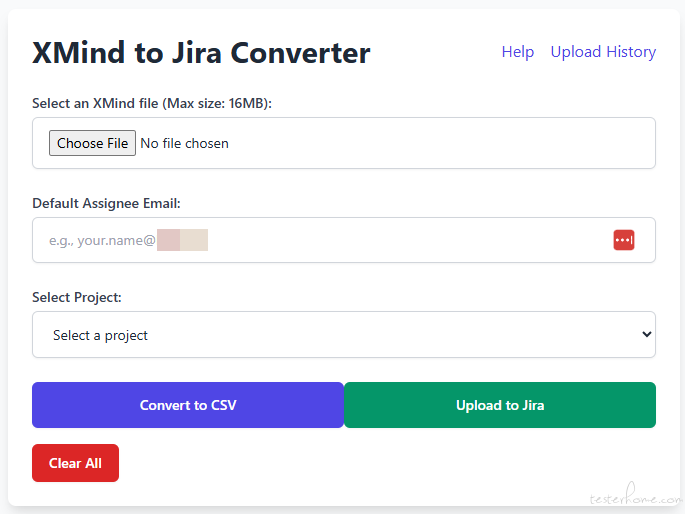

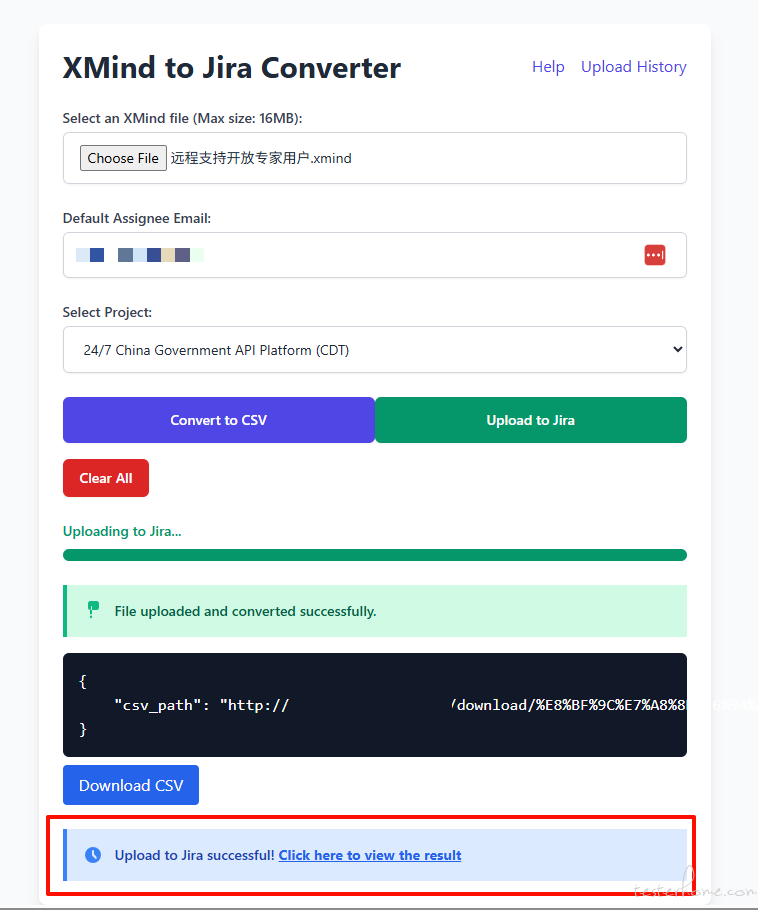

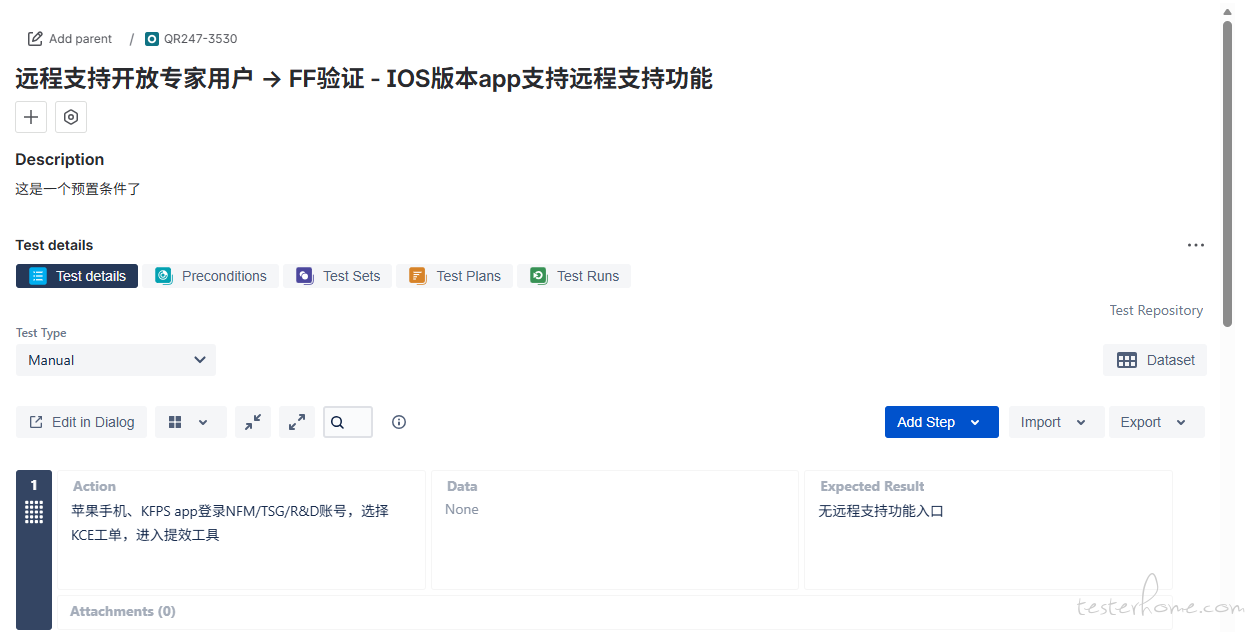
TesterHome 为用户提供「保留所有权利,禁止转载」的选项。
除非获得原作者的单独授权,任何第三方不得转载标注了「原创声明:保留所有权利,禁止转载」的内容,否则均视为侵权。
具体请参见TesterHome 知识产权保护协议。
如果觉得我的文章对您有用,请随意打赏。您的支持将鼓励我继续创作!

