
-
UiAutomator2 测试 H5 页面,切换 webview 后报没有找到对应的 ChromeDriver 版本 at December 27, 2020
自己顶一下,没人帮忙看下吗
-
UiAutomator2 测试 H5 页面,切换 webview 后报没有找到对应的 ChromeDriver 版本 at December 24, 2020
@codeskyblue 可以帮忙看下嘛?
-
菜鸟的成长之路 at December 01, 2020
坚持是一种美德。
-
设计多设备或者跨平台的 app 如何进行自动化? at November 25, 2020
我的理解是 app 控制设备都会走 mqtt 协议,举个栗子:你先订阅设备的 mqtt,然后 app 执行扫地机扫地操作按钮,等待 mqtt 的 notify 返回并断言即可
-
在执行 appium 时,发现程序一直卡在 adb /proc/net/unix, 一直待到 adb 超时才结束 at November 02, 2020
- 可能换了别的电脑时,有重启手机跟 kill-server 过。
- 换了不同电脑,每次都要重新安装 UiAutomation server 跟 UiAutomation server test
我先用别的电脑吧,后面有解决方案了再回来评论下。
-
在执行 appium 时,发现程序一直卡在 adb /proc/net/unix, 一直待到 adb 超时才结束 at November 02, 2020
您好,我用 adb logcat 发现问题了。
10-30 09:10:55.069  9948  9969 E AndroidRuntime: java.lang.IllegalStateException: UiAutomation not connected!
10-30 09:10:55.069  9948  9969 E AndroidRuntime:    at android.app.UiAutomation.throwIfNotConnectedLocked(UiAutomation.java:1198)
10-30 09:10:55.069  9948  9969 E AndroidRuntime:    at android.app.UiAutomation.disconnect(UiAutomation.java:294)
10-30 09:10:55.069  9948  9969 E AndroidRuntime:    at android.app.Instrumentation.finish(Instrumentation.java:249)
10-30 09:10:55.069  9948  9969 E AndroidRuntime:    at androidx.test.runner.MonitoringInstrumentation.finish(MonitoringInstrumentation.java:358)
10-30 09:10:55.069  9948  9969 E AndroidRuntime:    at androidx.test.runner.AndroidJUnitRunner.finish(AndroidJUnitRunner.java:408)
10-30 09:10:55.069  9948  9969 E AndroidRuntime:    at androidx.test.runner.AndroidJUnitRunner.onStart(AndroidJUnitRunner.java:397)
10-30 09:10:55.069  9948  9969 E AndroidRuntime:    at android.app.Instrumentation$InstrumentationThread.run(Instrumentation.java:2209)
10-30 09:14:05.892 11879 11901 E AndroidRuntime: FATAL EXCEPTION: Instr: androidx.test.runner.AndroidJUnitRunner
10-30 09:14:05.892 11879 11901 E AndroidRuntime: Process: io.appium.uiautomator2.server, PID: 11879
10-30 09:14:05.892 11879 11901 E AndroidRuntime: java.lang.IllegalStateException: UiAutomation not connected!
10-30 09:14:05.892 11879 11901 E AndroidRuntime:    at android.app.UiAutomation.throwIfNotConnectedLocked(UiAutomation.java:1198)
10-30 09:14:05.892 11879 11901 E AndroidRuntime:    at android.app.UiAutomation.disconnect(UiAutomation.java:294)
10-30 09:14:05.892 11879 11901 E AndroidRuntime:    at android.app.Instrumentation.finish(Instrumentation.java:249)
10-30 09:14:05.892 11879 11901 E AndroidRuntime:    at androidx.test.runner.MonitoringInstrumentation.finish(MonitoringInstrumentation.java:358)
10-30 09:14:05.892 11879 11901 E AndroidRuntime:    at androidx.test.runner.AndroidJUnitRunner.finish(AndroidJUnitRunner.java:408)
10-30 09:14:05.892 11879 11901 E AndroidRuntime:    at androidx.test.runner.AndroidJUnitRunner.onStart(AndroidJUnitRunner.java:397)
10-30 09:14:05.892 11879 11901 E AndroidRuntime:    at android.app.Instrumentation$InstrumentationThread.run(Instrumentation.java:2209)
针对上面的问题,网上有两种解决方式:
- 每次执行都需要做:adb kill-server/start-server -- 这种方式只会降低失误,不能解决问题
- 重启手机, 这个也试过了,还是无法解决
-
在执行 appium 时,发现程序一直卡在 adb /proc/net/unix, 一直待到 adb 超时才结束 at October 31, 2020
很感谢,我看看
-
在执行 appium 时,发现程序一直卡在 adb /proc/net/unix, 一直待到 adb 超时才结束 at October 30, 2020
今天执行后,又发现出现 adb 执行超时:
[debug] [35m[W3C][39m Encountered internal error running command: Error executing adbExec. Original error: 'Command 'E\:\\android-sdk\\platform-tools\\adb.exe -P 5037 -s 186eef2a shell settings put global hidden_api_policy_pre_p_apps 1' timed out after 200000ms'. Try to increase the 200000ms adb execution timeout represented by 'adbExecTimeout' capability [debug] [35m[W3C][39m Error: Command 'E\:\\android-sdk\\platform-tools\\adb.exe -P 5037 -s 186eef2a shell settings put global hidden_api_policy_pre_p_apps 1' timed out after 200000ms [debug] [35m[W3C][39m at Timeout._onTimeout (C:\Users\zhangfuqiang\AppData\Roaming\npm\node_modules\appium\node_modules\teen_process\lib\exec.js:112:19) [debug] [35m[W3C][39m at listOnTimeout (internal/timers.js:531:17) [debug] [35m[W3C][39m at processTimers (internal/timers.js:475:7) [35m[HTTP][39m [37m<-- POST /wd/hub/session [39m[31m500[39m [90m201835 ms - 1171[39m -
在执行 appium 时,发现程序一直卡在 adb /proc/net/unix, 一直待到 adb 超时才结束 at October 30, 2020
- 之前并行 2 台设备都没问题,后面突然间出现问题,不知道是否改了什么东西
- 现在只有 1 台设备在跑,也会出现这个问题。 (1)有时候执行 “/proc/net/unix” 这个命令时,等了 20 秒左右会执行下去,有时候就直接报上面的错误。
- 换过一台 mac 跟 win 电脑没问题,如果是当前这台电脑的话,不管换什么手机都有问题。
- 记得在每次切换 webview 时候出现该问题。 是否跟我的 chromedriver 配置有关系呢?
- 个人猜想是:android sdk 的问题,但是 sdk 重新安装了好几次都不行,而且都下了最新版本的 sdk.
-
在执行 appium 时,发现程序一直卡在 adb /proc/net/unix, 一直待到 adb 超时才结束 at October 29, 2020
- 不是每一次都会出现, 但是出现概率非常之高,我是并行执行测试(Pool),
- 手动执行( adb -P 5037 -s UJKDU20611008827 shell cat /proc/net/unix),是正常的,返回空数据
-
在执行 appium 时,发现程序一直卡在 adb /proc/net/unix, 一直待到 adb 超时才结束 at October 29, 2020
有没有知道的小伙伴,麻烦解答下, 目前就提供这些信息,如若还要需要其它的麻烦说下
-
Appium-desptop1.17.1 在 chrome app 中 get 地址时报 adb 命令超时 at October 28, 2020
我也遇到了,也在不断尝试,换个 usb 插口/是不是 appium 跟 sdk 不兼容/换个 sdk 试试
-
stf 云和本地服务器打通,求助!!! at October 04, 2020
本地怎么跟云服务器连接的,求指教!!
-
input 密码输入框如何定位,并且输入密码呢? at September 17, 2020
谢谢大家的回答,我最后用 driver.press_KeyCode(7)
-
SoloPi v0.10.2 版本更新 at August 16, 2020
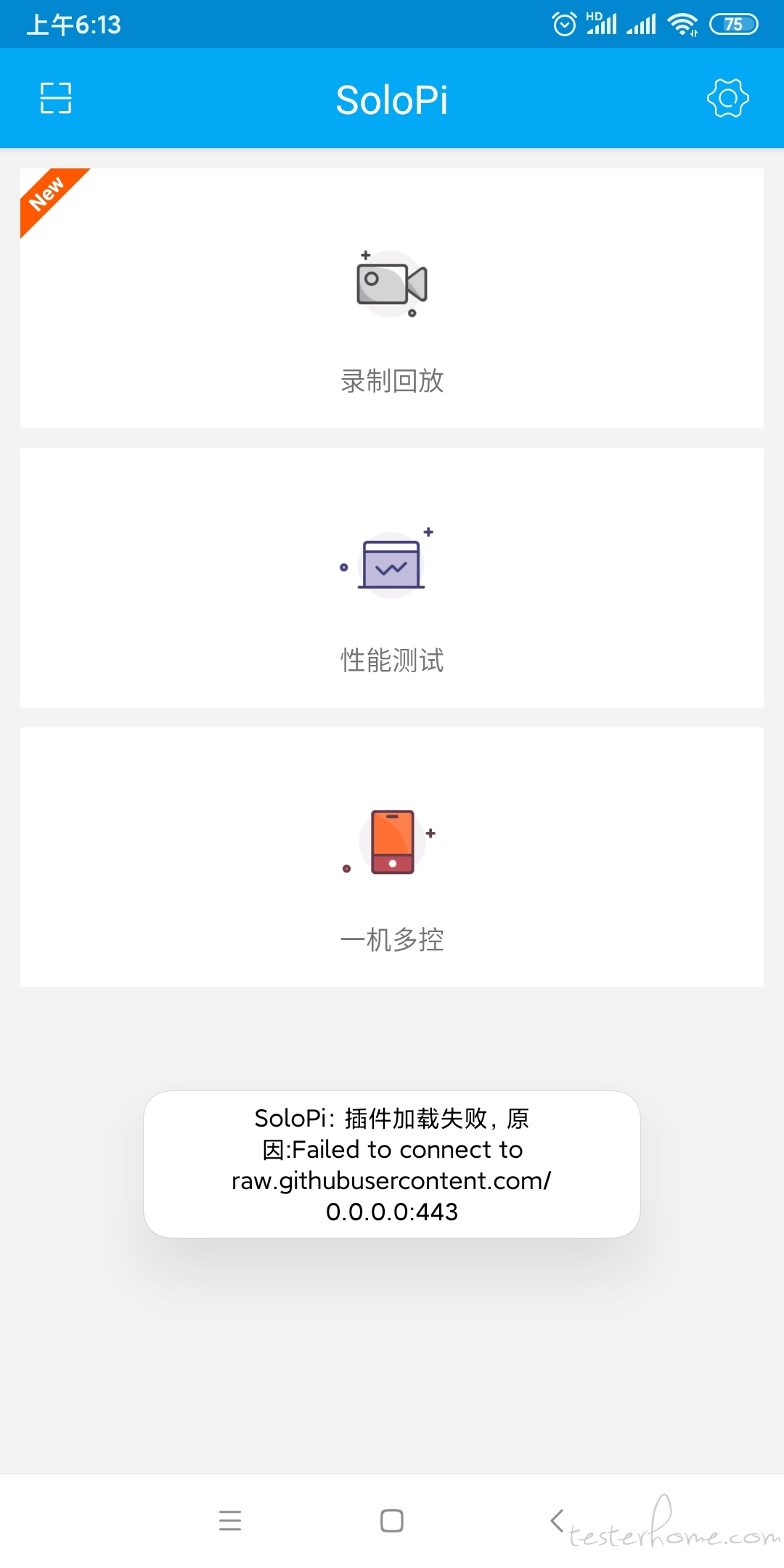
您好,新安装包后,提示这个地址无法访问 -
TesterHome 2019 第二期深圳沙龙 at August 21, 2019
报名成功后不会发短信或者邮件之类的吗? 那到时如何验证是否报名了
-
TesterHome 2019 第二期深圳沙龙 at August 21, 2019
已经报名了。
-
[深圳] 货拉拉 D 轮独角兽公司 估值 27 亿美元 急招测试负责人 at June 27, 2019
有招聘自动化测试工程师吗?
-
[深圳] DJI 大疆创新招聘软件测试工程师&测试开发工程师&高级测试开发工程师 at June 24, 2019
-
Appium 切换到 webview 页面,使用 ActionChains 时候,报 “Original error: 501 - "unimplemented command” 错误。麻烦帮忙看下 at June 20, 2019
好的,我看看,谢谢
-
Appium 切换到 webview 页面,使用 ActionChains 时候,报 “Original error: 501 - "unimplemented command” 错误。麻烦帮忙看下 at June 19, 2019
app 里面嵌套一个极验的滑动验证,里面是有涉及到 “appium.espressoserver.lib.helpers.w3c.processor” 这里面的 w3c,我用荣耀发现都是可以正常滑动的,但是到华为手机就不行,奇怪。
我看了下,所有的 actionchains 走的都是 w3c 的,比如下面我拿出来的这个方法. 不知道为什么,是因为我导入的包问题吗? 还是说一定是走 w3c
def reset_actions(self):
    """
        Clears actions that are already stored locally and on the remote end
    """
    if self._driver.w3c:
        self.w3c_actions.clear_actions()
    self._actions = []
导入的包如下
import time, re from selenium.common.exceptions import TimeoutException from selenium.webdriver.common.by import By from selenium.webdriver.support.wait import WebDriverWait from selenium.webdriver.support import expected_conditions as EC from selenium.webdriver.common.action_chains import ActionChains from PIL import Image import base64 from selenium import webdriver -
Appium 切换到 webview 页面,使用 ActionChains 时候,报 “Original error: 501 - "unimplemented command” 错误。麻烦帮忙看下 at June 19, 2019
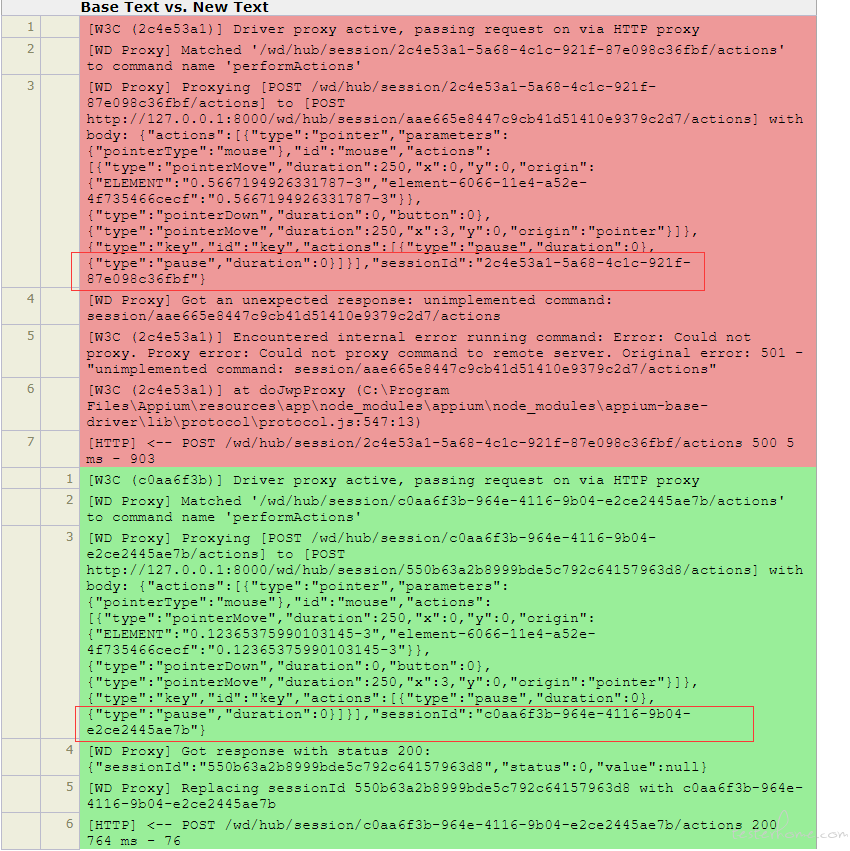
您好,我看了下 appium 报错日志,截图上面上是执行失败的返回日志,下面是 200 的日志,看不出来具体问题出现在哪里?
-
Appium 切换到 webview 页面,使用 ActionChains 时候,报 “Original error: 501 - "unimplemented command” 错误。麻烦帮忙看下 at June 19, 2019
好的,谢谢。我试下
-
Appium 切换到 webview 页面,使用 ActionChains 时候,报 “Original error: 501 - "unimplemented command” 错误。麻烦帮忙看下 at June 19, 2019
您好,谢谢您的回答,具体代码应该如何修改才能连贯闭合呢,不是很懂。
出问题的代码如下:# 开始移动 def start_move(self, distance): element = self.driver.find_element_by_xpath('//div[@class="geetest_slider_button"]') # 这里就是根据移动进行调试,计算出来的位置不是百分百正确的,加上一点偏移 print("方块的宽度:" + str(element.size.get('width'))) # distance -= element.size.get('width') / 2 # distance += 25 distance += element.size.get('width') / 2 print("最后的间距:" + str(distance)) action = ActionChains(self.driver) time.sleep(0.5) # 初始化步调值 span = 0 while distance > 0: span += 3 print(span) action.click_and_hold(element).move_by_offset(span, 0).perform() distance -= 3 # time.sleep(random.randint(10, 50) / 100) action = ActionChains(self.driver) # action.move_by_offset(distance, 1).perform() action.release(on_element=element).perform() # action.release().perform()我具体看了下主要是这行代码出问题了。 “action.click_and_hold(element).move_by_offset(span, 0).perform()”。 能帮我看下如何修改吗?
-
Appium 切换到 webview 页面,使用 ActionChains 时候,报 “Original error: 501 - "unimplemented command” 错误。麻烦帮忙看下 at June 19, 2019
您好,我用荣耀手机 Android9 系统执行该代码是没问题的。 我切换到 webview 后可以进行滑动操作的。 只是在华为手机就不行。