
使用 飞书开放接口 SDK 调用飞书接口实现自动化任务非常顺畅,因为 IDE 可以自动联想接口的请求和响应参数,AI 出错率也很低,但对于只提供了接口文档的开放接口,调用起来就会麻烦一些。
痛点
取得接口文档,打开 IDE 准备调用接口:
requests.get("https://api.example.com/api/v3/user/user1")
用户名参数是 username 还是 userName?age 类型是 str 还是 int?有没有 email 参数来着?为了确认,不得不在接口文档和 IDE 之间来回切换。
写完请求,还要断言响应,于是再次对着接口文档对比 JSON 层级:
assert resp.json()["user"]["firstName"] == "John"
现在有了 AI,那就让 AI 来写,写完之后一运行才发现有一个参数写错了,IDE 没有提示也没能第一时间发现。
我在想,OpenAPI 为接口定义了请求和响应,IDE 为什么不能自动补全呢?写脚本时怎样才能避免左边屏幕打开 IDE,右边屏幕打开接口文档呢?
Stoma - 让 OpenAPI 规范本身变成代码
我开发了一个接口自动化框架 Stoma 来解决这个问题。
ℹ️ GitHub 地址:Stoma。
定义接口
Stoma 的核心是「代码即协议」,在 Stoma 里这样定义接口:
from typing import Annotated
from pydantic import BaseModel, Field
from stoma import APIRoute, APIRouter, ResponseSpec, EmptyResponseSpec

class User(BaseModel):
    id: Annotated[int | None, Field(examples=[10])] = None
    """Example: 10"""

    username: Annotated[str | None, Field(examples=["theUser"])] = None
    """Example: 'theUser'"""

    first_name: Annotated[str | None, Field(alias="firstName", examples=["John"])] = None
    """Example: 'John'"""

router = APIRouter(prefix="/api/v3")

@router.get("/user/{username}")
class GetUserByName(APIRoute):
    """按用户名查询用户。"""

    username: str

    @property
    def on_200_application_json(self) -> ResponseSpec[User]:
        return ResponseSpec(
            status_code=200,
            media_type="application/json",
            expected_type=User,
        )

    @property
    def on_400(self) -> EmptyResponseSpec:
        return EmptyResponseSpec(
            status_code=400,
        )
- 接口定义包含了所有的请求参数,IDE 可以自动联想。
- 不止请求参数,Stoma 利用 Python 范型特性定义了响应协议(
ResponseSpec),支持为不同状态码定义不同响应类型,IDE 同样可以自动联想。
调用接口
from playwright.sync_api import sync_playwright

from stoma import Client

with sync_playwright() as p:
    ctx = p.request.new_context(base_url="https://petstore3.swagger.io")
    client = Client(context=ctx)

    endpoint = GetUserByName(username="user1")
    response = client.send(endpoint)
    user = response.expect(endpoint.on_200_application_json)
    assert user.username == "user1"
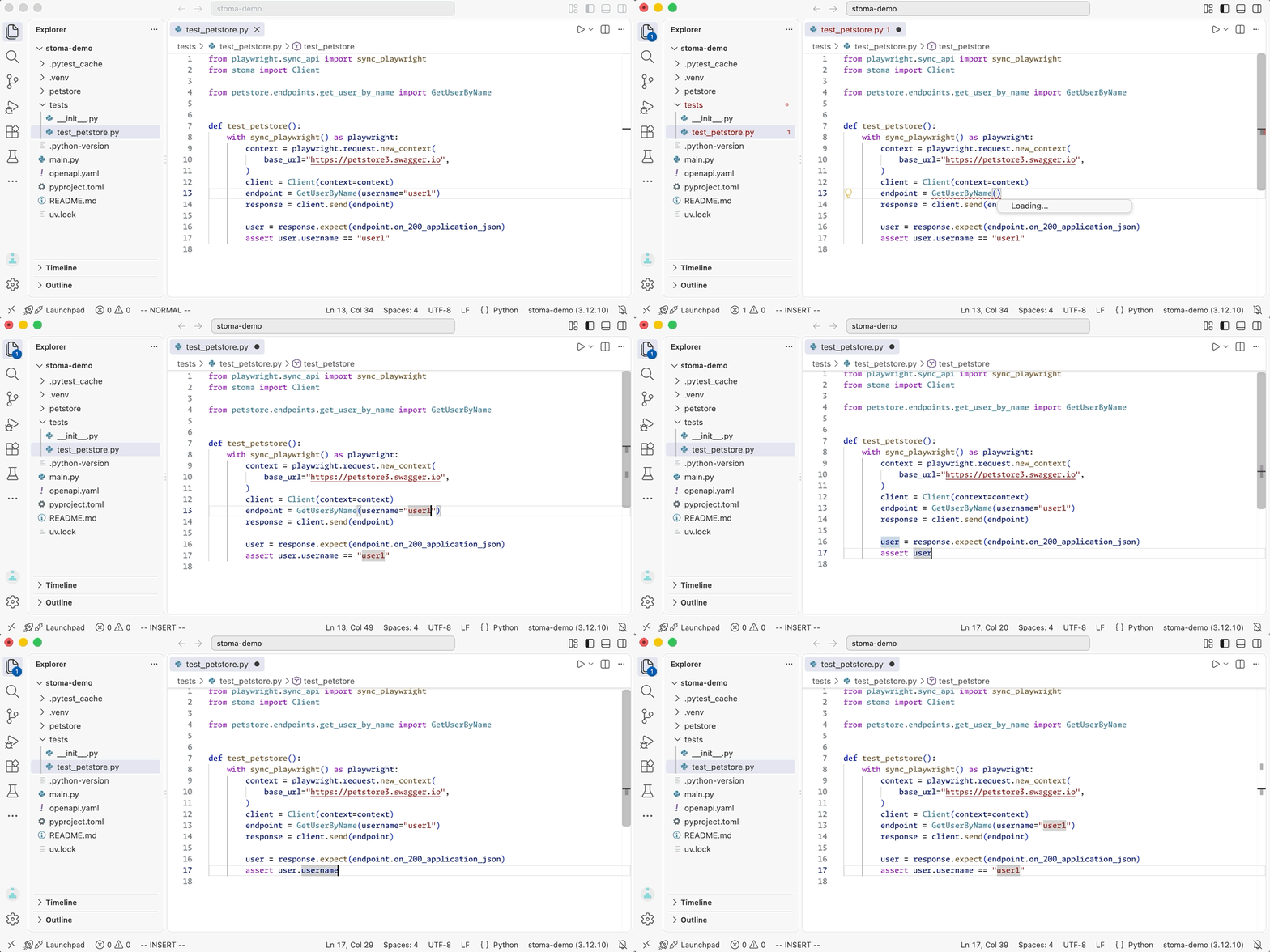
IDE 能自动联想请求参数以及指定状态码对应的响应参数,参数名写错了 IDE 也能立即通知用户。
底层是 Playwright
Stoma 内部基于 Playwright APIRequestContext 发送请求,Playwright 的全部特性(含 Cookie 持久化)都能正常使用,极大地扩展了 Stoma 的适用范围。
脚手架工具
Stoma 提供了 CLI 基于 OpenAPI 生成全部接口代码,如:
stoma openapi.yaml -o petstore --prefix /api/v3

文档
完整文档见 GitHub 仓库 Stoma。
「原创声明:保留所有权利,禁止转载」
暂无回复。