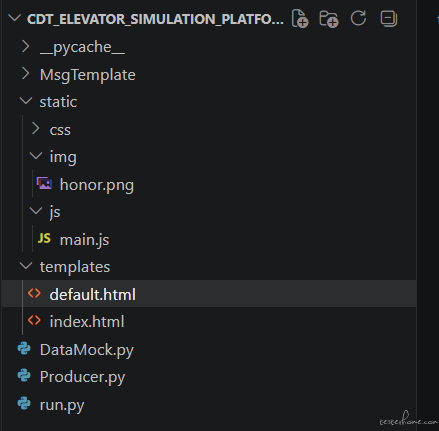
领导要求打通一条 “平台生成 SN 消息 → Kafka → 应用消费 → 自动创建并执行工单” 的端到端链路,实现全流程闭环验证。当前已实现 SN 的端到端的数据链路打通流程。
<!DOCTYPE html>
<html lang="zh-CN">
<head>
<meta charset="UTF-8" />
<meta name="viewport" content="width=device-width, initial-scale=1.0"/>
<title>电梯物联网数据仿真验证平台</title>
<link rel="stylesheet" href="https://cdnjs.cloudflare.com/ajax/libs/font-awesome/6.5.0/css/all.min.css">
<style>
* { margin: 0; padding: 0; box-sizing: border-box; }
html { font-size: 16px; scroll-behavior: smooth; }
body {
min-height: 100vh;
font-family: -apple-system, BlinkMacSystemFont, 'Segoe UI', 'PingFang SC', 'Microsoft YaHei', sans-serif;
/* 背景色: #F9FAFC */
background: #F9FAFC;
color: #1E293B;
display: flex;
flex-direction: column;
overflow-x: hidden;
-webkit-font-smoothing: antialiased;
position: relative;
}
body::before {
content: '';
position: fixed;
inset: 0;
background:
linear-gradient(180deg, rgba(0, 80, 145, 0.03), transparent 30%),
linear-gradient(90deg, rgba(148, 163, 184, 0.08) 1px, transparent 1px),
linear-gradient(rgba(148, 163, 184, 0.08) 1px, transparent 1px);
background-size: auto, 32px 32px, 32px 32px;
mask-image: linear-gradient(180deg, rgba(0, 0, 0, 0.45), transparent 78%);
pointer-events: none;
z-index: 0;
}
/* ========== HERO:浅色大气 ========== */
.hero-section {
position: relative;
padding: 100px 40px 56px;
text-align: center;
background: #FFFFFF;
overflow: hidden;
z-index: 1;
}
/* 柔和的蓝色光晕,不压抑 */
.hero-section::before {
content: '';
position: absolute;
top: -200px; left: 50%;
width: 900px; height: 600px;
background: radial-gradient(ellipse, rgba(0, 80, 145, 0.06) 0%, transparent 70%);
transform: translateX(-50%);
pointer-events: none;
}
.hero-logo {
position: absolute;
top: 32px; left: 50%;
transform: translateX(-50%);
height: 32px;
opacity: 0.5;
transition: opacity 0.3s;
}
.hero-logo:hover { opacity: 0.8; }
.hero-content {
position: relative;
max-width: 1040px;
margin: 0 auto;
z-index: 1;
}
.hero-tag {
display: inline-flex;
align-items: center;
gap: 8px;
font-size: 12px;
font-weight: 600;
color: #005091;
background: #E8F2FB;
padding: 6px 18px;
border-radius: 20px;
margin-bottom: 32px;
letter-spacing: 0.5px;
box-shadow: 0 2px 8px rgba(0, 80, 145, 0.08);
}
.hero-tag i { font-size: 10px; }
/* 标题:不限宽,不换行,深色清晰 */
.hero-title {
font-size: 2.75rem;
font-weight: 800;
line-height: 1.25;
letter-spacing: -0.5px;
margin-bottom: 18px;
color: #0B1A30;
}
.hero-title strong {
color: inherit;
font-weight: 800;
}
/* 副标题:添加 max-width 限制 */
.hero-desc {
margin: 0 auto 44px;
max-width: 760px;
}
.hero-desc-tag {
display: inline-block;
padding: 10px 26px;
background: rgba(0, 80, 145, 0.04);
border: 1px solid rgba(0, 80, 145, 0.08);
border-radius: 10px;
color: #334155;
font-weight: 500;
font-size: 1.02rem;
letter-spacing: 0.2px;
position: relative;
overflow: hidden;
box-shadow: 0 8px 20px rgba(0, 80, 145, 0.06);
}
.hero-desc-tag::before {
content: '';
position: absolute;
top: 0;
left: -110%;
width: 58%;
height: 100%;
background: linear-gradient(90deg, transparent, rgba(0, 120, 196, 0.10), transparent);
animation: heroShimmer 4.8s ease-in-out infinite;
}
@keyframes heroShimmer {
0%, 100% { left: -110%; }
50% { left: 145%; }
}
/* ========== 数据指标 ========== */
.metrics-section {
padding: 30px 40px 60px;
background: #FFFFFF;
border-bottom: 1px solid rgba(226, 232, 240, 0.9);
position: relative;
z-index: 1;
}
.hero-metrics {
display: grid;
grid-template-columns: repeat(3, minmax(0, 1fr));
gap: 18px;
margin: 0 auto;
max-width: 860px;
}
.hero-metric {
text-align: left;
background: rgba(248, 250, 252, 0.7);
border: 1px solid rgba(226, 232, 240, 0.95);
border-radius: 18px;
padding: 22px 24px;
box-shadow: 0 8px 24px rgba(15, 23, 42, 0.04);
transition: all 0.3s ease;
}
.hero-metric:hover {
background: #FFFFFF;
transform: translateY(-4px);
box-shadow: 0 14px 32px rgba(15, 23, 42, 0.08);
}
.hero-metric-top {
display: flex;
align-items: center;
justify-content: space-between;
gap: 12px;
margin-bottom: 16px;
}
.hero-metric-chip {
display: inline-flex;
align-items: center;
justify-content: center;
width: 34px;
height: 34px;
border-radius: 10px;
background: #EFF6FC;
color: #005091;
font-size: 14px;
}
.hero-metric-val {
font-size: 2.2rem;
font-weight: 800;
color: #005091;
line-height: 1;
font-variant-numeric: tabular-nums;
display: flex;
align-items: baseline;
gap: 2px;
}
.hero-metric-val .old {
font-size: 1.0rem; /* 2h 字体大小更小 */
color: #CBD5E1; /* 浅灰色 */
font-weight: 500;
text-decoration: line-through; /* 添加删除线 */
margin-right: 4px;
}
.hero-metric-val .new {
font-size: 1.8rem;
color: #CBD5E1; /* 浅灰色 */
font-weight: 500;
}
.hero-metric-val .u {
font-size: 0.9rem; /* 小字体 */
font-weight: 600;
color: #0078C4; /* 蓝色 */
margin-left: 2px;
}
.hero-metric-label {
font-size: 13px;
color: #94A3B8;
font-weight: 500;
}
.hero-metric-note {
font-size: 12px;
line-height: 1.6;
color: #64748B;
}
/* ========== 按钮组 ========== */
.btn-group {
display: flex;
gap: 24px;
margin-top: 10px;
flex-wrap: wrap;
justify-content: center;
}
.btn {
padding: 14px 36px;
font-size: 1.1rem;
text-decoration: none;
color: #fff;
/* 使用 KONE 主蓝 */
background: #005091;
border: none;
border-radius: 10px;
transition: all 0.25s ease;
font-weight: 600;
box-shadow: 0 4px 12px rgba(0, 80, 145, 0.25);
display: inline-flex;
align-items: center;
gap: 8px;
}
.btn:hover {
transform: translateY(-2px);
box-shadow: 0 6px 18px rgba(0, 80, 145, 0.35);
/* 悬停加深蓝色 */
background: #003D70;
}
.btn:active {
transform: translateY(0);
}
/* ========== 详情区 ========== */
.detail-section {
max-width: 880px;
width: 100%;
margin: 0 auto;
padding: 48px 32px 80px;
position: relative;
z-index: 1;
}
.author-strip {
display: flex;
align-items: center;
justify-content: center;
gap: 16px;
margin-bottom: 56px;
flex-wrap: wrap;
font-size: 14px;
color: #64748B;
font-weight: 500;
}
.author-strip .name { color: #005091; font-weight: 700; }
.author-strip .sep { width: 3px; height: 3px; border-radius: 50%; background: #CBD5E1; flex-shrink: 0; }
.author-strip i { color: #94A3B8; font-size: 12px; margin-right: 4px; }
.section-heading {
font-size: 15px;
font-weight: 700;
color: #475569;
letter-spacing: 0.5px;
margin-bottom: 18px;
}
/* ========== 卡片 ========== */
.features-grid {
display: grid;
grid-template-columns: repeat(2, 1fr);
gap: 16px;
margin-bottom: 56px;
}
.feature-card {
background: #FFFFFF;
border: 1px solid #E2E8F0;
border-radius: 14px;
padding: 30px 28px;
transition: all 0.3s ease;
position: relative;
overflow: hidden;
display: flex;
flex-direction: column;
min-height: 236px;
box-shadow: 0 2px 10px rgba(15, 23, 42, 0.03);
}
.feature-card::before {
content: '';
position: absolute;
inset: 0;
background: linear-gradient(180deg, rgba(0, 80, 145, 0.03), transparent 48%);
opacity: 0;
transition: opacity 0.3s ease;
}
.feature-card:hover {
transform: translateY(-3px);
box-shadow: 0 12px 28px rgba(0, 80, 145, 0.08);
border-color: rgba(0, 80, 145, 0.14);
}
.feature-card:hover::before { opacity: 1; }
.feature-card > * { position: relative; z-index: 1; }
.feature-icon {
width: 42px; height: 42px;
border-radius: 10px;
display: flex;
align-items: center;
justify-content: center;
font-size: 17px;
margin-bottom: 18px;
box-shadow: inset 0 0 0 1px rgba(0, 80, 145, 0.06);
}
.fi-blue { background: #EBF3FB; color: #005091; }
.fi-cyan { background: #E6F3FB; color: #006EBA; }
.fi-green { background: #EDF5FB; color: #2F6F99; }
.fi-gold { background: #F3F7FB; color: #476E8C; }
.feature-card h3 {
font-size: 16px;
font-weight: 700;
color: #0B1A30;
margin-bottom: 12px;
line-height: 1.45;
}
.feature-card p {
font-size: 14px;
line-height: 1.8;
color: #64748B;
margin-top: auto;
}
.text-accent { color: #005091; font-weight: 600; }
/* ========== 叙述区块:关键更新,增加左侧竖线 ========== */
.narrative-block {
background: #FFFFFF;
border: 1px solid #E2E8F0;
border-radius: 14px;
padding: 36px;
margin-bottom: 56px;
/* 增加左侧主色竖线,提升长文段落的结构感 */
border-left: 4px solid #005091;
}
.narrative-block p {
font-size: 14.5px;
line-height: 1.9;
color: #64748B;
margin-bottom: 16px;
text-indent: 2em;
}
.narrative-block p:last-child { margin-bottom: 0; }
.narrative-block strong { color: #005091; font-weight: 600; }
.process-section {
margin-bottom: 56px;
padding: 30px;
background: linear-gradient(180deg, #FFFFFF 0%, #F8FBFE 100%);
border: 1px solid #E2E8F0;
border-radius: 16px;
}
.process-grid {
display: grid;
grid-template-columns: repeat(4, minmax(0, 1fr));
gap: 14px;
}
.process-step {
background: #FFFFFF;
border: 1px solid #E2E8F0;
border-radius: 14px;
padding: 22px 20px;
min-height: 180px;
position: relative;
overflow: hidden;
transition: all 0.28s ease;
box-shadow: 0 2px 10px rgba(15, 23, 42, 0.03);
}
.process-step::before {
content: '';
position: absolute;
inset: 0 0 auto 0;
height: 3px;
background: linear-gradient(90deg, #005091, #0078C4);
}
.process-step:hover {
transform: translateY(-3px);
border-color: rgba(0, 80, 145, 0.18);
box-shadow: 0 12px 26px rgba(0, 80, 145, 0.08);
}
.process-step-index {
display: inline-flex;
align-items: center;
justify-content: center;
width: 32px;
height: 32px;
border-radius: 50%;
background: linear-gradient(135deg, #005091 0%, #0078C4 100%);
color: #FFFFFF;
font-size: 13px;
font-weight: 700;
margin-bottom: 20px;
box-shadow: 0 6px 14px rgba(0, 80, 145, 0.24);
}
.process-step h3 {
font-size: 15px;
color: #0B1A30;
margin-bottom: 10px;
}
.process-step p {
font-size: 13px;
line-height: 1.8;
color: #64748B;
}
.process-step strong {
color: #005091;
font-weight: 600;
}
.honor-block {
background: #FFFFFF;
border: 1px solid #E2E8F0;
border-radius: 16px;
overflow: hidden;
transition: all 0.3s ease;
position: relative;
}
.honor-block:hover {
transform: translateY(-3px);
box-shadow: 0 12px 36px rgba(0, 30, 60, 0.08);
}
.honor-block::before {
content: '';
position: absolute;
top: -80px;
left: 50%;
width: 320px;
height: 180px;
transform: translateX(-50%);
background: radial-gradient(ellipse, rgba(0, 120, 196, 0.10), transparent 68%);
pointer-events: none;
}
.honor-header {
padding: 34px 36px 22px;
display: block;
position: relative;
z-index: 1;
}
.honor-main {
display: flex;
align-items: flex-start;
gap: 18px;
flex: 1;
min-width: 0;
margin-bottom: 0;
}
.honor-icon {
width: 52px; height: 52px;
border-radius: 12px;
background: #FEF7E6;
display: flex;
align-items: center;
justify-content: center;
flex-shrink: 0;
}
.honor-icon i { font-size: 24px; color: #D4A017; }
.honor-text { flex: 1; }
.honor-text h3 { font-size: 18px; font-weight: 700; color: #0B1A30; margin-bottom: 8px; }
.honor-text p { font-size: 14px; line-height: 1.7; color: #64748B; margin-bottom: 16px; }
.honor-text strong { color: #005091; }
.honor-meta {
display: flex;
align-items: center;
gap: 10px;
flex-wrap: wrap;
}
.honor-meta span {
display: inline-flex;
align-items: center;
padding: 6px 10px;
border-radius: 999px;
background: #F8FBFE;
border: 1px solid rgba(0, 80, 145, 0.10);
font-size: 11px;
font-weight: 600;
color: #005091;
letter-spacing: 0.1px;
}
.honor-proof {
margin: 0 36px 30px;
border: 1px solid rgba(0, 80, 145, 0.10);
border-radius: 16px;
background: linear-gradient(180deg, #FBFDFF 0%, #FFFFFF 100%);
padding: 16px;
box-shadow: 0 10px 24px rgba(0, 80, 145, 0.07);
position: relative;
overflow: hidden;
}
.honor-proof::before {
content: '';
position: absolute;
top: -40px;
right: -20px;
width: 160px;
height: 160px;
background: radial-gradient(circle, rgba(0, 120, 196, 0.10), transparent 68%);
pointer-events: none;
}
.honor-proof-head {
display: flex;
align-items: center;
justify-content: space-between;
gap: 10px;
margin-bottom: 12px;
flex-wrap: wrap;
position: relative;
z-index: 1;
}
.honor-proof-label {
font-size: 11px;
font-weight: 700;
color: #005091;
letter-spacing: 0.8px;
text-transform: uppercase;
}
.honor-proof-title {
font-size: 14px;
font-weight: 700;
color: #005091;
letter-spacing: 0.2px;
}
.honor-proof-meta {
font-size: 12px;
color: #64748B;
}
.honor-img-wrap {
position: relative;
border-radius: 12px;
overflow: hidden;
border: 1px solid #E2E8F0;
background:
radial-gradient(circle at top, rgba(0, 120, 196, 0.10), transparent 40%),
linear-gradient(180deg, #F9FBFE 0%, #F5F8FC 100%);
display: flex;
justify-content: center;
align-items: center;
padding: 22px;
min-height: 320px;
isolation: isolate;
}
.honor-img-wrap::before {
content: '';
position: absolute;
inset: 16px;
border-radius: 12px;
background: linear-gradient(180deg, rgba(255, 255, 255, 0.94), rgba(246, 250, 254, 0.88));
border: 1px solid rgba(0, 80, 145, 0.05);
z-index: 0;
}
.honor-img-wrap::after {
content: '';
position: absolute;
left: 50%;
bottom: 20px;
width: 170px;
height: 22px;
transform: translateX(-50%);
background: radial-gradient(ellipse, rgba(0, 80, 145, 0.12), transparent 72%);
filter: blur(9px);
z-index: 0;
}
.honor-img {
width: auto;
max-width: min(100%, 272px);
max-height: 308px;
display: block;
object-fit: contain;
border-radius: 10px;
box-shadow: 0 16px 30px rgba(0, 80, 145, 0.16);
position: relative;
z-index: 1;
}
/* ========== 底部 ========== */
.page-footer {
margin-top: auto;
background: #FFFFFF;
border-top: 1px solid #E2E8F0;
padding: 28px 32px;
}
.footer-inner {
max-width: 880px;
margin: 0 auto;
display: flex;
align-items: center;
justify-content: space-between;
flex-wrap: wrap;
gap: 16px;
}
.footer-text {
font-size: 12px;
color: #94A3B8;
line-height: 1.7;
}
.footer-text a { color: #0078C4; text-decoration: none; }
.footer-text a:hover { text-decoration: underline; }
.footer-logo { height: 20px; opacity: 0.3; }
/* ========== 响应式 ========== */
@media (max-width: 768px) {
.hero-section { padding: 80px 20px 44px; }
.hero-logo { top: 24px; height: 26px; }
.hero-title { font-size: 1.85rem; }
.hero-desc { margin-bottom: 32px; }
.hero-desc-tag { font-size: 0.95rem; padding: 8px 18px; }
.metrics-section { padding: 24px 20px 40px; }
.hero-metrics { grid-template-columns: 1fr; gap: 12px; }
.hero-metric-val { font-size: 1.8rem; }
.btn { padding: 12px 28px; font-size: 1.05rem; width: 100%; justify-content: center; }
.detail-section { padding: 36px 20px 60px; }
.features-grid { grid-template-columns: 1fr; gap: 12px; }
.feature-card { padding: 24px; }
.narrative-block { padding: 24px; }
.process-section { padding: 24px 20px; }
.process-grid { grid-template-columns: 1fr; }
.process-step { min-height: auto; }
.honor-header { padding: 24px 20px 16px; }
.honor-main { width: 100%; }
.honor-proof { width: auto; margin: 0 20px 20px; padding: 48px 14px 14px; }
.honor-proof { width: auto; margin: 0 20px 20px; padding: 14px; }
.honor-img-wrap { min-height: auto; padding: 16px; }
.honor-img { max-width: min(100%, 220px); max-height: none; }
.footer-inner { flex-direction: column; text-align: center; }
}
@media (max-width: 480px) {
.hero-title { font-size: 1.55rem; }
.author-strip { flex-direction: column; gap: 6px; text-align: center; }
.author-strip .sep { display: none; }
}
@media (prefers-reduced-motion: reduce) {
*, *::before, *::after { transition-duration: 0.01ms !important; }
}
</style>
</head>
<body>
<section class="hero-section">
<img src="https://www.kone.cn/zh/Images/KONE_logo_blue_tcm156-121992.svg?v=1"
alt="KONE 张三" class="hero-logo">
<div class="hero-content">
<div class="hero-tag">
<i class="fas fa-microchip"></i>
数据要素 × 新型工业化
</div>
<h1 class="hero-title">电梯物联网<strong>数据仿真验证</strong>平台</h1>
<p class="hero-desc"><span class="hero-desc-tag">以高保真仿真数据集替代物理样机依赖,驱动工业软件可信迭代与高效交付</span></p>
<div class="btn-group">
<a href="/tool" class="btn"><i class="fas fa-arrow-right"></i>进入仿真平台</a>
</div>
</div>
</section>
<section class="metrics-section">
<div class="hero-metrics">
<div class="hero-metric">
<div class="hero-metric-top">
<div class="hero-metric-chip"><i class="fas fa-bolt"></i></div>
<div class="hero-metric-val"><span class="old">2h</span>1<span class="u">min</span></div>
</div>
<div class="hero-metric-label">场景准备时间</div>
<div class="hero-metric-note">将复杂仿真配置从人工准备压缩为分钟级发起,显著降低测试前置成本。</div>
</div>
<div class="hero-metric">
<div class="hero-metric-top">
<div class="hero-metric-chip"><i class="fas fa-wave-square"></i></div>
<div class="hero-metric-val">95<span class="u">%+</span></div>
</div>
<div class="hero-metric-label">异常覆盖率</div>
<div class="hero-metric-note">通过高保真协议建模与边界场景注入,补齐真实样机难以复现的异常样本。</div>
</div>
<div class="hero-metric">
<div class="hero-metric-top">
<div class="hero-metric-chip"><i class="fas fa-server"></i></div>
<div class="hero-metric-val">100<span class="u">%</span></div>
</div>
<div class="hero-metric-label">脱离物理样机</div>
<div class="hero-metric-note">在验证阶段构建稳定、可重复、可扩展的数据环境,提升软件交付确定性。</div>
</div>
</div>
</section>
<div class="detail-section">
<div class="author-strip">
<span><i class="fas fa-user"></i><span class="name">zhangsan</span> · 设计开发</span>
<span class="sep"></span>
<span><i class="fas fa-building"></i>张三 · 大中华区数字化技术中心</span>
<span class="sep"></span>
<span><i class="fas fa-envelope"></i>zhangsan@kone.com</span>
</div>
<div class="section-heading">战略背景</div>
<div class="narrative-block">
<p>在国家大力推进"数据要素×"行动计划与新型工业化的战略背景下,电梯作为城市垂直交通的核心基础设施,其物联网系统的可靠性、安全性和迭代效率,已成为高端装备智能化升级的关键瓶颈。本平台以数据要素为核心驱动力,创新构建了高端装备软件验证的新型工业化路径,为行业提供了可复用的方法论参考。</p>
</div>
<div class="section-heading">核心能力</div>
<div class="features-grid">
<div class="feature-card">
<div class="feature-icon fi-blue"><i class="fas fa-crosshairs"></i></div>
<h3>行业痛点</h3>
<p>传统测试高度依赖物理样机,故障场景复现难、边界条件覆盖弱、验证周期长,严重制约物联网软件质量与交付速度。</p>
</div>
<div class="feature-card">
<div class="feature-icon fi-cyan"><i class="fas fa-flask"></i></div>
<h3>技术路径</h3>
<p>首创以<span class="text-accent">高保真仿真数据</span>替代真实设备依赖,建模通力多代控制器通信协议与运行逻辑,构建可配置、可扩展的数据引擎。</p>
</div>
<div class="feature-card">
<div class="feature-icon fi-green"><i class="fas fa-chart-line"></i></div>
<h3>核心成效</h3>
<p>复杂场景准备从2小时压缩至1分钟,异常覆盖率提升至95%以上,实现从"经验驱动"向<span class="text-accent">数据驱动验证</span>的根本转型。</p>
</div>
<div class="feature-card">
<div class="feature-icon fi-gold"><i class="fas fa-shield-halved"></i></div>
<h3>质量防线</h3>
<p>覆盖电梯全生命周期时序一致的仿真数据流,显著加速研发闭环,为通力物联网平台的每一次迭代筑牢质量底线。</p>
</div>
</div>
<div class="section-heading">平台流程</div>
<div class="process-section">
<div class="process-grid">
<div class="process-step">
<div class="process-step-index">01</div>
<h3>场景配置</h3>
<p>按控制器类型、运行状态与异常条件快速编排验证任务,以<strong>统一参数入口</strong>替代分散式手工准备。</p>
</div>
<div class="process-step">
<div class="process-step-index">02</div>
<h3>数据生成</h3>
<p>基于协议建模生成<strong>时序一致、结构可信</strong>的仿真数据流,支撑正常与异常场景的稳定复现。</p>
</div>
<div class="process-step">
<div class="process-step-index">03</div>
<h3>链路注入</h3>
<p>面向物联网平台与下游应用进行数据注入,覆盖联调、回归、边界验证等多种研发场景。</p>
</div>
<div class="process-step">
<div class="process-step-index">04</div>
<h3>结果校验</h3>
<p>通过指标与行为回看完成验证闭环,推动测试结论从“经验判断”升级为<strong>数据化证据</strong>。</p>
</div>
</div>
</div>
<div class="section-heading">权威认可</div>
<div class="honor-block">
<div class="honor-header">
<div class="honor-main">
<div class="honor-icon">
<i class="fas fa-award"></i>
</div>
<div class="honor-text">
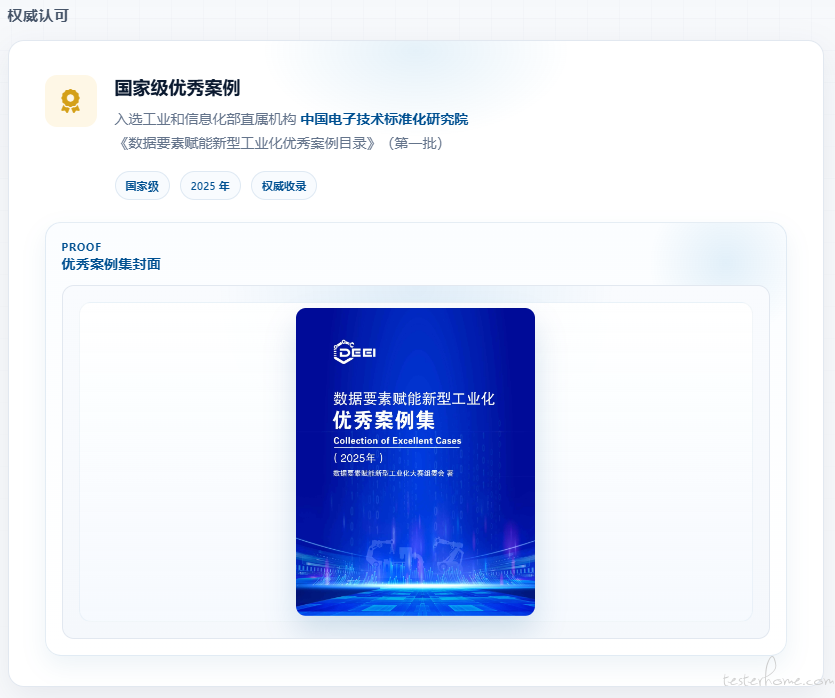
<h3>国家级优秀案例</h3>
<p>入选工业和信息化部直属机构 <strong>中国电子技术标准化研究院</strong><br>《数据要素赋能新型工业化优秀案例目录》(第一批)</p>
<div class="honor-meta">
<span>国家级</span>
<span>2025 年</span>
<span>权威收录</span>
</div>
</div>
</div>
</div>
<div class="honor-proof">
<div class="honor-proof-head">
<div>
<div class="honor-proof-label">Proof</div>
<div class="honor-proof-title">优秀案例集封面</div>
</div>
</div>
<div class="honor-img-wrap">
<img src="{{ url_for('static', filename='img/honor.png') }}" alt="数据要素赋能新型工业化优秀案例集封面" class="honor-img">
</div>
</div>
</div>
</div>
<footer class="page-footer">
<div class="footer-inner">
<div class="footer-text">
© 2026 张三有限公司 · 大中华区数字化技术中心 · 内部研发工具<br>
联系作者:<a href="mailto:zhangsan@kone.com">zhangsan@kone.com</a>
</div>
<img src="https://www.kone.cn/zh/Images/KONE_logo_blue_tcm156-121992.svg?v=1" alt="KONE" class="footer-logo">
</div>
</footer>
</body>
</html>
#!/usr/bin/env python3
# -*- coding:utf-8 -*-

'消息生成类'
__author__ = 'data mock'
__date__ = '2022-10-09'

import os
import json
import uuid
import datetime
import random
import copy
import time, random, queue
from collections import OrderedDict


# 1.创建Kafka消息mock服务类
class KafkaMsgMock:
    def __init__(self, data_source='Kafka'):
        '''
        类初始化
        '''
        self.data_source = data_source
        self.template = self.loadTemplate()
        self.equipmentNumber = self.loadEquipmentNumber()
        self.faultCode = self.loadFaultCode()
        print(f'Load resources from {data_source} folder...')

    def loadTemplate(self):
        '''
        读取模板文件,为快速处理,所有模板均加载到内存
        '''
        dict_template = dict()
        template_dir = f'./MsgTemplate/{self.data_source}/'
        for i in os.listdir(template_dir):
            if len(i) > 7: continue;
            print(f'Load resource for {i} in {self.data_source} folder')
            file_path = os.path.abspath(os.path.join(template_dir, i))
            if not os.path.isfile(file_path):
                continue
            with open(file_path, 'r', encoding='utf-8') as f:
                file_content = f.read().replace("\\n", "").replace("\\t", "").replace(" ", "")
                dict_template[i] = json.loads(file_content)
        return dict_template

    def loadEquipmentNumber(self):
        '''
        读取ken文件,为快速处理,所有模板均加载到内存
        '''
        dict_template = dict()
        with open(os.path.abspath(os.path.dirname('./')) + '/MsgTemplate/EQUIPMENT', 'r', encoding='utf-8') as f:
            dict_template.update(
                {'EQUIPMENT': json.loads(f.read().replace("\\n", "").replace("\\t", "").replace(" ", ""))})
        return dict_template

    def loadFaultCode(self):
        '''
        读取fault code文件,为快速处理,所有模板均加载到内存
        '''
        dict_template = dict()
        with open(os.path.abspath(os.path.dirname('./')) + '/MsgTemplate/FAULTCODE', 'r', encoding='utf-8') as f:
            dict_template.update(
                {'FAULTCODE': json.loads(f.read().replace("\\n", "").replace("\\t", "").replace(" ", ""))})

        return dict_template

    def utcTime(self):
        '''
        make utc time for timestemp
        '''
        a = datetime.datetime.utcnow()
        return datetime.datetime.utcnow().isoformat()[0:23] + 'Z'

    def uuid(self):
        '''
        make uuid for timestemp
        '''
        return str(uuid.uuid4())

    def generate_ordered_message(self, template_content):
        """
        生成保持原始顺序的消息(适用于所有消息类型)
        参数:
            template_content: 原始模板字典
        返回:
            有序JSON字符串
        """
        # 创建有序字典
        ordered_content = OrderedDict()
        # 按原始模板顺序填充字段
        for key in template_content.keys():
            ordered_content[key] = template_content[key]
        # 序列化为JSON字符串(保持中文可读性)
        return json.dumps(ordered_content, indent=2, ensure_ascii=False)

    def comon_msg(self, controller='LCE', msgType='random', count=1, equipmentNumber=None, SNCode=None):
        '''
        生成消息(支持手动输入设备号和ServiceNeedCode)
        '''
        # 1. 获取模板数据
        data = self.template.get(controller, {})
        if not data:
            print(f"错误:未找到控制器 {controller} 的模板")
            return None

        # 2. 设备号和故障码处理
        equipment_numbers = self.equipmentNumber.get('EQUIPMENT', {}).get(controller, [30359546])
        # 确保设备号是字符串类型
        equipment_numbers = [str(eq) for eq in equipment_numbers]
        fault_codes = self.faultCode.get('FAULTCODE', {}).get(controller, ['21'])

        # 3. 根据消息类型选择模板
        template_map = {
            'fault': 'faultTamplate',
            'faultRecovered': 'faultRecoveredTamplate',
            'alarm': 'alarmTamplate',
            'serviceModeChange': 'serviceModeChangeTamplate',
            'movementData': 'movementDataTamplate',
            'serviceNeed': 'serviceNeedTamplate',  # 关键模板
            'usagedata': 'usagedataTamplate',
            'button': 'buttonTamplate',
            'door': 'doorTamplate',
            'realtimestatus': 'realtimestatusTamplate',
            'serviceorderv2': 'serviceorderv2Tamplate',
            'edge': 'edgeTamplate',
            'upperpitsensor': 'upperpitsensorTamplate',
            'upperpitnoise': 'upperpitnoiseTamplate',
            'lowerpitsensor': 'lowerpitsensorTamplate',
            'lowerpitnoise': 'lowerpitnoiseTamplate',
            'movementv2': 'movementv2Tamplate',
            'kcecpucMainfault': 'kcecpucMainfaultTamplate',
            'kcecpucMainfaultRecovered': 'kcecpucMainfaultRecoveredTamplate',
            'faultGcd': 'faultGcdTamplate',
            'faultGcdRecovered': 'faultGcdRecoveredTamplate',
            'faultGw': 'faultGwTamplate',
            'faultGwRecovered': 'faultGwRecoveredTamplate',
            'modemaintenancechange': 'modemaintenancechangeTamplate',
            'ckpicapabilities': 'ckpicapabilitiesTamplate',
            'ckpidailystatistics': 'ckpidailystatisticsTamplate',
            'noservicepredict': 'noservicepredictTamplate',
            'toolconnectivity': 'toolconnectivityTamplate'
        }

        # 4. 获取具体模板
        template_key = template_map.get(msgType)
        if not template_key or template_key not in data:
            print(f"错误:未找到消息类型 {msgType} 的模板")
            return None

        messages = []
        for _ in range(count):
            # 使用深拷贝避免修改原始模板
            content = copy.deepcopy(data[template_key])

            # 5. 确定最终设备号
            if equipmentNumber:
                final_eq = str(equipmentNumber)  # 确保是字符串
            else:
                final_eq = str(random.choice(equipment_numbers))

            # 6. 替换所有设备号字段
            if 'EquipmentNumber' in content:
                content['EquipmentNumber'] = final_eq
                print(f"设置顶层设备号为: {final_eq}")

            # 替换IotRaw中的eq字段
            if 'IotRaw' in content:
                iot_raw = content['IotRaw']
                print(f"处理IotRaw中的eq字段...")

                # 替换Car中的eq
                if 'Car' in iot_raw and isinstance(iot_raw['Car'], list):
                    for car in iot_raw['Car']:
                        if isinstance(car, dict) and 'eq' in car:
                            print(f"替换Car设备号: {car['eq']} -> {final_eq}")
                            car['eq'] = final_eq

                # 替换Fault中的eq
                if 'Fault' in iot_raw and isinstance(iot_raw['Fault'], list):
                    for fault in iot_raw['Fault']:
                        if isinstance(fault, dict) and 'eq' in fault:
                            print(f"替换Fault设备号: {fault['eq']} -> {final_eq}")
                            fault['eq'] = final_eq

            # 7. 替换ServiceNeedCode(仅针对serviceNeed类型)
            if msgType == 'serviceNeed' and SNCode:
                if 'ServiceNeedCode' in content:
                    content['ServiceNeedCode'] = SNCode
                    print(f"设置ServiceNeedCode为: {SNCode}")
                else:
                    print("警告:serviceNeed模板中缺少ServiceNeedCode字段")

            # 8. 替换其他动态字段
            if 'Param' in content:
                if 'UUID' in content['Param']:
                    content['Param']['UUID'] = self.uuid()
                if 'Timestamp' in content['Param']:
                    content['Param']['Timestamp'] = self.utcTime()
                if 'FaultCode' in content['Param']:
                    content['Param']['FaultCode'] = random.choice(fault_codes)
            else:
                # 如果没有param,则直接替换uuid
                if 'UUID' in content:
                    content['UUID'] = self.uuid()

            # 5.6 将消息添加到列表
            messages.append(content)

        # 8. 返回结果
        if count == 1:
            return messages
        else:
            return [msg for msg in messages]
import sys
import os
import tempfile
import subprocess
import json
import time
import traceback
from flask import Flask, request, jsonify, render_template
from DataMock import KafkaMsgMock

app = Flask(__name__)

# 启用详细日志记录
app.logger.setLevel('DEBUG')


@app.route('/')
def index():
    return render_template('index.html')


@app.route('/get_template', methods=['POST'])
def get_template():
    data = request.json

    # 获取请求参数并设置默认值
    controller = data.get('controller', 'LCE')
    msgType = data.get('msgType', 'ServiceNeed')
    dataSource = data.get('dataSource', 'Kafka')
    equipmentNumber = data.get('equipmentNumber')
    serviceNeedCode = data.get('serviceNeedCode')
    message_count = int(data.get('messageCount', 1))  # 默认值为1

    # 添加详细日志
    app.logger.debug(f"请求参数: controller={controller}, msgType={msgType}, dataSource={dataSource}, "
                     f"equipmentNumber={equipmentNumber}, serviceNeedCode={serviceNeedCode}, messageCount={message_count}")

    try:
        # 创建对应数据源的mock生成器
        mock_generator = KafkaMsgMock(data_source=dataSource)

        # 生成消息时直接传递所有参数
        result = mock_generator.comon_msg(
            controller=controller,
            msgType=msgType,
            equipmentNumber=equipmentNumber,
            SNCode=serviceNeedCode,
            count=message_count  # 添加count参数
        )

        if not result:
            return jsonify({"status": "error", "message": "Message template not found"}), 500

        # 返回结果(根据生成数量返回单个对象或数组)
        app.logger.debug(f"生成消息成功: {json.dumps(result, indent=2)[:500]}...")  # 只记录前500个字符
        return jsonify({
            "status": "success",
            "message": result
        })

    except Exception as e:
        error_msg = f"Error generating message: {str(e)}"
        app.logger.error(error_msg)
        app.logger.error(traceback.format_exc())
        return jsonify({"status": "error", "message": error_msg}), 500


@app.route('/send_to_kafka', methods=['POST'])
def send_to_kafka():
    app.logger.info("收到 /send_to_kafka 请求")

    try:
        data = request.json
        kafka_messages = data.get('messages', [])

        if not kafka_messages:
            app.logger.warning("没有提供消息")
            return jsonify({"status": "error", "message": "No messages provided"}), 400

        # 添加详细日志 - 记录接收到的消息
        app.logger.debug(f"收到 {len(kafka_messages)} 条消息")
        for i, msg in enumerate(kafka_messages, 1):
            topic = msg.get('topic', 'enriched_service_needs')
            delay = msg.get('delay', 0)
            message_str = json.dumps(msg.get('message', {}))
            app.logger.debug(f"消息 #{i}: 主题={topic}, 延迟={delay}, 消息长度={len(message_str)}")
            if len(message_str) < 1000:  # 避免记录太长的消息
                app.logger.debug(f"消息内容: {message_str}")

        # 创建临时文件
        temp_file_path = None
        try:
            with tempfile.NamedTemporaryFile(mode='w', delete=False, suffix='.txt', encoding='utf-8') as temp_file:
                # 按照格式写入每一行
                for msg in kafka_messages:
                    topic = msg.get('topic', 'enriched_service_needs')
                    delay = msg.get('delay', 0)
                    message = msg.get('message', {})

                    # 关键修复1:确保消息是有效的JSON字符串
                    if isinstance(message, dict):
                        message_str = json.dumps(message)
                    elif isinstance(message, str):
                        # 尝试解析字符串是否为JSON
                        try:
                            json.loads(message)
                            message_str = message
                        except json.JSONDecodeError:
                            # 如果不是有效的JSON,则作为普通字符串处理
                            message_str = message
                    else:
                        message_str = str(message)

                    # 关键修复2:去除外层多余的双引号
                    if message_str.startswith('"') and message_str.endswith('"'):
                        message_str = message_str[1:-1]

                    # 写入格式: topic|delay|message
                    line = f"{topic}|{delay}|{message_str}\n"
                    temp_file.write(line)

                temp_file_path = temp_file.name
                app.logger.info(f"创建临时文件: {temp_file_path}")

                # 记录临时文件内容
                if app.config.get('DEBUG', False):
                    with open(temp_file_path, 'r') as f:
                        temp_content = f.read()
                        app.logger.debug(f"临时文件内容:\n{temp_content}")

        except Exception as e:
            app.logger.error(f"创建临时文件失败: {str(e)}")
            app.logger.error(traceback.format_exc())
            return jsonify({
                "status": "error",
                "message": f"创建临时文件失败: {str(e)}"
            }), 500

        # 获取脚本路径
        script_dir = os.path.dirname(os.path.abspath(__file__))
        producer_script = os.path.join(script_dir, 'Producer.py')
        app.logger.info(f"Producer脚本路径: {producer_script}")

        # 检查脚本是否存在
        if not os.path.exists(producer_script):
            app.logger.error(f"Producer.py 不存在于 {producer_script}")
            return jsonify({
                "status": "error",
                "message": f"Producer script not found at {producer_script}"
            }), 500

        # 获取当前Python解释器的绝对路径
        python_executable = sys.executable
        app.logger.info(f"Python解释器路径: {python_executable}")

        # 记录要执行的命令
        cmd = [python_executable, producer_script, temp_file_path]
        app.logger.info(f"执行命令: {' '.join(cmd)}")

        # 调用Producer.py脚本
        process_output = ""
        process_error = ""
        return_code = None

        try:
            start_time = time.time()

            # 使用subprocess.Popen并进行超时处理
            with subprocess.Popen(
                    cmd,
                    stdout=subprocess.PIPE,
                    stderr=subprocess.PIPE,
                    text=True,
                    encoding='utf-8',
                    bufsize=1  # 行缓冲
            ) as process:
                try:
                    # 尝试在60秒内完成
                    stdout, stderr = process.communicate(timeout=60)
                    return_code = process.returncode
                except subprocess.TimeoutExpired:
                    process.kill()
                    stdout, stderr = process.communicate()
                    return_code = -1
                    app.logger.warning("Producer脚本执行超时")

            elapsed_time = time.time() - start_time
            app.logger.info(f"Producer脚本执行完成,用时 {elapsed_time:.2f} 秒")

            # 整理输出
            process_output = stdout.strip() or ""
            process_error = stderr.strip() or ""

            # 记录完整的脚本输出
            app.logger.debug(f"Producer标准输出:\n{process_output}")
            app.logger.debug(f"Producer标准错误:\n{process_error}")

            # 从输出中提取转换后的消息
            processed_messages = []
            if process_output:
                # 从脚本输出中查找时间戳替换后的消息
                for line in process_output.split('\n'):
                    if "Processed message:" in line:
                        message_content = line.split("Processed message: ", 1)[-1]
                        processed_messages.append(message_content)
                        app.logger.debug(f"找到转换后消息: {message_content[:100]}...")
            else:
                app.logger.warning("Producer脚本没有输出")

        except Exception as e:
            app.logger.error(f"执行Producer脚本失败: {str(e)}")
            app.logger.error(traceback.format_exc())
            return_code = -2
            process_error = str(e)

        finally:
            # 确保删除临时文件
            try:
                if temp_file_path and os.path.exists(temp_file_path):
                    os.unlink(temp_file_path)
                    app.logger.info(f"已删除临时文件 {temp_file_path}")
            except Exception as e:
                app.logger.error(f"删除临时文件失败: {str(e)}")

        # 返回结果
        if return_code == 0:
            result = {
                "status": "success",
                "message": f"{len(kafka_messages)} 条消息已发送",
                "output": process_output,
                "processed_messages": processed_messages
            }

            # 如果有处理后的消息,在前端显示
            if processed_messages:
                result["message"] += f",包含 {len(processed_messages)} 条转换后消息"
                app.logger.info(f"成功捕获 {len(processed_messages)} 条转换后消息")

            return jsonify(result)
        else:
            error_msg = f"Producer脚本执行失败"
            if return_code is not None:
                error_msg += f",返回码 {return_code}"
            if process_error:
                error_msg += f" - {process_error}"

            app.logger.error(error_msg)

            return jsonify({
                "status": "error",
                "message": error_msg,
                "error": process_error,
                "output": process_output,
                "return_code": return_code
            }), 500

    except Exception as e:
        app.logger.error(f"/send_to_kafka 请求处理失败: {str(e)}")
        app.logger.error(traceback.format_exc())
        return jsonify({
            "status": "error",
            "message": f"Internal server error: {str(e)}"
        }), 500


if __name__ == '__main__':
    # 确保工作目录正确
    working_dir = os.path.dirname(os.path.abspath(__file__))
    os.chdir(working_dir)
    app.logger.info(f"工作目录: {working_dir}")

    # 运行应用
    app.run(host='0.0.0.0', port=9090, debug=True)
import sys
import datetime
import pytz
import re
import time
import traceback
import json
from kafka import KafkaProducer
from kafka.errors import KafkaError, NoBrokersAvailable

# 配置立即刷新输出
sys.stdout = open(sys.stdout.fileno(), 'w', encoding='utf-8', buffering=1)
sys.stderr = open(sys.stderr.fileno(), 'w', encoding='utf-8', buffering=1)

def log_info(message):
    """记录信息级别日志"""
    print(f"[INFO] {message}", flush=True)

def log_debug(message):
    """记录调试级别日志"""
    print(f"[DEBUG] {message}", flush=True)

def log_error(message):
    """记录错误级别日志"""
    print(f"[ERROR] {message}", file=sys.stderr, flush=True)

def log_warning(message):
    """记录警告级别日志"""
    print(f"[WARNING] {message}", file=sys.stderr, flush=True)

def is_valid_json(message):
    """检查是否为有效的JSON"""
    try:
        json.loads(message)
        return True
    except json.JSONDecodeError:
        return False

def main():
    log_info("=" * 60)
    log_info("启动 Producer 脚本")

    # 检查参数
    if len(sys.argv) != 2:
        log_error("使用方法: python Producer.py <文件路径>")
        log_error(f"参数数量错误: {len(sys.argv)}")
        return 1

    file_path = sys.argv[1]
    log_info(f"处理文件: {file_path}")

    # Kafka配置
    bootstrap_servers = 'XXXXXX'
    security_protocol = 'SASL_SSL'
    sasl_mechanism = 'SCRAM-SHA-512'
    sasl_plain_username = 'XXXXXX'
    sasl_plain_password = 'XXXXXX'

    # 生产者配置
    producer_config = {
        'bootstrap_servers': bootstrap_servers,
        'security_protocol': security_protocol,
        'sasl_mechanism': sasl_mechanism,
        'sasl_plain_username': sasl_plain_username,
        'sasl_plain_password': sasl_plain_password
    }

    # 创建生产者
    try:
        log_info("尝试连接 Kafka 集群...")
        producer = KafkaProducer(**producer_config)
        log_info("Kafka 生产者创建成功")
    except Exception as e:
        log_error(f"创建 Kafka 生产者失败: {type(e).__name__}: {str(e)}")
        return 1

    # 处理文件内容
    processed_count = 0
    try:
        with open(file_path, "r", encoding='utf-8') as file:
            log_info(f"打开文件: {file_path}")
            for line_num, line in enumerate(file, 1):
                # 清理行
                raw_line = line.rstrip('\n')
                if not raw_line:
                    continue

                log_info(f"处理第 {line_num} 行: {raw_line[:100]}...")

                try:
                    parts = raw_line.split('|', 2)
                    if len(parts) < 3:
                        log_error(f"无效格式 - 需要至少3个部分,但找到 {len(parts)}")
                        log_debug(f"行内容: {raw_line}")
                        continue

                    topic, delay_str, original_message = parts
                    log_debug(f"主题: {topic}, 延迟: {delay_str}, 消息长度: {len(original_message)}")

                    # 关键修复1:检查消息格式
                    if not is_valid_json(original_message):
                        log_warning("原始消息不是有效的JSON格式")

                        # 尝试修复:去除外层多余的双引号
                        if original_message.startswith('"') and original_message.endswith('"'):
                            original_message = original_message[1:-1]
                            log_info("已移除外层多余的双引号")

                            if is_valid_json(original_message):
                                log_info("修复后消息格式有效")
                            else:
                                log_error("修复后消息格式仍然无效")
                                continue
                        else:
                            log_error("无法修复消息格式,跳过")
                            continue

                    # 解析延迟
                    try:
                        delay = int(delay_str) if delay_str.isdigit() else 0
                        log_debug(f"延迟设置: {delay}秒")
                    except ValueError:
                        log_error(f"无效的延迟值: '{delay_str}', 使用默认值 0")
                        delay = 0

                    log_debug(f"原始消息: {original_message}...")

                    # 处理延迟
                    if delay > 0:
                        log_info(f"延迟 {delay} 秒...")
                        time.sleep(delay)

                    # 生成时间戳
                    try:
                        timestamp = datetime.datetime.now().astimezone(pytz.utc).strftime('%Y-%m-%dT%H:%M:%S.%f')[:-3]
                        log_info(f"生成的时间戳: {timestamp}")
                    except Exception as e:
                        log_error(f"生成时间戳失败: {type(e).__name__}: {str(e)}")
                        return 1

                    # 定义时间戳模式
                    pattern1 = r'\d{4}-\d{2}-\d{2}T\d{2}:\d{2}:\d{2}.\d{3}'
                    pattern2 = r'\d{4}-\d{2}-\d{2}T\d{2}:\d{2}:\d{2}.\d{3}\+\d{2}:\d{2}'
                    pattern3 = r'\d{4}-\d{2}-\d{2}T\d{2}:\d{2}:\d{2}.\d{3}\+\d{4}'

                    # 执行替换
                    processed_message = re.sub(pattern1, timestamp, original_message)
                    processed_message = re.sub(pattern2, timestamp + 'Z', processed_message)
                    processed_message = re.sub(pattern3, timestamp + 'Z', processed_message)

                    log_info(f"转换后消息: {processed_message}...")

                    # 关键修复2:再次验证消息格式
                    if not is_valid_json(processed_message):
                        log_error("转换后消息不是有效的JSON格式")
                        log_debug(f"完整消息内容: {processed_message}")
                        continue

                    # 发送消息
                    try:
                        log_info(f"发送消息到主题 {topic}...")
                        producer.send(topic, processed_message.encode('utf-8'))
                        producer.flush()
                        log_info("消息发送成功")
                        processed_count += 1
                    except Exception as e:
                        log_error(f"发送消息失败: {type(e).__name__}: {str(e)}")

                except Exception as e:
                    log_error(f"处理第 {line_num} 行失败: {type(e).__name__}: {str(e)}")
                    log_error(traceback.format_exc())

    except Exception as e:
        log_error(f"处理文件失败: {type(e).__name__}: {str(e)}")
        log_error(traceback.format_exc())
        return 1

    # 清理资源
    log_info(f"处理完成,成功发送 {processed_count} 条消息")
    try:
        producer.close()
        log_info("Kafka 生产者已关闭")
    except:
        pass

    return 0

if __name__ == "__main__":
    try:
        exit_code = main()
        log_info(f"脚本退出码: {exit_code}")
        sys.exit(exit_code)
    except Exception as e:
        log_error(f"未处理的异常: {type(e).__name__}: {str(e)}")
        log_error(traceback.format_exc())
        sys.exit(2)
<!DOCTYPE html>
<html lang="en">
<head>
    <meta charset="UTF-8">
    <meta name="viewport" content="width=device-width, initial-scale=1.0">
    <title>Elevator Data Simulation Platform</title>
    <link rel="stylesheet" href="{{ url_for('static', filename='css/style.css') }}">
</head>
<body>
    <div class="container">
        <h1>Elevator Data Simulation Platform</h1>

        <form id="messageForm">
            <div class="form-row">
                <div class="form-col">
                    <div class="form-group">
                        <label for="controller">Controller Type</label>
                        <select id="controller" class="form-control">
                            <option value="LCE" selected>LCE</option>
                            <option value="KCE">KCE</option>
                            <option value="KCECPUC">KCECPUC</option>
                            <option value="GCE">GCE</option>
                            <option value="STEP">STEP</option>
                            <option value="ESC">ESC</option>
                            <option value="KSE">KSE</option>
                            <option value="DTU">DTU</option>
                            <option value="AE">AE</option>
                        </select>
                    </div>
                </div>

                <div class="form-col">
                    <div class="form-group">
                        <label for="msgType">Message Type</label>
                        <select id="msgType" class="form-control">
                            <option value="serviceNeed" selected>ServiceNeed</option>
                            <option value="fault">Fault</option>
                            <option value="alarm">Alarm</option>
                            <option value="faultRecovered">Fault Recovered</option>
                            <option value="movementData">Movement Data</option>
                            <option value="serviceModeChange">Service Mode Change</option>
                            <option value="usagedata">Routine Call</option>
                            <option value="button">Button Event</option>
                            <option value="door">Door Operation</option>
                            <option value="realtimestatus">Online Status</option>
                            <option value="serviceorderv2">Service Order v2</option>
                            <option value="edge">Edge</option>
                            <option value="upperpitsensor">AnyEscalator Sensor Stats</option>
                            <option value="upperpitnoise">AnyEscalator Sound Stats</option>
                            <option value="lowerpitsensor">AnyEscalator Sensor Stats2</option>
                            <option value="lowerpitnoise">AnyEscalator Sound Stats2</option>
                            <option value="movementv2">Movement v2</option>
                            <option value="modemaintenancechange">Main Fault</option>
                            <option value="ckpicapabilities">Main FaultRecovered</option>
                            <option value="ckpidailystatistics">Fault Gcd</option>
                            <option value="noservicepredict">Fault GcdRecovered</option>
                            <option value="toolconnectivity">Fault Gw</option>
                            <option value="toolconnectivity">Fault GwRecovered</option>
                            <option value="modemaintenancechange">Mode Maintenance Change</option>
                            <option value="ckpicapabilities">CKPI Capabilities</option>
                            <option value="ckpidailystatistics">CKPI Daily Statistics</option>
                            <option value="noservicepredict">Noser Vice Predict</option>
                            <option value="toolconnectivity">Tool Connectivity</option>
                        </select>
                    </div>
                </div>

                <div class="form-col">
                    <div class="form-group">
                        <label for="dataSource">Data Source</label>
                        <select id="dataSource" class="form-control">
                            <option value="Kafka" selected>Kafka</option>
                            <option value="DTU">DTU</option>
                        </select>
                    </div>
                </div>
            </div>

            <div class="form-row">
                <div class="form-col">
                    <div class="form-group">
                        <label for="equipmentNumber">Equipment Number</label>
                        <input type="text" id="equipmentNumber" class="form-control" placeholder="e.g., 32009970">
                        <div class="input-hint">Optional - leave blank for random</div>
                    </div>
                </div>

                <div class="form-col">
                    <div class="form-group">
                        <label for="serviceNeedCode">ServiceNeed Code</label>
                        <input type="text" id="serviceNeedCode" class="form-control" placeholder="e.g., GBRM12">
                        <div class="input-hint">Required for ServiceNeed type</div>
                    </div>
                </div>

                <div class="form-col">
                    <div class="form-group">
                        <label for="messageCount">Number of Messages</label>
                        <input type="number" id="messageCount" class="form-control" placeholder="e.g., 1" value="1" min="1" max="100">
                        <div class="input-hint">How many messages to generate</div>
                    </div>
                </div>
            </div>

            <div class="button-container">
                <button type="submit" class="btn btn-primary">Generate Messages</button>
                <button type="button" class="btn btn-secondary" id="clearButton">Clear Messages</button>
                <button type="button" class="btn btn-danger" id="resetButton">Reset All</button>
                <button type="button" class="btn btn-success" id="kafkaButton">Send to Kafka</button>
            </div>
        </form>

        <div id="response" class="response"></div>
        <div id="messageBox" class="message-box"></div>
    </div>

    <!-- 复制提示框 -->
    <div id="copyAlert" class="alert copy-alert">
        <strong>Message copied to clipboard successfully!</strong>
    </div>

    <script src="{{ url_for('static', filename='js/main.js') }}"></script>
</body>
</html>
// 在脚本最开头添加全局变量声明
let currentMessageContent = null; // 存储当前生成的消息
let alertTimeout = null; // 用于提示框的定时器
let isKafkaSending = false; // 标记Kafka是否正在发送中
let activeAlert = null; // 跟踪当前活动的提示框

// 表单提交事件
document.getElementById('messageForm').addEventListener('submit', async (e) => {
    e.preventDefault();

    const controller = document.getElementById('controller').value;
    const msgType = document.getElementById('msgType').value;
    const dataSource = document.getElementById('dataSource').value;
    const equipmentNumber = document.getElementById('equipmentNumber').value;
    const serviceNeedCode = document.getElementById('serviceNeedCode').value;
    const messageCount = parseInt(document.getElementById('messageCount').value) || 1;

    document.getElementById('messageBox').innerHTML = '';
    document.getElementById('response').innerHTML = '';

    if (!controller || !msgType || !dataSource) {
        showAlert('Please select Controller Type, Message Type, and Data Source!', 'error');
        return;
    }

    try {
        const response = await fetch('/get_template', {
            method: 'POST',
            headers: {
                'Content-Type': 'application/json'
            },
            body: JSON.stringify({
                controller,
                msgType,
                dataSource,
                equipmentNumber,
                serviceNeedCode,
                messageCount
            })
        });

        const data = await response.json();

        if (data.status === 'success') {
            let messageContent = data.message;

            // 存储当前消息
            currentMessageContent = messageContent;

            // 处理DTU数据源的特殊要求:移除topic字段
            if (dataSource === 'DTU') {
                if (Array.isArray(messageContent)) {
                    messageContent = messageContent.map(msg => {
                        const { topic, ...rest } = msg;
                        return rest;
                    });
                } else {
                    const { topic, ...rest } = messageContent;
                    messageContent = rest;
                }
            }

            // 渲染消息区域
            document.getElementById('messageBox').innerHTML = `
                <div class="message-content">
                    <pre>${JSON.stringify(messageContent, null, 2)}</pre>
                </div>
                <button class="btn copy-btn">Copy Message</button>
            `;

            // 根据生成的消息数量显示不同的提示信息
            const successMessage = messageCount > 1
                ? `${messageCount} messages generated Successfully.`
                : `Message generated successfully!`;

            showAlert(successMessage, 'success');

            // 绑定复制按钮事件
            const copyBtn = document.querySelector('.copy-btn');
            if (copyBtn) {
                copyBtn.addEventListener('click', async () => {
                    try {
                        const messageText = document.querySelector('.message-content pre').textContent;
                        if (!messageText) {
                            throw new Error('No message content to copy.');
                        }

                        if (navigator.clipboard) {
                            await navigator.clipboard.writeText(messageText);
                        } else {
                            // 回退方案
                            const tempTextArea = document.createElement('textarea');
                            tempTextArea.value = messageText;
                            document.body.appendChild(tempTextArea);
                            tempTextArea.select();
                            document.execCommand('copy');
                            document.body.removeChild(tempTextArea);
                        }

                        showCopyAlert();
                    } catch (err) {
                        console.error('Failed to copy message:', err);
                        showAlert('Failed to copy message.', 'error');
                    }
                });
            }
        } else {
            showAlert(data.message || 'Failed to generate message.', 'error');
        }
    } catch (error) {
        console.error('Error:', error);
        showAlert('Failed to communicate with the server', 'error');
    }

    // 滚动到消息区域
    document.getElementById('messageBox').scrollIntoView({ behavior: 'smooth' });
});

// Kafka按钮事件绑定
document.getElementById('kafkaButton').addEventListener('click', async () => {
    // 防止多次点击导致重复请求
    if (isKafkaSending) return;

    if (!currentMessageContent) {
        showAlert('Please generate a message first!', 'error');
        return;
    }

    try {
        // 标记为正在发送中
        isKafkaSending = true;

        // 更新按钮状态
        const kafkaBtn = document.getElementById('kafkaButton');
        kafkaBtn.disabled = true;
        kafkaBtn.textContent = 'Sending...';

        // 显示发送中的提示
        showKafkaAlert('Sending message to Kafka...', 'info');

        // 然后发送到Kafka
        await sendToKafka(currentMessageContent);
    } catch (error) {
        console.error('Kafka send error:', error);

        // 优化错误信息显示
        let errorMessage;

        // 处理 AbortError 特殊类型
        if (error.name === 'AbortError') {
            errorMessage = 'Request timed out. Please check server status.';
        }
        // 处理网络错误
        else if (error.name === 'TypeError' && error.message.includes('Failed to fetch')) {
            errorMessage = 'Network error: Failed to connect to server';
        }
        // 处理连接重置错误
        else if (error.message.includes('ERR_CONNECTION_RESET')) {
            errorMessage = 'Connection reset by server. Please try again later.';
        }
        // 其他错误
        else {
            errorMessage = error.message;
        }

        // 限制错误信息长度
        if (errorMessage.length > 200) {
            errorMessage = errorMessage.substring(0, 200) + '...';
        }

        showKafkaAlert(`Failed to send to Kafka: ${errorMessage}`, 'error');
    } finally {
        // 无论成功与否,都恢复按钮状态
        const kafkaBtn = document.getElementById('kafkaButton');
        kafkaBtn.disabled = false;
        kafkaBtn.textContent = 'Send to Kafka';
        isKafkaSending = false;
    }
});

// 清除按钮功能
document.getElementById('clearButton').addEventListener('click', () => {
    document.getElementById('messageBox').innerHTML = '';
    document.getElementById('response').innerHTML = '';
    currentMessageContent = null;
    showAlert('Messages cleared successfully!', 'success');
});

// 重置按钮功能
document.getElementById('resetButton').addEventListener('click', () => {
    // 重置表单字段
    document.getElementById('controller').value = '';
    document.getElementById('msgType').value = '';
    document.getElementById('dataSource').value = '';
    document.getElementById('equipmentNumber').value = '';
    document.getElementById('serviceNeedCode').value = '';
    document.getElementById('messageCount').value = '';

    // 清除消息显示
    document.getElementById('messageBox').innerHTML = '';
    document.getElementById('response').innerHTML = '';
    currentMessageContent = null;

    showAlert('All fields reset successfully!', 'success');
});

/**
 * 发送消息到Kafka
 * @param {Object} messageContent 消息内容
 */
async function sendToKafka(messageContent) {
    // 创建AbortController用于超时处理
    const controller = new AbortController();
    let timeoutId;

    try {
        // 处理消息:如果是数组则处理每个消息,否则包装成数组
        const messages = Array.isArray(messageContent) ? messageContent : [messageContent];

        // 创建要发送的数据
        const payload = {
            messages: messages.map(msg => {
                // 确保消息是完整JSON字符串
                try {
                    return {
                        topic: 'enriched_service_needs',
                        delay: 0,
                        message: JSON.stringify(msg)
                    };
                } catch (e) {
                    console.error("Failed to stringify message:", msg);
                    throw new Error("Invalid message content");
                }
            })
        };

        // 设置超时
        timeoutId = setTimeout(() => {
            // 添加明确的超时原因
            controller.abort(new Error('Request timed out after 30 seconds'));
        }, 30000); // 30秒超时

        // 发送到后端
        const response = await fetch('/send_to_kafka', {
            method: 'POST',
            headers: {
                'Content-Type': 'application/json'
            },
            body: JSON.stringify(payload),
            signal: controller.signal
        });

        // 清除超时定时器
        clearTimeout(timeoutId);

        // 检查响应状态
        if (!response.ok) {
            const text = await response.text();
            throw new Error(`Server returned ${response.status}: ${text}`);
        }

        // 解析JSON响应
        const result = await response.json();

        // 根据后端响应显示结果
        if (result.status === 'success') {
            const successMessage = result.message || 'Message sent to Kafka successfully!';
            showKafkaAlert(successMessage, 'success');
        } else {
            throw new Error(result.message || 'Failed to send message to Kafka');
        }
    } catch (error) {
        // 清除超时定时器
        if (timeoutId) clearTimeout(timeoutId);

        console.error('Kafka send error:', error);
        // 重新抛出错误以便上层处理
        throw error;
    }
}

/**
 * 清除现有提示框
 */
function clearExistingAlert() {
    // 清除定时器
    if (alertTimeout) {
        clearTimeout(alertTimeout);
        alertTimeout = null;
    }

    // 移除现有提示框
    if (activeAlert) {
        // 添加淡出动画
        activeAlert.classList.remove('show');

        // 等待动画完成后再移除元素
        setTimeout(() => {
            // 安全移除:检查父节点是否存在
            if (activeAlert && activeAlert.parentNode) {
                activeAlert.remove();
            }
            activeAlert = null;
        }, 300);
    }
}

/**
 * 显示提示框
 * @param {string} message 消息内容
 * @param {string} type 消息类型(success, error)
 */
function showAlert(message, type = 'default') {
    // 清除现有提示框
    clearExistingAlert();

    // 创建提示框元素
    const alertDiv = document.createElement('div');
    alertDiv.className = `alert ${type}`;
    alertDiv.innerHTML = `<strong>${message}</strong>`;

    // 添加到页面
    document.body.appendChild(alertDiv);

    // 存储当前活动提示框
    activeAlert = alertDiv;

    // 强制触发重绘以便动画生效
    void alertDiv.offsetWidth;

    // 添加show类触发动画
    alertDiv.classList.add('show');

    // 设置自动消失时间
    const delay = type === 'success' ? 5000 : type === 'error' ? 10000 : 3000;
    alertTimeout = setTimeout(() => {
        // 添加淡出动画
        alertDiv.classList.remove('show');

        // 等待动画完成后再移除元素
        setTimeout(() => {
            if (alertDiv.parentNode) {
                alertDiv.remove();
            }
            activeAlert = null;
        }, 300);
    }, delay);
}

/**
 * 显示Kafka状态提示
 * @param {string} message 消息文本
 * @param {string} type 消息类型(info, success, error)
 */
function showKafkaAlert(message, type = 'info') {
    // 清除现有提示框
    clearExistingAlert();

    // 创建提示框元素
    const kafkaAlert = document.createElement('div');
    kafkaAlert.className = `alert kafka-alert ${type}`;
    kafkaAlert.innerHTML = `<strong>Kafka Status:</strong> ${message}`;

    // 添加到页面
    document.body.appendChild(kafkaAlert);

    // 存储当前活动提示框
    activeAlert = kafkaAlert;

    // 强制触发重绘以便动画生效
    void kafkaAlert.offsetWidth;

    // 添加show类触发动画
    kafkaAlert.classList.add('show');

    // 设置自动消失时间
    const delay = type === 'success' ? 5000 : type === 'info' ? 3000 : 10000;
    alertTimeout = setTimeout(() => {
        // 添加淡出动画
        kafkaAlert.classList.remove('show');

        // 等待动画完成后再移除元素
        setTimeout(() => {
            if (kafkaAlert.parentNode) {
                kafkaAlert.remove();
            }
            activeAlert = null;
        }, 300);
    }, delay);
}

/**
 * 显示复制提示
 */
function showCopyAlert() {
    // 清除现有提示框
    clearExistingAlert();

    // 创建提示框元素
    const copyAlert = document.createElement('div');
    copyAlert.className = 'alert copy-alert';
    copyAlert.innerHTML = '<strong>Message copied to clipboard successfully!</strong>';

    // 添加到页面
    document.body.appendChild(copyAlert);

    // 存储当前活动提示框
    activeAlert = copyAlert;

    // 强制触发重绘以便动画生效
    void copyAlert.offsetWidth;

    // 添加show类触发动画
    copyAlert.classList.add('show');

    // 3秒后自动清除
    alertTimeout = setTimeout(() => {
        // 添加淡出动画
        copyAlert.classList.remove('show');

        // 等待动画完成后再移除元素
        setTimeout(() => {
            if (copyAlert.parentNode) {
                copyAlert.remove();
            }
            activeAlert = null;
        }, 300);
    }, 3000);
}
:root {
    --primary-color: #3498db;
    --secondary-color: #2c3e50;
    --light-bg: #f8f9fa;
    --dark-text: #2c3e50;
    --border-color: #e1e5e9;
    --success-color: #27ae60;
    --error-color: #e74c3c;
    --info-color: #3498db;
    --kafka-color: #9b59b6;
}

* {
    box-sizing: border-box;
    margin: 0;
    padding: 0;
}

body {
    font-family: 'Segoe UI', Tahoma, Geneva, Verdana, sans-serif;
    line-height: 1.6;
    color: var(--dark-text);
    background-color: #f5f7fa;
    padding: 20px;
}

.container {
    max-width: 1000px;
    margin: 0 auto;
    background: white;
    border-radius: 10px;
    padding: 30px;
    box-shadow: 0 5px 15px rgba(0, 0, 0, 0.1);
}

h1 {
    text-align: center;
    color: var(--secondary-color);
    margin-bottom: 20px;
    padding-bottom: 15px;
    border-bottom: 1px solid var(--border-color);
}

.form-row {
    display: flex;
    flex-wrap: wrap;
    margin: 0 -10px;
    margin-bottom: 20px;
}

.form-col {
    padding: 0 10px;
    flex: 1;
    min-width: 200px;
    margin-bottom: 15px;
}

.form-group {
    display: flex;
    flex-direction: column;
    height: 100%;
}

label {
    margin-bottom: 8px;
    font-weight: 600;
    color: var(--secondary-color);
}

.form-control {
    padding: 12px;
    font-size: 1rem;
    border: 1px solid var(--border-color);
    border-radius: 6px;
    width: 100%;
    transition: all 0.3s;
}

.form-control:focus {
    border-color: var(--primary-color);
    outline: none;
    box-shadow: 0 0 0 3px rgba(52, 152, 219, 0.15);
}

.input-hint {
    font-size: 0.85rem;
    color: #7f8c8d;
    margin-top: 6px;
}

.button-container {
    display: flex;
    justify-content: center;
    flex-wrap: wrap;
    gap: 15px;
    margin-top: 20px;
}

.btn {
    padding: 12px 25px;
    font-size: 1rem;
    font-weight: 600;
    border: none;
    border-radius: 8px;
    cursor: pointer;
    transition: all 0.3s ease;
}

.btn-primary {
    background-color: var(--primary-color);
    color: white;
}

.btn-primary:hover {
    background-color: #2980b9;
    transform: translateY(-2px);
    box-shadow: 0 4px 8px rgba(52, 152, 219, 0.25);
}

.btn-secondary {
    background-color: #95a5a6;
    color: white;
}

.btn-secondary:hover {
    background-color: #7f8c8d;
    transform: translateY(-2px);
}

.btn-danger {
    background-color: #e74c3c;
    color: white;
}

.btn-danger:hover {
    background-color: #c0392b;
    transform: translateY(-2px);
}

.btn-success {
    background-color: var(--success-color);
    color: white;
}

.btn-success:hover {
    background-color: #219653;
    transform: translateY(-2px);
    box-shadow: 0 4px 8px rgba(39, 174, 96, 0.25);
}

.message-box {
    margin-top: 30px;
    padding: 20px;
    border: 1px solid var(--border-color);
    border-radius: 8px;
    background-color: var(--light-bg);
}

.message-content pre {
    white-space: pre-wrap;
    word-break: break-word;
    padding: 15px;
    border-radius: 6px;
    background-color: white;
    max-height: 500px;
    overflow: auto;
    font-size: 0.95rem;
    line-height: 1.5;
}

.copy-btn {
    width: 100%;
    padding: 12px;
    color: white;
    border: none;
    border-radius: 6px;
    margin-top: 15px;
    font-weight: 600;
    cursor: pointer;
    transition: background-color 0.3s;
    background-color: var(--secondary-color);
}

.copy-btn:hover {
    background-color: #1a252f;
}

/* =================== 提示框统一样式 =================== */
.alert {
    position: fixed;
    top: 20px;
    left: 50%;
    transform: translateX(-50%);
    padding: 15px 25px;
    border-radius: 8px;
    font-weight: 500;
    color: white; /* 确保文字为白色 */
    display: flex;
    align-items: center;
    justify-content: center;
    z-index: 1000;
    box-shadow: 0 4px 12px rgba(0, 0, 0, 0.15);
    opacity: 0;
    transition: opacity 0.3s, transform 0.3s;
    transform: translateX(-50%) translateY(-20px);
    max-width: 90%;
    text-align: center;
}

.alert.show {
    opacity: 1;
    transform: translateX(-50%) translateY(0);
}

/* 成功提示框 */
.alert.success {
    background-color: var(--success-color);
}

/* 错误提示框 */
.alert.error {
    background-color: var(--error-color);
}

/* 信息提示框 */
.alert.info {
    background-color: var(--info-color);
}

/* Kafka提示框 */
.alert.kafka-alert {
    background-color: var(--kafka-color); /* 紫色背景 */
}

/* 复制提示框 */
.alert.copy-alert {
    background-color: var(--success-color);
}

/* =================== 响应式设计 =================== */
@media (max-width: 768px) {
    .form-col {
        flex: 1 1 100%;
    }

    .button-container {
        flex-direction: column;
        align-items: center;
    }

    .btn {
        width: 100%;
        max-width: 300px;
        margin-bottom: 10px;
    }

    .alert {
        width: 90%;
        padding: 12px 20px;
        font-size: 0.9rem;
    }
}

@media (max-width: 480px) {
    .container {
        padding: 15px;
    }

    .form-control {
        padding: 10px;
    }

    .btn {
        padding: 10px 15px;
        font-size: 0.9rem;
    }

    .message-content pre {
        padding: 10px;
        font-size: 0.85rem;
    }

    .alert {
        padding: 12px 15px;
        font-size: 0.85rem;
    }
}